Freedom251 › Document Comparison Software
Setpdf PDF Compare
What Setpdf PDF Compare is
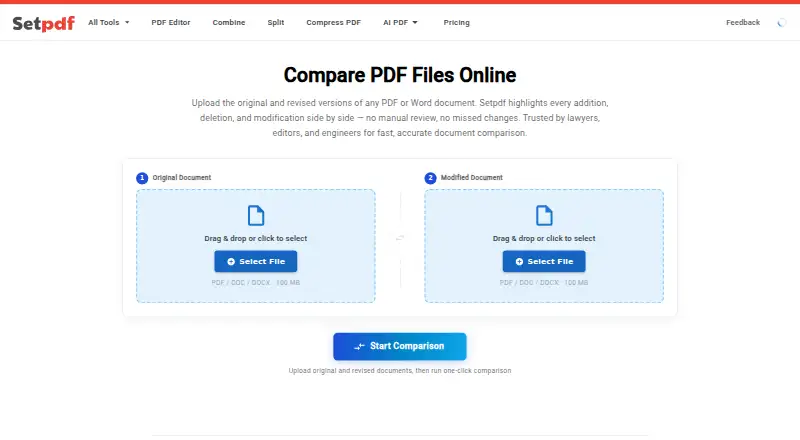
Setpdf PDF Compare is a web tool for comparing PDF and Word documents, showing additions, deletions, and edits alongside each other. It accepts PDF, DOC, and DOCX files up to 100 MB each, including comparisons between a Word document and a PDF without manual conversion. Changes receive green, red, or amber markings and word-level highlighting. Users can move through differences with j/k keyboard shortcuts or the sidebar, while the documents scroll together. A completed comparison can be downloaded as a Blackline PDF with inline annotations. For Chinese, Japanese, and Korean text, the page describes character-level segmentation. Basic use requires no account or software installation. The comparison engine works with text-layer PDFs and Word files; scanned PDFs first need OCR to create searchable text. Setpdf says uploaded documents are deleted after conversion and are not retained. There is no free plan. Setpdf Pro costs $4.99 a month or $29.99 a year, with automatic renewal. Enterprise Custom pricing is available by contacting Setpdf.
Who it suits
It suits people who need to review differences between PDF and Word files, including cross-format comparisons. Organizations needing API integration or team collaboration can consider the Enterprise Custom plan.
What it does well
- Compares PDF, DOC, and DOCX files up to 100 MB.
- Supports Word-to-PDF comparisons without manual conversion.
- Highlights changes and offers an annotated Blackline PDF.
- Basic use requires no account or installation.
- Uploaded documents are deleted after conversion.
What to know first
- No free plan is listed.
- Scanned PDFs need OCR before comparison.
- Pro plans renew automatically.
Limits
There is no free plan. Pro Monthly and Pro Annual list unlimited file processing, while scanned PDFs need OCR before comparison.
Plans
| Plan | Billed and limits | Price |
|---|---|---|
| Setpdf Pro - Annual | $29.99/year; auto-renews yearly · Unlimited file processing · Advanced editing features · Priority technical support · Ad-free experience | $29.99 a year |
| Setpdf Pro - Monthly | $4.99/month; auto-renews monthly · Unlimited file processing · Advanced editing features · Priority technical support · Ad-free experience | $4.99 a month |
| Enterprise Custom | Contact Us · All Pro features · API integration support · Team collaboration features · Dedicated customer service · Data security guarantee · Custom development | On request |
As setpdf.com lists them, read 9 Oct 2026. The maker's own page has the final word.
Getting started
- Open the Setpdf PDF Compare website
- Upload a PDF, DOC, or DOCX file up to 100 MB
- Upload the second document for comparison
- Review changes with the sidebar or j/k shortcuts
- Download the annotated Blackline PDF
Verdict
Setpdf PDF Compare covers text-based PDF and Word comparisons, with navigation and an annotated export. Check that scanned files have a searchable text layer and consider the recurring Pro prices before choosing a plan.
Questions
Does Setpdf PDF Compare have a free plan?
No. Setpdf lists paid plans, including Pro Monthly at $4.99 a month and Pro Annual at $29.99 a year.
What file types and sizes are supported?
The service accepts PDF, DOC, and DOCX files up to 100 MB per file.
Can it compare Word and PDF files together?
Yes. A Word document can be compared with a PDF without manual conversion.
Do I need an account or installation?
Basic use requires no account, browser extension, desktop app, or software installation.
What happens to uploaded documents?
Setpdf's privacy policy says uploaded documents are deleted from its servers when conversion finishes and are not retained.
Does an enterprise plan offer integrations?
Enterprise Custom lists API integration support, team collaboration features, dedicated customer service, and custom development; pricing is available by contacting Setpdf.
Facts from Setpdf PDF Compare's own pages
- CJK support
- The comparison page says it uses character-level segmentation for Chinese, Japanese, and Korean documents. · setpdf.com, 9 Oct 2026
- Contact options
- Setpdf's contact page lists technical support, account issues, product suggestions, and business cooperation as reasons to contact its team. · setpdf.com, 9 Oct 2026
- Cross-format comparison
- The page says users can compare a Word document against a PDF without manual conversion. · setpdf.com, 9 Oct 2026
- Difference highlighting
- Additions are marked green, deletions red, and edits amber, with word-level highlighting. · setpdf.com, 9 Oct 2026
- Export
- Users can download an annotated Blackline PDF with changes marked inline. · setpdf.com, 9 Oct 2026
- File types and size
- It accepts PDF, DOC, and DOCX files up to 100 MB per file. · setpdf.com, 9 Oct 2026
- Integrations
- The Enterprise Custom plan lists API integration support and team collaboration features. · setpdf.com, 9 Oct 2026
- Navigation
- Users can navigate between changes with j/k keyboard shortcuts or the sidebar, and the two documents scroll in sync. · setpdf.com, 9 Oct 2026
- No account or install
- The page says basic use requires no account, extension, desktop app, or software installation. · setpdf.com, 9 Oct 2026
- Purpose
- Setpdf Compare compares PDF and Word documents and highlights additions, deletions, and modifications side by side. · setpdf.com, 9 Oct 2026
- Scanned PDF limitation
- The comparison engine works on text-layer PDFs and Word documents; scanned PDFs need OCR to create a searchable text layer first. · setpdf.com, 9 Oct 2026
- Security and file handling
- Setpdf's privacy policy says uploaded documents are deleted from its servers upon completion of conversion and are not retained; it also describes industry-standard security measures. · setpdf.com, 9 Oct 2026
- Support
- Setpdf lists technical support with the weekly plan, priority technical support with monthly and annual plans, and dedicated customer service for Enterprise Custom. · setpdf.com, 9 Oct 2026
Where Setpdf PDF Compare stands on Freedom251
- Document Comparison Software#25 of 25