Freedom251 › Image Compression Software
Shrinkly
What Shrinkly is
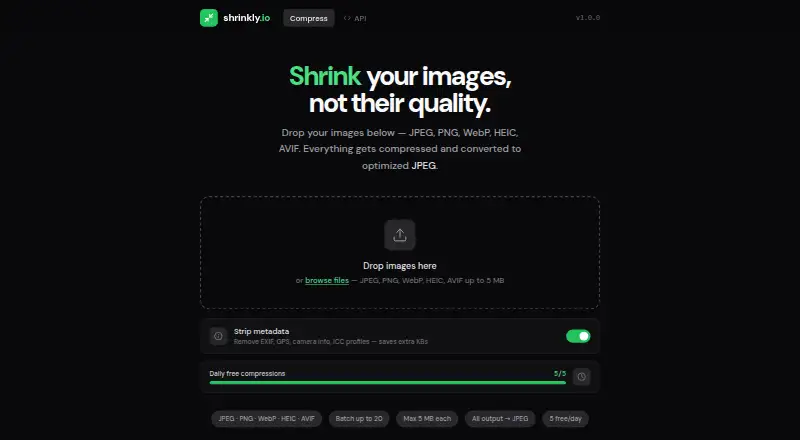
Shrinkly is a free image compression service available through a web app and API. It accepts JPEG, PNG, WebP, HEIC, and AVIF files, then converts the result to optimized JPEG output. Metadata controls can remove EXIF, GPS, camera information, and ICC profiles. The web app processes batches of up to 20 images, with a 5 MB maximum per image, and the Free plan allows five free images per day. Uploaded web files are automatically deleted after one hour. The homepage displays an API link and version 1.0.0. A Chrome extension listing adds bulk compression, resizing, and conversion for JPG, PNG, and WebP, handling up to 200 images at once with individual or ZIP downloads. The listing says files remain on the device, no account is needed, and storage is its only permission. Its interface supports 18 languages, including right-to-left layouts.
Who it suits
Shrinkly suits people who need browser-based or API image compression and JPEG conversion. The Chrome extension is aimed at users handling larger local batches without uploading files.
What it does well
- Supports JPEG, PNG, WebP, HEIC, and AVIF
- Strips EXIF, GPS, camera data, and ICC profiles
- Web batches support up to 20 images
- Chrome extension handles up to 200 images
- Files deleted after one hour on web app
What to know first
- Free plan allows five images per day
- Web images limited to 5 MB each
- Web output is converted to JPEG
Plans
| Plan | Billed and limits | Price |
|---|---|---|
| Free | 5 free/day · batches up to 20 · max 5 MB per image · output converted to JPEG | Free |
As shrinkly.io lists them, read 11 Oct 2026. The maker's own page has the final word.
Verdict
Shrinkly combines free web and API compression with metadata controls and several input formats. Its Chrome extension adds larger local batches, while the web app has daily, batch-size, and file-size limits.
Facts from Shrinkly's own pages
- API
- The homepage displays an API link and version 1.0.0. · shrinkly.io, 11 Oct 2026
- API access
- Yes · shrinkly.io, 22 Sept 2026
- Batch limit
- The web app supports batches of up to 20 images, with a 5 MB maximum per image. · shrinkly.io, 11 Oct 2026
- Batch processing
- Yes · shrinkly.io, 22 Sept 2026
- Browser extension
- A Chrome extension listing describes bulk image compression, resizing, and conversion for JPG, PNG, and WebP. · chromewebstore.google.com, 11 Oct 2026
- Extension batch limit
- The Chrome extension listing says it can process up to 200 images at a time and download them individually or as a ZIP. · chromewebstore.google.com, 11 Oct 2026
- Extension developer
- The Chrome Web Store identifies the developer as sourabh sahu and lists an address in Narsinghgarh, Madhya Pradesh, India. · chromewebstore.google.com, 11 Oct 2026
- Extension languages
- The Chrome extension listing says its interface supports 18 languages, including right-to-left layout. · chromewebstore.google.com, 11 Oct 2026
- Extension privacy
- The Chrome extension listing says files are not uploaded, no account is needed, and its only requested permission is storage for settings. · chromewebstore.google.com, 11 Oct 2026
- File retention
- Uploaded files are automatically deleted after one hour. · shrinkly.io, 11 Oct 2026
- Free plan
- Yes · shrinkly.io, 22 Sept 2026
- Input formats
- The web app accepts JPEG, PNG, WebP, HEIC, and AVIF images. · shrinkly.io, 11 Oct 2026
- Metadata
- Users can strip EXIF, GPS, camera information, and ICC profiles. · shrinkly.io, 11 Oct 2026
- Metadata controls
- Yes · shrinkly.io, 22 Sept 2026
- Purpose
- Shrinkly compresses images and converts the output to optimized JPEG. · shrinkly.io, 11 Oct 2026
- Supported formats
- JPEG,PNG,WebP,HEIC,AVIF · shrinkly.io, 22 Sept 2026
Where Shrinkly stands on Freedom251
- Image Compression Software#53 of 85