Freedom251 › Web Development IDEs
ShiftEdit
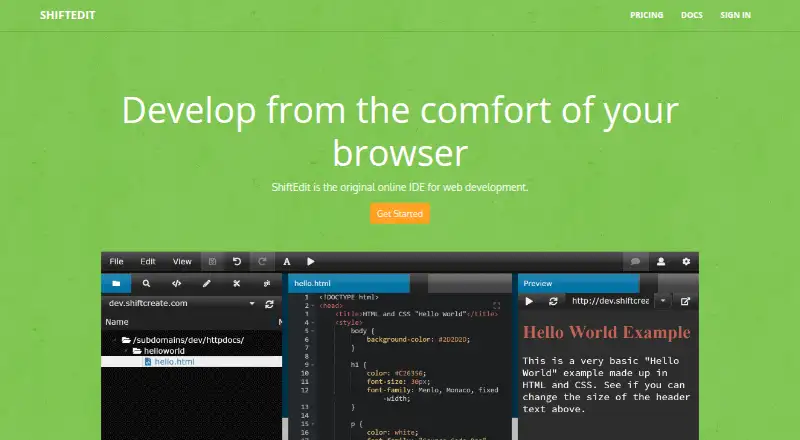
What ShiftEdit is
ShiftEdit is a browser-based online IDE for web development. It connects to project files through FTP, SFTP, Dropbox, Google Drive, or a local filesystem. Editing tools include autocomplete, syntax checking, function definitions, live preview, revision history, and file comparison. Users can invite collaborators, chat, and work together in real time. The maker lists a Git client and integrations with GitHub and Bitbucket, while documentation covers server connections and setup for AWS, DigitalOcean, and Linode. Remote development, database tools, and deployment previews are also listed. ShiftEdit has a free plan alongside paid plans. Premier costs $6 a month and includes unlimited projects; the yearly option has a 10% discount through PayPal. Basic lists 50 projects and 20 revisions per file. FTP and SFTP connections pass through ShiftEdit’s server, so the target server must be publicly accessible; an ajax server type is mentioned for direct connections. A master password can encrypt stored server passwords. The documentation recommends the latest stable Chrome or Firefox. Revision-history file copies are stored when that Premier-only feature is enabled.
Who it suits
ShiftEdit suits web developers who want browser-based editing, remote file connections, and real-time collaboration. It can also fit teams using Git services or cloud-hosted development servers.
What it does well
- Runs as an online browser IDE
- Supports FTP, SFTP, cloud drives, and local files
- Real-time collaboration with chat
- Includes Git, GitHub, and Bitbucket options
- Premier includes unlimited projects
What to know first
- FTP and SFTP targets must be publicly accessible
- Premier costs $6 a month
- Revision history stores saved file copies
Limits
Basic lists 50 projects and 20 revisions per file. Premier costs $6 a month and includes unlimited projects; revision history is Premier-only and disabled by default.
Plans
| Plan | Billed and limits | Price |
|---|---|---|
| Premier account | The documentation says $6 per month; yearly option has a 10% discount (PayPal only). · Unlimited projects | $6 a month |
| Basic | The pricing page says “Per user/ month. Billed x.”; the amount is displayed as “??”. · 50 projects · 20 revisions per file · online IDE · realtime collaboration · terminal client · Git client | On request |
| Business | The pricing page says “Per user/ month. Billed x.”; the amount is displayed as “??”. · Unlimited projects · unlimited revisions · includes Basic features | On request |
| Enterprise Licences | The page displays “?? per month” for a selectable number of users. · Online IDE · realtime collaboration · terminal client · Git client · unlimited projects · unlimited revisions | On request |
As shiftedit.net lists them, read 4 Oct 2026. The maker's own page has the final word.
Getting started
- Open ShiftEdit in the latest stable Chrome or Firefox
- Create an account or choose the available free plan
- Connect project files through FTP, SFTP, Dropbox, Google Drive, or local storage
- Configure a server connection for AWS, DigitalOcean, or Linode if needed
- Invite collaborators and begin editing in the browser
Verdict
ShiftEdit brings web editing, collaboration, remote connections, and development integrations into a browser. Check the connection model, plan allowances, and storage implications of revision history before choosing a tier.
Questions
Is ShiftEdit free?
ShiftEdit has a free plan as well as paid plans.
How much is Premier?
Premier is $6 a month. A yearly option has a 10% discount through PayPal.
Which platforms can run ShiftEdit?
The listed platforms are Android, API, iOS, Linux, and web; the product is described as running in a browser.
How does ShiftEdit connect to files?
It connects through FTP, SFTP, Dropbox, Google Drive, or a local filesystem.
What does Basic include?
Basic lists 50 projects, 20 revisions per file, an online IDE, real-time collaboration, a terminal client, and a Git client.
Facts from ShiftEdit's own pages
- Browser support
- The troubleshooting documentation recommends the latest stable Chrome or Firefox. · shiftedit.net, 4 Oct 2026
- Cloud and hosting
- The documentation describes connections and server setup for AWS, DigitalOcean, and Linode. · shiftedit.net, 4 Oct 2026
- Collaboration
- Users can invite collaborators, chat, and collaborate in real time. · shiftedit.net, 4 Oct 2026
- Company
- The terms identify ShiftEdit Ltd. as a UK company with an office at 64A Southfields, Letchworth, Herts. · shiftedit.net, 4 Oct 2026
- Editing features
- The product lists autocomplete, syntax checking, function definitions, live preview, revision history, and file comparison. · shiftedit.net, 4 Oct 2026
- File connections
- It can connect to project files over FTP, SFTP, Dropbox, Google Drive, or a local filesystem. · shiftedit.net, 4 Oct 2026
- Integrations
- The maker lists a Git client and GitHub and Bitbucket integrations. · shiftedit.net, 4 Oct 2026
- Network requirement
- The support page says FTP and SFTP connections go through ShiftEdit’s server, so the target server must be publicly accessible; it also mentions an ajax server type for direct connections. · shiftedit.net, 4 Oct 2026
- Password protection
- A master password can encrypt stored server passwords, and the documentation says its hash is stored in a cookie. · shiftedit.net, 4 Oct 2026
- Privacy
- The privacy policy says saved file copies are stored when revision history is enabled, a Premier-only feature disabled by default. · shiftedit.net, 4 Oct 2026
- Product
- ShiftEdit describes itself as an online IDE for web development that runs in a browser. · shiftedit.net, 4 Oct 2026
- Security details
- The support page says the maker’s systems are fully patched and behind a firewall and recommends enabling the master password feature. · shiftedit.net, 4 Oct 2026
- Support
- The pricing page directs questions to Discord or [email protected]. · shiftedit.net, 4 Oct 2026
Where ShiftEdit stands on Freedom251
- Web Development IDEs#18 of 44