Freedom251 › Code Formatting Tools
shfmt
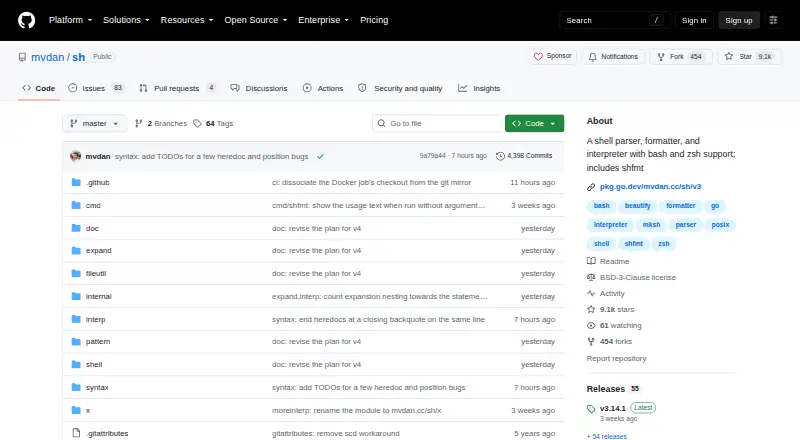
What shfmt is
shfmt is a free, open-source formatter for shell programs, included in a project that also provides a shell parser and interpreter. It supports POSIX Shell, Bash, Zsh, and mksh; the listed language coverage also includes Bats. Its consistent default style can be adjusted with options for indentation, case indentation, binary operator placement, redirect spacing, block placement, and minification.
The tool can format files or standard input, process directories recursively, and list, write, or diff files with formatting differences. When parser or printer flags are not supplied, it reads formatting options from EditorConfig files. The project also describes shfmt as a syntax checker that can replace bash -n: it statically parses syntax and requires valid UTF-8. Installation routes include package managers and distributions such as Alpine, Arch, Debian, Fedora, and Homebrew, along with Docker, PyPI, Scoop, and others. Listed editor integrations include JetBrains shell plugins, micro, NeoVim, VS Code, Emacs, and Trunk. Other integrations include a Prettier plugin, GitHub Action, Markdown formatter plugin, and pre-commit hook. It supports ignore files and provides a library API. The formatter cannot be disabled for selected line ranges, and the project says it avoids adding formatting options where possible.
Who it suits
shfmt suits people who format or syntax-check scripts written in POSIX Shell, Bash, Zsh, mksh, or Bats. Its directory processing, EditorConfig support, editor integrations, and library API also make it relevant to users fitting formatting into broader development workflows.
What it does well
- Free and open source, with no paid plan stated.
- Supports POSIX Shell, Bash, Zsh, mksh, and Bats.
- Formats files, standard input, and directories recursively.
- Can list, write, or diff files with formatting differences.
- Reads options from EditorConfig when flags are absent.
- Offers editor integrations and a library API.
What to know first
- Cannot disable formatting for selected line ranges.
- Requires valid UTF-8 for static syntax parsing.
Plans
| Plan | Billed and limits | Price |
|---|---|---|
| shfmt | Open-source shell formatter · no paid plan or usage limits stated | Free |
As github.com lists them, read 9 Oct 2026. The maker's own page has the final word.
Getting started
- Visit the shfmt GitHub project at https://github.com/mvdan/sh.
- Choose an installation route such as a listed package manager, Docker, PyPI, or Scoop.
- Run shfmt on files, standard input, or directories.
- Use an editor integration or library API if it suits your workflow.
Verdict
Choose shfmt for free shell formatting and syntax checking across its supported shell dialects, especially if you want directory processing or editor integration. Its key constraint is that formatting cannot be turned off for selected line ranges; the project also aims to keep its option set limited.
Questions
Is shfmt free?
Yes. It is open source and listed as free, with no paid plan stated.
Which shell languages does it support?
It supports POSIX Shell, Bash, Zsh, and mksh; the listed language coverage also includes Bats.
Which platforms are supported?
The listed platforms are Linux, Windows, and macOS. The project also lists self-hosted availability.
Can shfmt check shell syntax?
Yes. The project says it can replace bash -n to check scripts for syntax errors. It statically parses syntax and requires valid UTF-8.
Can it use EditorConfig settings?
Yes. It reads formatting options from EditorConfig files when parser or printer flags are not provided.
Can formatting be disabled for part of a file?
No. The formatter cannot be disabled for selected line ranges.
Facts from shfmt's own pages
- Configuration
- shfmt reads formatting options from EditorConfig files when parser or printer flags are not provided. · github.com, 9 Oct 2026
- Distribution
- The README lists packages and installation routes including Alpine, Arch, Debian, Docker, Fedora, FreeBSD, Homebrew, MacPorts, NixOS, OpenSUSE, PyPI, Scoop, Snapcraft, Void, and webi. · github.com, 9 Oct 2026
- Docker
- Docker release tags include versioned releases, a v3 stable tag, and a latest development tag; images contain shfmt and have Alpine variants. · github.com, 9 Oct 2026
- Editor integrations
- Listed integrations include JetBrains shell plugins, micro, NeoVim, VS Code, Emacs, and Trunk. · github.com, 9 Oct 2026
- File handling
- It can format files or standard input, recursively process directories, and list, write, or diff files whose formatting differs. · github.com, 9 Oct 2026
- Formatting
- shfmt uses a consistent default style and offers flags for indentation, case indentation, binary operator placement, redirect spacing, block placement, and minification. · github.com, 9 Oct 2026
- Limit
- The formatter cannot be disabled for selected line ranges, and the project says it avoids adding formatting options where possible. · github.com, 9 Oct 2026
- Maintainer
- The man page identifies Daniel Martí as maintainer, assisted by open-source contributors. · github.com, 9 Oct 2026
- Other integrations
- Other listed integrations include a Prettier plugin, a GitHub Action, a Markdown formatter plugin, and a pre-commit hook. · github.com, 9 Oct 2026
- Purpose
- shfmt formats shell programs and is included in a shell parser, formatter, and interpreter project. · github.com, 9 Oct 2026
- Security
- The latest release page says its release tag was signed with the committer’s verified signature. · github.com, 9 Oct 2026
- Shell dialects
- The project supports POSIX Shell, Bash, Zsh, and mksh. · github.com, 9 Oct 2026
- Support
- The project asks users to file detailed bug reports and feature requests as issues; sponsorship tiers mention prioritized issues and direct support in a company chat app. · github.com, 9 Oct 2026
- Syntax checking
- The project says shfmt can replace bash -n to check scripts for syntax errors and statically parses all syntax, requiring valid UTF-8. · github.com, 9 Oct 2026
Where shfmt stands on Freedom251
- Code Formatting Tools#18 of 34