Shape
What Shape is
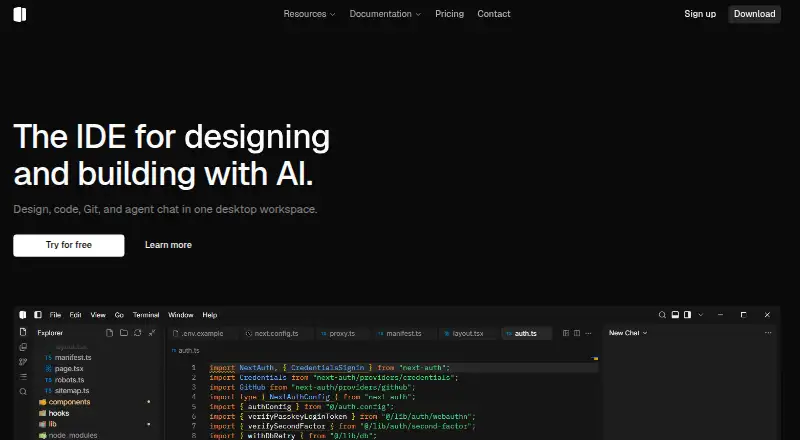
Shape is a Windows desktop workspace for working with design, code, Git, and an AI agent in one environment. In a live preview, users can select an element, change it in a sidebar, and apply that adjustment to the source. The agent can search and read project files, make edits, and run checks in the same conversation. Git tools include a graph, pull request discussions, checks, workflows, and controls for staging or restoring individual diff hunks. Shape lists languages and technologies including TypeScript, JavaScript, Python, Go, Rust, HTML, CSS, Tailwind, Vue, Svelte, Astro, and Node.js. It also has a built-in terminal, codebase indexing, agent mode, and multiple model choices. The free plan includes the local-first desktop editor, the Auto model, and a monthly token pool; free accounts have monthly usage limits. Paid plans start at $15/month for Plus with 450 credits/month. Pro costs $50/month and includes 1,500 credits/month; Max costs $150/month and includes 4,500 credits/month. Shape says projects are not uploaded by default for local editor, Git, and terminal features.
Who it suits
Shape suits Windows users who want design previews, source editing, Git tools, and AI-assisted project work in one desktop workspace. Its free plan offers a local-first editor, while paid options include monthly credits and access to all models.
What it does well
- Edits live-preview selections back to source.
- Agent can search, edit, and run checks.
- Git tools include diff-hunk staging and restore.
- Built-in terminal and codebase indexing.
- Paid plans unlock all models.
What to know first
- Available platform listed is Windows only.
- Free accounts have monthly usage limits.
- Paid credits do not roll over by default.
Limits
Free accounts have monthly usage limits and include the Auto model with a monthly token pool. Paid plans include 450 credits/month on Plus, 1,500 on Pro, and 4,500 on Max; unused credits from a paid billing period do not roll over unless Shape states otherwise.
Plans
| Plan | Billed and limits | Price |
|---|---|---|
| Plus | $15/month · 450 credits/month · All models unlocked · Commercial usage · Dashboard usage tracking | $15 a month |
| Max | $150/month · 4500 credits/month · All models unlocked · Largest included pool · Priority support | $150 a month |
| Pro | $50/month · 1500 credits/month · All models unlocked · Higher credit pool · Priority support | $50 a month |
| Free | $0/month · Auto model included · Monthly token pool for Auto · Local-first desktop editor | On request |
As useshape.org lists them, read 7 Oct 2026. The maker's own page has the final word.
Getting started
- Visit https://www.useshape.org/.
- Use the Windows desktop workspace.
- Start with the Free plan or choose Plus, Pro, or Max.
- Sign in with GitHub to avoid credential prompts when pushing, if desired.
Verdict
Shape brings visual editing, coding, Git, and agent tasks into one Windows workspace. Check the monthly usage limits and paid credit allowances against the work you expect to do.
Questions
How much do Shape's plans cost?
The Free plan is billed at $0/month. Plus is $15/month, Pro is $50/month, and Max is $150/month.
What is included in the Free plan?
It includes the local-first desktop editor, the Auto model, and a monthly token pool for Auto. Free accounts have monthly usage limits.
Which platforms does Shape support?
Windows is the listed supported platform.
Does Shape upload projects by default?
Shape says local editor, Git, and terminal features operate on the device, and projects are not uploaded by default.
Does Shape use content to train models?
Shape says it does not use content to train foundation models for general third-party use unless a user explicitly opts into a described program.
Do paid credits roll over?
Unused credits from a paid billing period do not roll over unless Shape states otherwise.
Facts from Shape's own pages
- AI agent
- The agent can search, read files, edit, and run checks in the same thread. · useshape.org, 7 Oct 2026
- AI data use
- The privacy policy says Shape does not use content to train foundation models for general third-party use unless the user explicitly opts in to a described program. · useshape.org, 7 Oct 2026
- Code handling
- The EULA says local editor, Git, and terminal features operate on the device and projects are not uploaded by default. · useshape.org, 7 Oct 2026
- Git features
- Shape includes a Git graph, pull request discussions, checks, workflows, and controls to stage or restore individual diff hunks. · useshape.org, 7 Oct 2026
- GitHub
- The Source Control guide says signing in with GitHub can avoid credential prompts when pushing. · useshape.org, 7 Oct 2026
- Integrations
- The terms say Shape may integrate with model providers, MCP servers, Skills, extensions, Git hosts, and payment processors. · useshape.org, 7 Oct 2026
- Platforms
- The download page offers Windows x64 and arm64 installers; Mac and Linux are marked “Coming soon.” · useshape.org, 7 Oct 2026
- Product
- Shape describes itself as a desktop workspace combining design, code, Git, and agent chat. · useshape.org, 7 Oct 2026
- Project languages
- The homepage lists TypeScript, JavaScript, Python, Go, Rust, HTML, CSS, Tailwind, Vue, Svelte, Astro, and Node.js. · useshape.org, 7 Oct 2026
- Security and privacy
- The privacy policy says Shape uses encryption in transit, access controls, and build attestation for official Shape Cloud AI clients. · useshape.org, 7 Oct 2026
- Support
- The contact page accepts questions about Shape, billing, or partnerships and says replies are sent by email. · useshape.org, 7 Oct 2026
- Telemetry
- IDE product telemetry is off by default, and the policy says enabling it collects anonymous product events without chat content or source code. · useshape.org, 7 Oct 2026
- Usage limits
- The terms say free accounts have monthly usage limits and unused credits from a paid billing period do not roll over unless Shape states otherwise. · useshape.org, 7 Oct 2026
- Visual design
- Users can select an element in a live preview, adjust it in a sidebar, and apply the change back to source. · useshape.org, 7 Oct 2026
Where Shape stands on Freedom251
- AI Code Editors#23 of 26