Freedom251 › Peer-to-Peer Payment Apps

Settle Up
by Settle Up
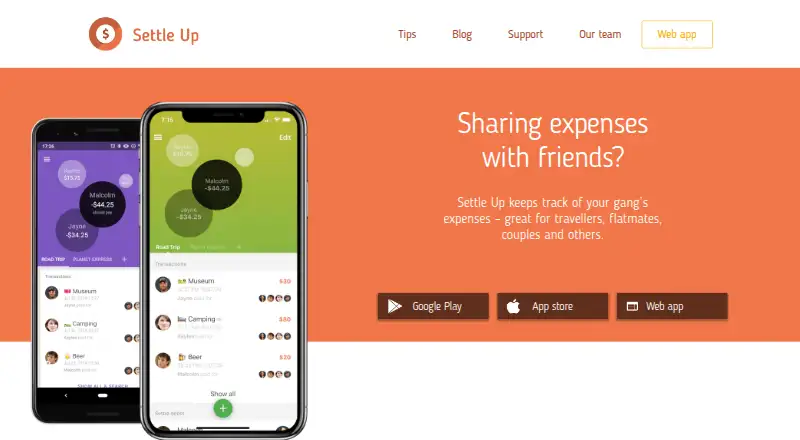
What Settle Up is
Settle Up tracks shared expenses and IOUs, helping a group determine who should pay next while reducing the number of transactions needed to settle debts. It is intended for travelers, flatmates, couples, event organizers and groups of friends. Members can use weighted shares, record multiple payers, add incomes and itemize bills. The app works offline and syncs again when internet access returns. It supports all currencies with real-time exchange rates, and groups can be shared by link or QR code. Free capabilities include transaction filters and statistics, CSV export by email, read-only access, backup and synchronization, widgets and shortcuts. Premium adds ad-free use, receipt photos, recurring expenses, custom categories, Excel export and statistics. Monthly Premium costs $3.99 a month, and Yearly Premium costs $19.99 a year. Group Premium costs $5.99 USD for one week, $14.99 a month or $39.99 a year. Settle Up is available on Android, iOS, web and Windows.
Who it suits
Settle Up suits groups that share expenses, from flatmates and couples to travelers and event organizers. It is useful for groups needing offline entry, flexible splits or shared group access.
What it does well
- Works offline and syncs when internet returns.
- Supports weighted shares and multiple payers.
- Handles all currencies with real-time exchange rates.
- Groups can be shared by link or QR code.
- Free tier includes CSV export and backups.
What to know first
- Free tier includes ads.
- Monthly Premium costs $3.99 a month.
- Yearly Premium costs $19.99 a year.
- Group Premium for one year costs $39.99 a year.
Limits
The Free plan includes ads and does not include Premium features such as receipt photos, recurring expenses, custom categories, or Excel export. The listed Free plan includes CSV export; the Monthly Premium plan costs $3.99 a month and the Yearly Premium plan costs $19.99 a year.
Plans
| Plan | Billed and limits | Price |
|---|---|---|
| Premium | Ad-free use · Receipt photos · Recurring expenses · Custom categories · Statistics · Excel export | On request |
| Free | core group expense tracking · free features | Free |
| Group Premium for 1 month | Group Premium for 1 month $14.99 · Premium features for one group | $14.99 a month |
| Lifetime Group Premium | Lifetime Group Premium $149.99 · Premium features for one group | $149.99, paid once |
| Yearly Premium | Yearly Premium $19.99 · ad-free · receipt photos · recurring expenses · categories · statistics · Excel export | $19.99 a year |
| Group Premium for 2 months | Group Premium for 2 months $29.99 · Premium features for one group | $29.99, paid once |
| Monthly Premium | Monthly Premium $3.99 · ad-free · receipt photos · recurring expenses · categories · statistics · Excel export | $3.99 a month |
| Group Premium for 1 year | Group Premium for 1 year $39.99 · Premium features for one group | $39.99 a year |
The first 8 of 11 plans, as settleup.io lists them, read 20 Sept 2026. The maker's own page has the final word. Every plan
Getting started
- Visit https://settleup.io/.
- Choose Android, iOS, web, or Windows.
- Start with the Free plan for core expense tracking and group sharing.
- Create a group and share it using a link or QR code.
- Choose a Premium plan if you want ad-free use, receipt photos, recurring expenses, custom categories, or Excel export.
Settle Up is a shared-expense tracker for groups that need more than a simple equal split. It suits travelers, flatmates, couples and event groups; its strongest case is flexible accounting with guidance on settling balances, though useful extras cost money.
Overview
Instead of leaving a group to work out who should reimburse whom, Settle Up shows who pays next and reduces the number of transactions needed to settle debts. It can accommodate unequal weighted shares, expenses funded by multiple people, income and itemized bills. That makes it a better fit for groups with uneven contributions than for people who only need a basic payment app.
Groups can be shared by link or QR code. The app supports all currencies with real-time exchange rates and works offline, syncing when a connection returns. It can also send a debt directly to a group member’s Lightning address, with no Settle Up fee beyond network fees.
Key features
The flexible split options are the core strength: they let a group record who actually owes what rather than forcing every bill into equal shares. Transaction filters and statistics help members review activity. Free users also get read-only access, backup and synchronization, widgets and shortcuts, and CSV export by email. Android users can export a group’s data as CSV in the app.
Premium adds ad-free use, receipt photos, recurring transactions, custom categories, Excel export and group colour choices. These are useful for groups that want richer records or automate repeat expenses, but the free tier already covers core tracking and CSV export. Users can contact the company for more extensive exports.
The public API documentation says mobile app capabilities are accessible through the API and identifies Firebase Realtime Database as the backend. The privacy policy says data are stored in Firebase and Google App Engine services in the United States, sent only over HTTPS, and handled in compliance with privacy regulations such as GDPR. Group members can see a user’s name, email, profile pictures and entered transaction and other group data, so the app is best used with people who should have access to those details.
Pricing
The Free plan costs nothing and includes core expense tracking, CSV export and group sharing, with ads. It is the sensible starting point for occasional groups that can do without receipt photos, recurring expenses and Excel export.
Monthly Premium costs $3.99 a month; Yearly Premium costs $19.99 a year. Both remove ads and add receipt photos, recurring and future expenses, custom categories, Excel export and statistics. The annual option costs less than twelve monthly payments at the stated rates, while monthly billing avoids a year-long commitment.
For a group that wants Premium features for everyone, Group Premium costs $5.99, paid once for one week, $9.99, paid once for two weeks, $14.99 a month for one month, $29.99, paid once for two months, or $39.99 a year for one year. Short passes suit a trip or event; the annual term is aimed at groups sharing expenses throughout the year. Premium and Lifetime Group Premium are also named as plans, but have custom pricing.
Platforms
Settle Up is available on Android, iOS, web and Windows. Support lists separate feedback email addresses for each of these app versions and says it will reply.
Who it's for
Choose Settle Up when a group needs flexible shares, a clear path to settle balances, or offline expense entry—especially for trips and shared households. It is less compelling for someone seeking only a way to transfer money: its main purpose is tracking group expenses and IOUs, and ad-free use and several record-keeping extras require Premium.
Pros and cons
- Pros: Weighted shares, multiple payers, incomes and itemized bills handle more complicated group spending than equal splits alone.
- Pros: Offline use, all-currency support and real-time exchange rates suit groups that may be spending across locations or without steady connectivity.
- Pros: Free users get core tracking, group sharing and CSV export; Lightning payments add a direct settlement route without a Settle Up fee beyond network fees.
- Cons: Ads remain on the free plan, while receipt photos, recurring expenses and Excel export require Premium.
- Cons: Group members can see personal profile details as well as group records, so sharing is not suited to expenses users want to keep private from the group.
- Cons: Data are stored in United States cloud services, which may not suit users who want data stored elsewhere.
Alternatives
For a different way to manage transfers or payments, compare Wise, PhonePe, Remitly, Vipps, BHIM or Lydia. For another shared-expense option, consider Splitwise. Readers looking more broadly can browse Peer-to-Peer Payment Apps or Personal Finance Software.
Verdict
Settle Up is a strong choice for groups that need accurate, flexible expense accounting and a simpler route from shared bills to settled balances. Start with the free plan if CSV export and core tracking are enough; choose Premium for receipts, recurring costs or Excel export. Look elsewhere if you need only a payment service or are uncomfortable sharing group records and profile details with other members.
Verdict
Settle Up covers flexible group expense tracking, offline use and multiple settlement options. The free tier includes core tracking, while premium plans add features such as receipt photos and Excel export.
Questions
Is Settle Up free?
Yes. The Free plan costs nothing and includes core expense tracking, CSV export, group sharing, and ads.
How much does Premium cost?
Monthly Premium costs $3.99 a month. Yearly Premium costs $19.99 a year.
What platforms does Settle Up support?
It is available on Android, iOS, web, and Windows.
Can groups use Settle Up offline?
Yes. It works offline and syncs when internet access returns.
Can a group settle a debt through Lightning?
Yes. Users can pay a group member’s Lightning address, with no Settle Up fee beyond network fees.
What does Group Premium cost?
Listed options are $5.99, paid once for one week, $9.99, paid once for two weeks, $14.99 a month, $29.99, paid once for two months, and $39.99 a year.
Facts from Settle Up's own pages
- Android intents
- Android integrations can open prefilled add-expense, bill, transfer or income screens through intents. · api.settleup.io, 14 Oct 2026
- API and backend
- The public API documentation says mobile app capabilities are accessible through the API and identifies Firebase Realtime Database as the backend. · api.settleup.io, 3 Oct 2026
- API authentication
- Most API requests require Firebase Authentication; live API keys are issued after developer registration and review. · api.settleup.io, 14 Oct 2026
- API capabilities
- The public API is intended to expose everything the mobile apps can do through Firebase SDKs or Firebase REST calls. · api.settleup.io, 14 Oct 2026
- API documentation limit
- The operations documentation says it is probably incomplete and invites developers to request extensions by email. · api.settleup.io, 14 Oct 2026
- API entities
- Documentation covers groups, members, permissions, transactions, recurring transactions, changes, categories, debts and users. · api.settleup.io, 14 Oct 2026
- API integrations
- Published examples include Stripe, Integromat, Up bank, Catchers club, Mercury, YANB PWA and a Settle Up CLI. · api.settleup.io, 14 Oct 2026
- Company size and founding
- LinkedIn lists Step Up Labs as a Prague company founded in 2011 with 2–10 employees. · linkedin.com, 14 Oct 2026
- Currencies
- Exchange rates are downloaded daily from Yahoo, can be edited, and are applied to transactions in different currencies. · settleup.io, 14 Oct 2026
- Currencies and sharing
- It supports all currencies with real-time exchange rates and lets users share groups by link or QR code. · play.google.com, 3 Oct 2026
- Data export
- The Android app has built-in CSV export for individual groups, and users can contact the company for more extensive exports. · settleup.io, 3 Oct 2026
- Data location
- The privacy policy says data are stored in Google Cloud Platform services Firebase and Google App Engine in the United States. · settleup.io, 3 Oct 2026
- Data sharing
- The policy says group members can see a user's name, email, profile pictures and entered transaction and other group data. · settleup.io, 3 Oct 2026
- Debt settlement
- It shows who pays next and minimizes the number of transactions between group members. · settleup.io, 3 Oct 2026
- Expense splits
- The app supports unequal weighted shares, multiple people paying for one expense, incomes and itemized bills. · play.google.com, 3 Oct 2026
- Expense visibility
- Expenses are backed up and synchronized so every group member can view them. · settleup.io, 14 Oct 2026
- Exports
- Free functionality includes CSV export by email, while Premium adds Excel export. · play.google.com, 14 Oct 2026
- Free features
- The listed free capabilities include transaction filters and statistics, CSV export by email, read-only access, backup and synchronization, widgets and shortcuts. · play.google.com, 3 Oct 2026
- Free plan
- Yes · settleup.io, 20 Sept 2026
- Headquarters
- Casper, Wyoming, United States · settleup.io, 28 Sept 2026
- Legal owner and headquarters
- Terms identify Step Up Labs Inc. at 1611 E. 2nd Street, Casper, Wyoming, while saying the team is based in the Czech Republic. · settleup.io, 14 Oct 2026
- Lightning payments
- Users can settle debts directly to a group member's Lightning address, with no Settle Up fee beyond network fees. · settleup.io, 3 Oct 2026
- Limit: cancellation and refunds
- Google Play reviews describe difficulty cancelling Premium and confusion when recording refunds or settled transactions. · play.google.com, 14 Oct 2026
- Limit: interface and sync
- Independent reviewers report unintuitive navigation, dated or less polished design, login problems and occasional cross-platform synchronization or balance errors. · justuseapp.com, 14 Oct 2026
Where Settle Up stands on Freedom251
- Peer-to-Peer Payment Apps#7 of 24
- Personal Finance Software#104 of 181