Freedom251 › API Monitoring Tools
Sentinel
What Sentinel is
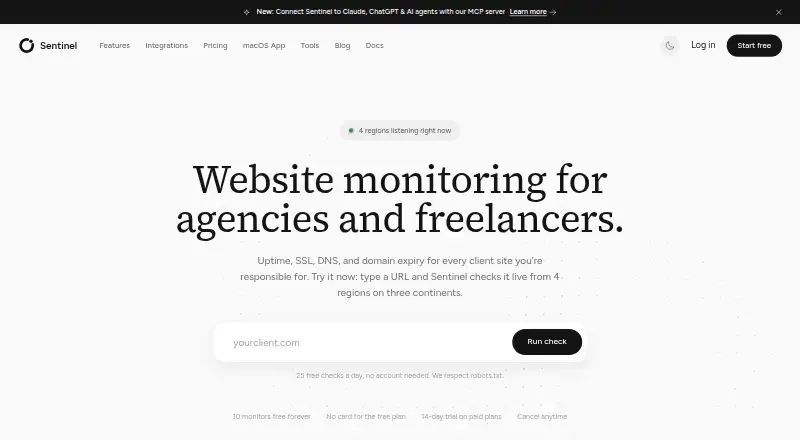
Sentinel monitors websites and infrastructure from outside, checking services across multiple global regions. Its checks cover uptime, SSL certificates, DNS records, domain expiry, page keywords, JSON and API responses, ping, TCP ports, and heartbeat or cron jobs. Checks can run every 30 seconds from four regions, and regional consensus helps determine when to flag an outage. Alerts can reach email, SMS, Slack, Discord, Telegram, Microsoft Teams, and webhooks. Sentinel also lists GitHub, Terraform, PagerDuty, command-line access, and MCP connections among its integrations. MCP lets Claude, ChatGPT, and other compatible agents ask questions about monitors and help with incident triage. Customizable status pages and incident history are available, with page limits and features depending on the plan.
Sentinel is designed for digital agencies, freelance developers and designers, and SaaS teams managing sites. The Free plan includes up to 10 monitors, five-minute checks, and one public status page. The pricing note says paid access starts at $12/mo and lists a 14-day trial; named monthly plans are Starter at 14.00 USD, Pro at 29.00 USD, and Business at 79.00 USD. A downloadable macOS menu bar app requires macOS 13.0 or later and a read-only API token.
Who it suits
Sentinel suits agencies, freelance developers and designers, and SaaS teams responsible for one or more sites. Its multi-region checks, alert channels, status pages, and incident history support teams that need to monitor services and communicate incidents.
What it does well
- Checks cover uptime, certificates, DNS, domains, page keywords, APIs, ports, and jobs.
- Checks run from four regions as often as every 30 seconds.
- Alerts reach email, SMS, Slack, Discord, Telegram, Teams, or webhooks.
- Customizable status pages include incident history.
- MCP access lets compatible AI agents query monitors and assist with incident triage.
What to know first
- Free checks run every five minutes and cover up to 10 monitors.
- Free includes one public status page.
- The macOS app requires macOS 13.0 or later and a read-only API token.
Limits
The Free plan allows up to 10 monitors, checks every five minutes, and one public status page. The listed Starter plan allows up to 25 endpoints, checks every minute, and five client status pages; status-page limits and features depend on the plan.
Plans
| Plan | Billed and limits | Price |
|---|---|---|
| Free | up to 10 monitors · 5-minute checks · uptime, SSL, DNS, domain, keyword, ping, port, JSON/API and server-error checks · 1 public status page · email, Discord and Telegram alerts · API, CLI, Terraform, MCP · macOS app | Free |
| Starter | Billed monthly · up to 25 monitors · 1-minute checks · heartbeat/cron monitoring · Slack and Teams alerts · US/Canada SMS · 5 client status pages | $14 a month |
| Pro | Billed monthly · up to 100 monitors · Lighthouse audits · signed webhooks · one team with up to 5 members · 10 branded status pages · custom-domain status pages | $29 a month |
| Business | Billed monthly · up to 300 monitors · 30-second checks · PagerDuty · unlimited teams and members · unlimited status pages · client-ready uptime reports · priority support | $79 a month |
As sentinel.rootstuff.io lists them, read 15 Oct 2026. The maker's own page has the final word.
Getting started
- Open https://sentinel.rootstuff.io/.
- Choose the Free plan or review the paid plans and 14-day trial.
- Set up monitors for the services and checks you need.
- Choose alert channels such as email, Slack, or webhooks.
- Optionally download the macOS menu bar app; it requires macOS 13.0 or later and a read-only API token.
Verdict
Choose Sentinel if you need multi-region website and infrastructure monitoring with broad checks, alerts, and status pages. The Free plan covers up to 10 monitors, while paid monthly plans add capacity and features; check the plan limits that fit your monitor and status-page needs.
Questions
Is there a free plan?
Yes. Free includes up to 10 monitors, five-minute check intervals, and one public status page.
What does Sentinel cost?
The pricing note says paid plans start at $12/mo. Listed monthly plans are Starter at 14.00 USD, Pro at 29.00 USD, and Business at 79.00 USD.
Is a free trial available?
Yes. The pricing note lists a 14-day trial.
Which platforms does Sentinel support?
The listed platforms are API, extension, macOS, and web. Its downloadable macOS menu bar app requires macOS 13.0 or later.
What alert channels and integrations are listed?
Alert channels include email, SMS, Slack, Discord, Telegram, Microsoft Teams, and webhooks. Other listed integrations include GitHub, Terraform, PagerDuty, command-line access, and MCP for compatible AI agents.
Who makes Sentinel?
Adam Balée identifies himself as Sentinel’s founder and developer. He says Rootstuff is based in West Chester, Pennsylvania.
Facts from Sentinel's own pages
- AI access
- The MCP integration connects Claude, ChatGPT, and other MCP-compatible agents to monitors for questions and incident triage. · sentinel.rootstuff.io, 7 Oct 2026
- Alerts
- Alert channels include email, SMS, Slack, Discord, Telegram, Microsoft Teams, and webhooks. · sentinel.rootstuff.io, 7 Oct 2026
- API authentication and limits
- API calls use bearer tokens, and standard requests are limited to 120 per minute with no daily or monthly quota. · sentinel.rootstuff.io, 15 Oct 2026
- API base and versioning
- The REST API uses https://sentinel.rootstuff.io/api/v1 and promises additive-only changes within version 1. · sentinel.rootstuff.io, 15 Oct 2026
- API monitoring
- Custom HTTP requests can assert JSON response paths and values to detect silent API failures. · sentinel.rootstuff.io, 15 Oct 2026
- Checks
- It monitors uptime, SSL certificates, DNS records, domain expiry, page keywords, JSON/API responses, ping, TCP ports, and heartbeat or cron jobs. · sentinel.rootstuff.io, 7 Oct 2026
- CLI
- The CLI is installed with npm, requires Node.js 18 or newer, supports CI/CD workflows and manages monitors, incidents, teams, webhooks and status pages. · sentinel.rootstuff.io, 15 Oct 2026
- Company stack
- Rootstuff's case study says Sentinel is built with Laravel, Vue and Inertia and operates checks from multiple regions. · rootstuff.io, 15 Oct 2026
- Data retention
- Terms state that monitoring data is retained for 30 days on Free, 90 days on Pro and one year on Business. · sentinel.rootstuff.io, 15 Oct 2026
- Desktop app
- Sentinel offers a downloadable macOS menu bar app that requires macOS 13.0 or later and a read-only API token. · sentinel.rootstuff.io, 7 Oct 2026
- DNS monitoring
- Sentinel watches seven DNS record types and alerts when records change. · sentinel.rootstuff.io, 15 Oct 2026
- Documentation depth
- Documentation includes getting-started guides, monitor concepts, integrations, CLI instructions, API references, pagination, errors, rate limits and troubleshooting. · sentinel.rootstuff.io, 15 Oct 2026
- Founded
- The company timeline says Sentinel was founded in 2024 and launched in February 2026. · sentinel.rootstuff.io, 7 Oct 2026
- Founder and location
- Adam Balée identifies himself as Sentinel’s founder and developer, and says Rootstuff is based in West Chester, Pennsylvania. · sentinel.rootstuff.io, 7 Oct 2026
- Heartbeat and cron
- Push heartbeat and cron monitors open incidents when expected job pings are missing or report failure. · sentinel.rootstuff.io, 15 Oct 2026
- Hosted service
- The MCP server documentation describes Sentinel as a hosted service and says its server code is not open source. · sentinel.rootstuff.io, 15 Oct 2026
- Integrations
- GitHub deploy markers, Terraform, PagerDuty, a CLI and MCP-based AI assistants are supported; Zapier and Datadog are listed as coming soon. · sentinel.rootstuff.io, 15 Oct 2026
- Keyword monitoring
- Keyword checks verify required page text or detect unwanted error and defacement content. · sentinel.rootstuff.io, 15 Oct 2026
- Licence
- The hosted Sentinel service is proprietary, while the published Sentinel CLI is open source under the MIT licence. · sentinel.rootstuff.io, 15 Oct 2026
- Limit: availability guarantee
- Terms say Rootstuff strives for 99.9% uptime but does not guarantee uninterrupted service and is not liable for missed incidents or monitoring delays. · sentinel.rootstuff.io, 15 Oct 2026
- Limit: compliance
- Slack's security listing says the app is not HIPAA compliant, does not support SAML, has no dedicated security team, no vulnerability disclosure program and no bug bounty. · slack.com, 15 Oct 2026
- Limit: macOS desktop coverage
- The maker's blog states that the menu-bar app is macOS-only, with no Windows or Linux build at that time. · sentinel.rootstuff.io, 15 Oct 2026
- Limit: webhook tier
- Custom webhooks are documented as a Pro and Business feature, so they are unavailable on Free and Starter. · sentinel.rootstuff.io, 15 Oct 2026
- macOS app
- The free menu-bar app is version 1.0.5, requires macOS 13 or later, uses a read-only API token and refreshes from 15 seconds to five minutes. · sentinel.rootstuff.io, 15 Oct 2026
Where Sentinel stands on Freedom251
- API Monitoring Tools#11 of 27