Freedom251 › AI Security Testing Tools
SENTINEL RED
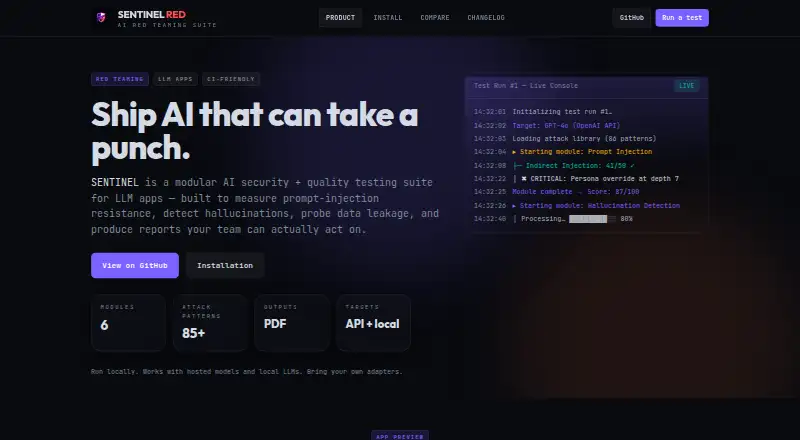
What SENTINEL RED is
SENTINEL RED is a modular security and quality testing suite for applications built with large language models. Its six modules address prompt injection, hallucinations, data leakage, adversarial testing, poisoning, and compliance, and the homepage lists more than 85 attack patterns. The suite can test API and local targets, hosted models, and local LLMs through user-provided adapters. Users add a model target and API key, choose modules and test depth, and follow results streaming to the dashboard over WebSocket. SENTINEL generates PDF reports with actionable scoring; its REST API can create runs, check their status, and retrieve reports programmatically. It supports local execution, pipelines, and scheduled runs. The recommended installation uses Docker Compose and opens the dashboard at localhost:3000. Provider keys, with OpenAI and Anthropic as examples, can be set through environment variables or dashboard settings; multiple providers are supported. The maker describes local operation as a way to keep secrets on the user’s own machine. The project is free and open source under the AGPL-3.0 license, and is intended for engineers, auditors, product teams, and security teams shipping AI applications.
Who it suits
SENTINEL RED suits engineers, auditors, product teams, and security teams assessing AI applications. It supports hosted and local models, with local deployment, pipeline, and scheduled-run options.
What it does well
- Six modules cover security and quality testing areas.
- Homepage lists more than 85 attack patterns.
- Supports hosted models and local LLMs through adapters.
- Produces PDF reports with actionable scoring.
- REST API can create runs and retrieve reports.
What to know first
- Recommended installation requires Docker Compose.
- Model targets require user-provided adapters.
- The project is licensed under AGPL-3.0.
Getting started
- Visit https://sentinelred.dev/.
- Install locally using the recommended Docker Compose setup.
- Open the dashboard at localhost:3000.
- Configure provider keys through environment variables or dashboard settings.
- Add a model target and API key, then select modules and test depth.
- Watch results and generate a PDF report, or use the REST API.
Verdict
SENTINEL RED covers several LLM testing areas and provides live results, PDF reporting, and a programmatic API. Its recommended local setup uses Docker Compose, and targets are configured with user-provided adapters.
Questions
Is SENTINEL RED free?
Yes. Its pricing model is free, and the project is open source under the AGPL-3.0 license.
Which platforms does it support?
Its listed platforms are API, Linux, self-hosted, and web.
What does it test?
Six modules cover prompt injection, hallucinations, data leakage, adversarial testing, poisoning, and compliance. It also supports jailbreak, unsafe-output, and custom test cases.
Can it test local models?
Yes. It supports local LLMs and hosted models through user-provided adapters, as well as API and local targets.
How can teams automate runs?
The REST API can create runs, poll their status, and download PDF reports. The product also says it can run in pipelines or on schedules.
Who built SENTINEL RED?
The site footer says it was built by Abou D.
Facts from SENTINEL RED's own pages
- API
- The REST API can create runs, poll their status, and download PDF reports programmatically. · sentinelred.dev, 8 Oct 2026
- Attack library
- The homepage lists more than 85 attack patterns. · sentinelred.dev, 8 Oct 2026
- Attack patterns
- The homepage lists more than 85 attack patterns. · sentinelred.dev, 8 Oct 2026
- CI use
- The product says it can run locally, in pipelines, or on schedules. · sentinelred.dev, 8 Oct 2026
- Deployment
- The installation page recommends running locally with Docker Compose and accessing the dashboard at localhost:3000. · sentinelred.dev, 8 Oct 2026
- Execution
- SENTINEL is designed to run locally and supports hosted models and local LLMs through adapters. · sentinelred.dev, 8 Oct 2026
- Installation
- The recommended installation uses Docker Compose and opens the dashboard at localhost:3000. · sentinelred.dev, 8 Oct 2026
- Intended users
- The site describes SENTINEL as built for engineers, auditors, and security teams shipping AI. · sentinelred.dev, 8 Oct 2026
- License
- The GitHub repository lists the project under the AGPL-3.0 license. · github.com, 8 Oct 2026
- Live results
- The dashboard streams test results live via WebSocket. · sentinelred.dev, 8 Oct 2026
- Maker
- The site footer says SENTINEL RED was built by Abou D. · sentinelred.dev, 8 Oct 2026
- Product
- SENTINEL is a modular AI security and quality testing suite for LLM applications. · sentinelred.dev, 8 Oct 2026
- Provider configuration
- The installation page shows OpenAI and Anthropic API keys configured through environment variables and says multiple providers are supported. · sentinelred.dev, 8 Oct 2026
- Providers
- The installation page gives OpenAI and Anthropic API keys as provider configuration examples. · sentinelred.dev, 8 Oct 2026
- Reports
- Users can generate PDF reports with actionable scoring. · sentinelred.dev, 8 Oct 2026
- Security handling
- The installation page says its local-first design keeps secrets on the user's machine, and keys can be stored in environment variables or configured in dashboard settings. · sentinelred.dev, 8 Oct 2026
- Security posture
- The maker says SENTINEL is designed to run locally so users can keep secrets on their own machine. · sentinelred.dev, 8 Oct 2026
- Targets
- The suite supports API and local targets, hosted models, and local LLMs, with user-provided adapters. · sentinelred.dev, 8 Oct 2026
- Testing coverage
- Its six modules cover prompt injection, hallucinations, data leakage, adversarial testing, poisoning, and compliance. · sentinelred.dev, 8 Oct 2026
- Workflow
- Users add a model target and API key, choose modules and test depth, watch results, and generate a report. · sentinelred.dev, 8 Oct 2026
Where SENTINEL RED stands on Freedom251
- AI Security Testing Tools#27 of 29