Freedom251 › Email Cleanup Software
Sender Sweep
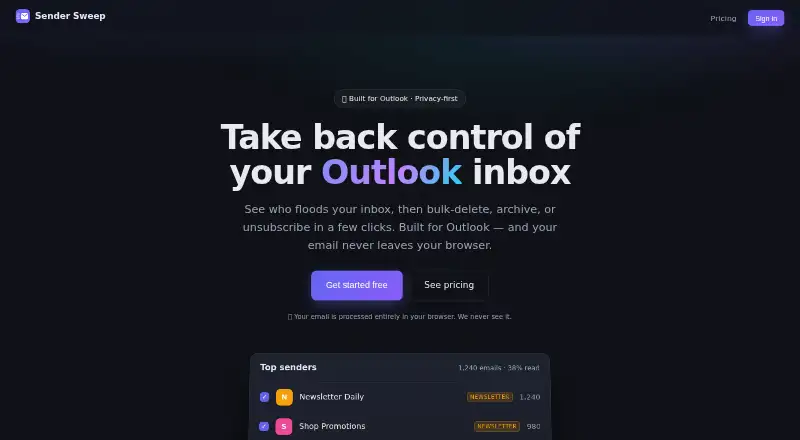
What Sender Sweep is
Sender Sweep helps Outlook users see which senders contribute to inbox activity and take cleanup actions in bulk. It scans a connected mailbox and shows per-sender counts, read rates, and email volume over time. Users can filter for messages they never read, then delete or archive messages from selected senders. The app detects newsletters automatically and takes unsubscribe links from message headers. Users can group addresses by company domain and act on that domain together. It connects to Microsoft accounts, including Outlook.com, Hotmail, Live, and work or school accounts; sign-in uses Microsoft rather than a separate Sender Sweep password. Scanning and cleanup run in the browser through Microsoft Graph. The maker says email is not sent to its servers, and its backend sees plan and usage counts, not email. Deleted messages move to recoverable Deleted Items. The free plan costs nothing and includes unlimited scanning and analytics, 500 deletes per month, and 5 unsubscribes per month. Pro costs $29 a year, billed $29/year, and includes unlimited deletes and unsubscribes.
Who it suits
Sender Sweep may suit Outlook users who want to review sender activity and clear messages or unsubscribe in batches. Its free plan is described for light cleanup.
What it does well
- Shows sender counts, read rates, and email volume over time.
- Bulk delete and archive options are available.
- Groups addresses by company domain.
- Deleted messages can be recovered from Deleted Items.
- Email stays out of the maker's servers, according to the maker.
What to know first
- Free plan caps deletes at 500 per month.
- Free plan caps unsubscribes at 5 per month.
- Works with listed Microsoft accounts, not other providers.
Limits
The Free plan allows 500 deletes and five unsubscribes per month. Pro costs $29 a year and includes unlimited deletes and unsubscribes.
Plans
| Plan | Billed and limits | Price |
|---|---|---|
| Free | Unlimited scanning and analytics · 500 deletes/month · 5 unsubscribes/month | Free |
| Pro | $29/year · Unlimited deletes and unsubscribes | $29 a year |
As sendersweep.com lists them, read 7 Oct 2026. The maker's own page has the final word.
Getting started
- Open the Sender Sweep website.
- Connect an Outlook.com, Hotmail, Live, or Microsoft work or school account.
- Sign in with Microsoft.
- Scan the mailbox, review sender analytics, and choose messages or domains to clean up.
- Choose Free or Pro based on the monthly cleanup limits you need.
Verdict
Sender Sweep combines mailbox analytics with batch cleanup and newsletter unsubscribe tools for Microsoft accounts. The free plan has monthly action caps; Pro costs $29 a year and removes those limits for deletes and unsubscribes.
Questions
How much does Sender Sweep cost?
The Free plan costs nothing. Pro costs $29 a year, billed $29/year.
What does the free plan include?
It includes unlimited scanning and analytics, 500 deletes per month, and five unsubscribes per month.
Which email accounts can I connect?
Sender Sweep supports Outlook.com, Hotmail, Live, and Microsoft work or school accounts.
How does sign-in work?
Users sign in with Microsoft and do not need a separate Sender Sweep password.
Does Sender Sweep send email to its servers?
The maker says scanning and cleanup run in the browser through Microsoft Graph and email does not go to its servers. Its backend sees plan and usage counts, not email.
Can deleted messages be recovered?
Yes. Deleting moves messages to Deleted Items, where they are recoverable.
Facts from Sender Sweep's own pages
- Authentication
- Users sign in with Microsoft and do not need a separate Sender Sweep password. · sendersweep.com, 7 Oct 2026
- Bulk cleanup
- Users can filter for messages they never read, select matching senders, and delete or archive in bulk. · sendersweep.com, 7 Oct 2026
- Domain grouping
- Users can group addresses by company domain and act on the domain together. · sendersweep.com, 7 Oct 2026
- Email integration
- Sender Sweep connects to Microsoft accounts, including Outlook.com, Hotmail, Live, and work or school accounts. · sendersweep.com, 7 Oct 2026
- Intended user
- The free plan is described as being for light cleanup. · sendersweep.com, 7 Oct 2026
- Mailbox analytics
- It scans the mailbox and shows per-sender counts, read rates, and email volume over time. · sendersweep.com, 7 Oct 2026
- Microsoft Graph
- Mailbox scanning and cleanup happen in the browser, which communicates directly with Microsoft Graph. · sendersweep.com, 7 Oct 2026
- Privacy
- The maker says email does not go to its servers and that its backend sees only plan and usage counts, never email. · sendersweep.com, 7 Oct 2026
- Purpose
- Sender Sweep helps users see which senders fill their Outlook inbox, then bulk-delete, archive, or unsubscribe. · sendersweep.com, 7 Oct 2026
- Recoverable deletes
- Deleting moves messages to Deleted Items, where they are recoverable. · sendersweep.com, 7 Oct 2026
- Unsubscribe
- Newsletters are detected automatically, and the app pulls an unsubscribe link from message headers. · sendersweep.com, 7 Oct 2026
Where Sender Sweep stands on Freedom251
- Email Cleanup Software#23 of 31