Freedom251 › Distraction Blocking Software
SelfLock
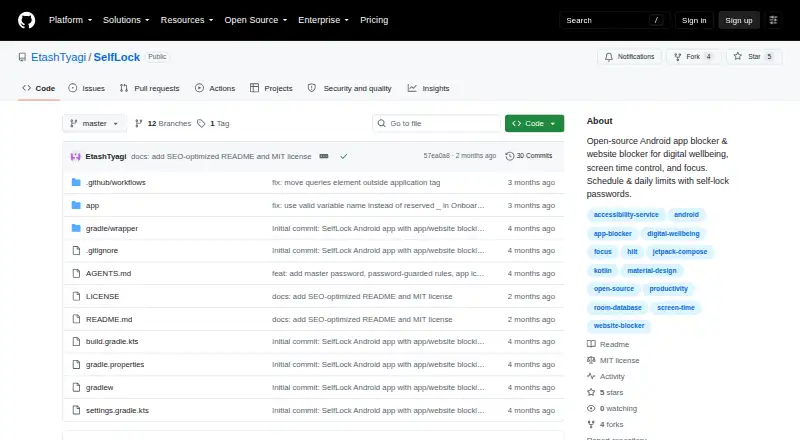
What SelfLock is
SelfLock is a free, open-source Android app and website blocker for digital wellbeing, screen-time control, and focus. It blocks installed apps or website domains according to schedules or daily usage limits, then displays a full-screen overlay when a block applies. Active rules can be locked against editing or deletion, with optional master and per-rule passwords. The app records daily app and matched-website usage and provides local statistics, date-range summaries, block history, budget warnings, and notifications. Website blocking detects browser URL bars in Chrome, Firefox, Samsung Internet, and Edge. Rules, logs, and passwords remain on the device; the project states there is no login, telemetry, cloud sync, or third-party advertising or analytics SDK. Passwords use PBKDF2-HMAC-SHA256 hashing with 600,000 iterations and EncryptedSharedPreferences. Setup requires several Android permissions and unrestricted battery use. SelfLock requires Android 14 or newer, is installed from a built APK rather than Google Play, and is licensed under MIT.
Who it suits
SelfLock suits Android users seeking local app and website limits with locked rules and usage reports. It is aimed at people comfortable building and installing an open-source APK.
What it does well
- Free and open-source under MIT
- Scheduled and daily-limit blocking
- Locked rules with optional passwords
- Local usage statistics and warnings
- No login, telemetry, or cloud sync
What to know first
- Requires Android 14 or newer
- Installation requires building from source
- Website blocking depends on browser URL identifiers
- Cannot fully prevent Safe Mode, ADB, or factory reset removal
Limits
Website blocking is not a network-level DNS blocker and relies on browser accessibility URL-bar identifiers that browsers may change. Enforcement cannot fully prevent removal through Safe Mode, ADB or a factory reset.
Getting started
- Use an Android device running Android 14 or newer
- Build SelfLock from the project source
- Install the resulting APK
- Grant Accessibility, Usage access and display-over-other-apps permissions
- Allow notifications, exact alarms and unrestricted battery use
- Create app or website rules with schedules or daily limits
Verdict
SelfLock offers local, password-protected blocking for apps and selected browser websites without cloud accounts. Its source-build installation, permission requirements, browser-dependent detection, and stated enforcement limits are important before adoption.
Questions
What does SelfLock cost?
SelfLock is free and open source under the MIT License.
Which devices are supported?
SelfLock runs on Android 14 or newer.
Which browsers can it block?
Website blocking uses URL-bar detection in Chrome, Firefox, Samsung Internet and Edge.
Does SelfLock send usage data to a server?
SelfLock says browsing and app-usage data stay off servers. Rules, logs and passwords remain on-device, and internet access is used only for website favicons.
What permissions are needed?
Setup requires Accessibility, Usage access, display-over-other-apps, notifications, exact alarms and unrestricted battery use for reliable enforcement.
Facts from SelfLock's own pages
- Android requirement
- SelfLock requires Android 14 or newer (minSdk 34). · github.com, 11 Oct 2026
- App blocking
- It can block installed apps by schedule or daily usage limit and show a full-screen block overlay. · github.com, 10 Oct 2026
- Blocking rules
- It can block installed apps or website domains by schedule or daily usage limit. · github.com, 11 Oct 2026
- Enforcement limitation
- The project says it cannot fully prevent removal through Safe Mode, ADB, or factory reset. · github.com, 10 Oct 2026
- Installation
- The README directs users to build from source for now; it says releases may appear as GitHub Actions artifacts and that the app is not on Google Play. · github.com, 11 Oct 2026
- License
- The repository states that SelfLock is licensed under the MIT License. · github.com, 11 Oct 2026
- Network behavior
- SelfLock says it does not send browsing or app-usage data to a server and uses internet access only to load website favicons. · github.com, 11 Oct 2026
- Password security
- The README says passwords use PBKDF2-HMAC-SHA256 hashing with 600,000 iterations and EncryptedSharedPreferences. · github.com, 10 Oct 2026
- Permissions
- Setup requires accessibility, usage access, overlay, notifications, exact alarms, and unrestricted battery settings for reliable enforcement. · github.com, 11 Oct 2026
- Privacy
- Rules, logs, usage, and passwords stay on-device; the project says it has no login, cloud sync, telemetry, or third-party ad or analytics SDKs. · github.com, 11 Oct 2026
- Purpose
- SelfLock is an open-source Android app and website blocker for digital wellbeing, screen-time control, and focus. · github.com, 11 Oct 2026
- Security
- The README says passwords are hashed with PBKDF2-HMAC-SHA256 at 600,000 iterations and stored using EncryptedSharedPreferences. · github.com, 11 Oct 2026
- Self-lock
- Active rules are locked against editing or deletion, with optional master and per-rule passwords. · github.com, 11 Oct 2026
- Supported browsers
- Website blocking uses URL-bar detection in Chrome, Firefox, Samsung Internet, and Edge. · github.com, 11 Oct 2026
- Usage statistics
- It tracks daily app and matched website usage and provides statistics, budget warnings, and block notifications. · github.com, 10 Oct 2026
- Usage stats
- The app provides local usage statistics, date-range summaries, block history, and budget warnings. · github.com, 11 Oct 2026
- Website blocking
- It blocks domains by schedule or daily budget by detecting browser URL bars in Chrome, Firefox, Samsung Internet, and Edge. · github.com, 10 Oct 2026
- Website-blocking limit
- Website blocking depends on browser accessibility URL-bar identifiers, which may change, and is not a network-level DNS blocker. · github.com, 11 Oct 2026
- Website blocking limitation
- Website blocking depends on browser accessibility URL-bar identifiers, which browsers can change. · github.com, 10 Oct 2026
Where SelfLock stands on Freedom251
- Distraction Blocking Software#26 of 29