Freedom251 › Distraction Blocking Software
Pausa
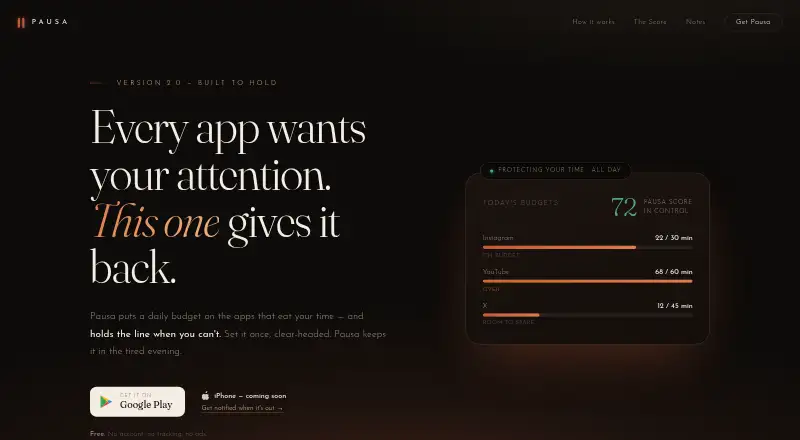
What Pausa is
Pausa is a free Android app for setting daily time budgets on apps and helping users stick to them. Budgets can cover feeds, games, browsers, videos, and other apps. When five minutes remain, it sends a quiet notification; after a budget runs out, it shows a calm screen, followed by more pause stages and a cooldown if use continues. Strict Mode adds a 60-second wait before loosening a budget or easing the blocking screen, while tightening a limit takes effect immediately. Users can schedule chosen apps to go quiet overnight and set different hours for weekends. Usage views include a daily score, weekly and monthly summaries, and a rolling seven-day trend. The maker says budgets, scores, and history stay in the app’s private storage on the device. Pausa works offline with local notifications, and the maker says it has no server, account, sign-up, analytics, ads, or data collection. The listed Free plan costs nothing and includes the whole app, without subscriptions or features to unlock. Pausa is available on Google Play; the maker’s site lists an iPhone version as coming soon.
Who it suits
It suits people who already have a rough idea of how much app time they want and want help keeping to that limit. It is available for Android users on Google Play.
What it does well
- Budgets cover a range of app types
- Works offline with local notifications
- No account, ads, or subscription
- Separate overnight hours for weekends
- Includes weekly and monthly usage views
What to know first
- Android only; iPhone version is coming soon
- Locked sessions are not supported
Limits
The whole app is included in the Free plan at no cost, with no subscription or paid features to unlock. The maker lists no trial.
Plans
| Plan | Billed and limits | Price |
|---|---|---|
| Free | Whole app included · no subscription · no ads · no account | Free |
As pausa-app.com lists them, read 9 Oct 2026. The maker's own page has the final word.
Getting started
- Visit pausa-app.com or find Pausa on Google Play.
- Install the Android app from Google Play.
- Choose apps and set daily time budgets.
- Set overnight quiet hours, including separate weekend hours if needed.
- Enable Strict Mode if you want a 60-second wait before loosening limits.
Verdict
Pausa pairs app budgets with staged pauses, schedules, and usage summaries in a free Android app. Its offline operation and on-device storage may suit people who want limits without an account.
Questions
How much does Pausa cost?
The Free plan costs nothing. The maker says the whole app is free, with no subscription or fees.
Is there a free plan or trial?
Yes, the complete app is free. There is no free trial.
Which platforms does Pausa support?
Pausa is available on Android through Google Play. The maker’s site lists an iPhone version as coming soon.
Does Pausa work offline?
Yes. The Google Play listing says it works fully offline and uses local notifications.
Does Pausa require an account?
No. The maker says there is no account or sign-up, and that the app has no server, analytics, ads or data collection.
Who makes Pausa?
The product website is pausa-app.com. Google Play provides support at [email protected].
Facts from Pausa's own pages
- App coverage
- Budgets can be set for feeds, games, browsers, videos, and other apps. · play.google.com, 9 Oct 2026
- Availability
- Pausa is available on Google Play; the maker’s site lists the iPhone version as coming soon. · pausa-app.com, 9 Oct 2026
- Blocking screen
- When a budget runs out, Pausa shows a calm screen, and continued use leads to additional pause stages and a cooldown. · play.google.com, 9 Oct 2026
- Budget alerts
- Pausa quietly notifies users when five minutes remain in an app’s budget. · pausa-app.com, 9 Oct 2026
- Evening window
- Users can schedule chosen apps to go quiet overnight, with different hours available for weekends. · pausa-app.com, 9 Oct 2026
- Intended users
- The maker describes Pausa as for people who know roughly how much app time they want and want help sticking to that choice. · pausa-app.com, 9 Oct 2026
- No account or tracking
- The maker says Pausa has no account, sign-up, analytics, ads, or data collection. · pausa-app.com, 9 Oct 2026
- Offline use
- The Google Play listing says Pausa works fully offline and uses local notifications. · play.google.com, 9 Oct 2026
- On-device privacy
- The maker says budgets, scores, and history stay in the app’s private storage on the device and that Pausa has no server. · pausa-app.com, 9 Oct 2026
- Pricing limits
- The maker says the whole app is free, with no trial, fees, subscription, premium tier, or features to unlock. · pausa-app.com, 9 Oct 2026
- Purpose
- Pausa lets users set daily time budgets for apps and helps enforce them throughout the day. · pausa-app.com, 9 Oct 2026
- Strict Mode
- Strict Mode makes loosening a budget or easing the blocking wall wait 60 seconds, while tightening takes effect immediately. · play.google.com, 9 Oct 2026
- Support
- The Google Play listing provides support at [email protected]. · play.google.com, 9 Oct 2026
- Usage history
- Pausa provides a daily score, weekly and monthly views, and a rolling seven-day trend. · play.google.com, 9 Oct 2026
Where Pausa stands on Freedom251
- Distraction Blocking Software#24 of 29