Freedom251 › Secure Notes Apps
SecNotes
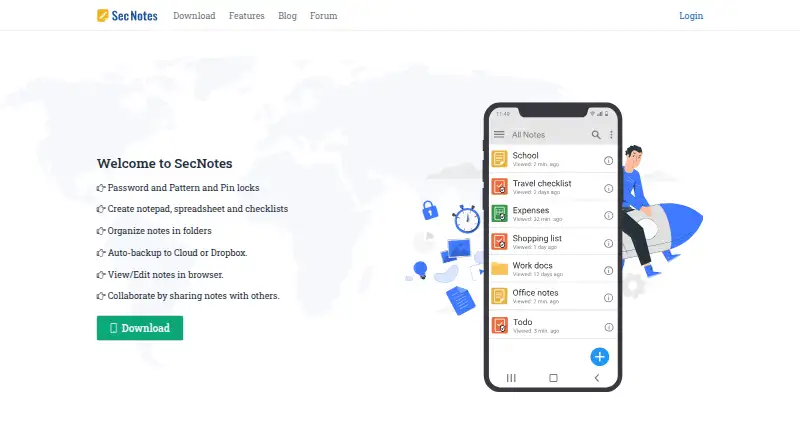
What SecNotes is
SecNotes is an Android note-taking app for personal information, with text notes, spreadsheets, and checklists. Notes can be arranged in folders and subfolders and protected with a password, PIN, or pattern lock. The maker says notes are stored using AES128 encryption. The notepad supports formatting, image and video attachments, reminders, text-to-speech, themes, and custom fonts. Spreadsheet tools include formulas, cell formatting, and row and column editing. Checklists can be sorted, have items added or removed, and check for duplicates; other checklist options include reminders and automatic completion when all items are checked. The app lists Cloud and Dropbox backups, while its app listing also describes SD card backup and restore. Cloud-backed notes can be viewed and edited in a browser, and shared notes can be edited by up to 10 people, with changes synced to everyone sharing. The app listing describes importing text and CSV files and exporting notes to SD card in text, HTML, or XLS formats. SecNotes has a free Android plan with ads and in-app purchases. The maker lists browser editing, shared notes, premium cloud backup, XLSX and PDF export, printing, password recovery, and ad removal among Premium features.
Who it suits
SecNotes suits Android users who want to keep personal notes, spreadsheet-style records, and checklists behind a password, PIN, or pattern. It may also suit people who need browser access to cloud-backed notes or shared editing with up to 10 people.
What it does well
- Offers text notes, spreadsheets, and checklists in one app.
- Supports password, PIN, and pattern locks.
- The maker says notes are stored using AES128 encryption.
- Includes folders and subfolders for organizing notes.
- Cloud-backed notes can be viewed and edited in a browser.
- Shared notes support editing by up to 10 people.
What to know first
- The free plan includes ads and in-app purchases.
- Browser editing and shared notes are listed as Premium features.
- The free plan is identified as an Android note-taking app.
- Premium plan pricing is not provided.
Limits
The free plan includes ads and in-app purchases. Browser editing, shared notes, XLSX export, password recovery, printing, PDF export, premium cloud backup, and ad removal are listed as Premium features.
Plans
| Plan | Billed and limits | Price |
|---|---|---|
| Free | Free Android note-taking app; ads and in-app purchases; premium upgrade subscription | Free |
| Premium | Removes ads · premium cloud backup · browser editing · shared notes · XLSX export · password recovery · printing · PDF export | On request |
As secnotes.com lists them, read 8 Oct 2026. The maker's own page has the final word.
Getting started
- Open the SecNotes website or follow its Google Play download link.
- Install the Android app.
- Create notes, spreadsheets, or checklists and organize them in folders or subfolders.
- Set a password, PIN, or pattern lock for notes.
- Use Cloud or Dropbox backup, or the SD card backup and restore described in the app listing.
- Upgrade to Premium for features such as browser editing, shared notes, or PDF export.
Verdict
Choose SecNotes if you want Android notes, spreadsheets, and checklists with several lock options and organized folders. Look elsewhere if you need browser editing, shared notes, or other features listed as Premium without upgrading; the Premium price is not provided.
Questions
Is SecNotes free?
Yes. Its Free plan is listed as free and includes ads and in-app purchases.
What platforms are supported?
The app is for Android. Cloud-backed notes can also be viewed and edited in a browser.
What does Premium include?
The maker lists ad removal, premium cloud backup, browser editing, shared notes, XLSX export, password recovery, printing, and PDF export.
What security does SecNotes offer?
Notes can be protected by password, PIN, or pattern lock. The maker says notes are stored using AES128 encryption.
Can I import and export files?
The app listing describes importing text and CSV files and exporting to SD card as text, HTML, or XLS. XLSX and PDF export are listed as Premium features.
Which backups and integrations are listed?
The site lists Cloud and Dropbox backups, and the app listing describes SD card backup and restore. Browser backup instructions use Google login.
Facts from SecNotes's own pages
- Backups
- The site lists automatic Cloud and Dropbox backups; the app listing also describes SD card backup and restore. · secnotes.com, 8 Oct 2026
- Browser access
- Cloud-backed notes can be viewed and edited in a browser, using the same password, PIN, or pattern and Google login. · secnotes.com, 8 Oct 2026
- Browser access and sharing
- Cloud backed up notes can be viewed and edited in a browser, and shared notes can be updated by multiple users. · secnotes.com, 8 Oct 2026
- Checklist features
- Checklists support sorting, ticking items, adding and removing items, and duplicate checking. · secnotes.com, 8 Oct 2026
- Checklists
- Checklists support drag-and-sort ordering, reminders, text-to-speech, custom sorting, and automatic completion when all items are checked. · secnotes.com, 8 Oct 2026
- Cloud authentication
- The browser backup instructions say users sign in with Google and that updated notes sync to the cloud. · secnotes.com, 8 Oct 2026
- Encryption
- The site says notes are stored using AES128 encryption. · secnotes.com, 8 Oct 2026
- Import and export
- The app listing says it can import text and CSV files and export notes to SD card as text, HTML, or XLS files. · play.google.com, 8 Oct 2026
- Locks
- The app offers password, pattern, and PIN locks. · secnotes.com, 8 Oct 2026
- Notepad
- The notepad supports formatting, image and video attachments, reminders, text-to-speech, themes, and custom fonts. · secnotes.com, 8 Oct 2026
- Note security
- The site says notes are stored using AES128 encryption and can be protected with a password, PIN, or pattern lock. · secnotes.com, 8 Oct 2026
- Note types
- It supports text notes, Excel type spreadsheets, and checklists. · secnotes.com, 8 Oct 2026
- Organization
- Notes can be organized in folders and subfolders. · secnotes.com, 8 Oct 2026
- Other integrations
- The product pages list Dropbox backup and Google login; they do not list other integrations. · secnotes.com, 8 Oct 2026
- Platform
- The app listing identifies Sec Notes as an Android application. · play.google.com, 8 Oct 2026
- Platform availability
- The maker links to Google Play for download and describes browser access for viewing and editing synced notes. · secnotes.com, 8 Oct 2026
- Premium features
- The maker lists ad removal, premium cloud backup, browser editing, shared notes, XLSX export, password recovery, printing, and PDF export as premium features. · secnotes.com, 8 Oct 2026
- Product
- Sec Notes is a password protected Android note-taking app for personal data. · play.google.com, 8 Oct 2026
- Purpose
- SecNotes is an Android note-taking app for personal data, with notepads, spreadsheets, and checklists. · secnotes.com, 8 Oct 2026
- Sharing limit
- Shared notes can be edited by up to 10 people, with changes synced to everyone sharing the note. · secnotes.com, 8 Oct 2026
- Spreadsheet features
- Spreadsheets support formulas, cell formatting, smooth scrolling, and row and column formatting. · secnotes.com, 8 Oct 2026
- Spreadsheets
- Spreadsheets support formulas, cell formatting, row and column editing, and export or sharing as XLS files. · secnotes.com, 8 Oct 2026
- Support
- The site directs users with questions or issues to its support forum. · secnotes.com, 8 Oct 2026
Where SecNotes stands on Freedom251
- Secure Notes Apps#23 of 30