Freedom251 › Secure Notes Apps
Safe Notes
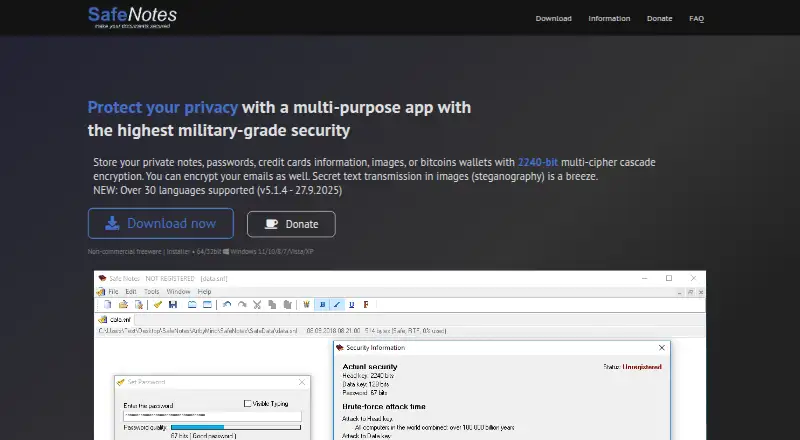
What Safe Notes is
Safe Notes is a local application for storing private notes, passwords, credit card information, images, and Bitcoin wallets using cascade encryption. Its security page describes six ciphers used in sequence with three independent keys and states a total of 6720 bits. The application works offline and does not require registration. Safe Notes also includes tools for secure messaging, password management, steganography, and file wiping. Safe Notes Mail can encrypt, decrypt, and sign messages, emails, or texts. A password generator and checker provide password strength estimates, while a picture feature hides information using image resampling filters. The Wipe Tool securely deletes files or wipes free drive space using five algorithms, including DoD 5220.22-M(E) and Gutmann. The freeware license is free, does not expire, and is limited to private, non-commercial use; business users are directed to order a commercial version. Windows downloads include 32-bit and 64-bit installers or portable archives for Windows 11, 10, 8, 7, Vista, and XP. The maker says the app can run on Linux with Wine, and that source code has been included in the setup file since version 5.0.8. ArtByMind is identified as the project maker and copyright holder.
Who it suits
Safe Notes suits people who want to keep sensitive information locally and use offline encryption, messaging, password, picture, and file-wiping tools. Its free license is for private, non-commercial use; the maker directs business users to a commercial version.
What it does well
- Stores notes, passwords, card information, images, and Bitcoin wallets locally.
- Works offline and does not require registration.
- Includes encrypted messaging, password tools, steganography, and file wiping.
- Windows installers and portable archives are available in 32-bit and 64-bit versions.
- Source code is included in the setup file since version 5.0.8.
- Supports over 30 languages, according to the maker.
What to know first
- The free license is limited to private, non-commercial use.
- Forgotten passwords cannot be recovered, and encrypted data is lost.
- Linux support is through Wine.
- There is no free trial.
Limits
The Freeware plan costs nothing, does not expire, and is limited to private, non-commercial use. Forgotten passwords cannot be recovered, and the encrypted data is lost.
Plans
| Plan | Billed and limits | Price |
|---|---|---|
| Freeware | Free for private non-commercial use · does not expire | Free |
As safenotes.org lists them, read 7 Oct 2026. The maker's own page has the final word.
Getting started
- Visit the Safe Notes website.
- Choose a Windows 32-bit or 64-bit installer or portable archive, or use Wine on Linux.
- Install or run the application; registration is not required.
- Use Safe Notes for private, non-commercial purposes under the freeware license.
- Keep the password secure, since forgotten passwords cannot be recovered.
Verdict
Choose Safe Notes if you want a local, offline application for private information and its included encryption and file tools. The freeware license does not expire, but it is limited to private, non-commercial use. Business users should consider the commercial version offered by the maker.
Questions
How much does Safe Notes cost?
The Freeware plan is free and does not expire. It is for private, non-commercial use.
Is there a free plan or trial?
Yes, Safe Notes offers a free plan for private, non-commercial use. There is no free trial.
Which platforms does Safe Notes support?
Windows downloads are offered, and the maker says Safe Notes can run on Linux systems with Wine.
Does Safe Notes require an account?
No. Registration is not required to use the application.
Is Safe Notes open source?
The maker says source code has been included in the setup file since version 5.0.8.
Who makes Safe Notes, and is there a business option?
The site describes Safe Notes as an ArtByMind project and identifies ArtByMind as its copyright holder. Business users are directed to order a commercial version.
Facts from Safe Notes's own pages
- Commercial use
- The free application is for non-commercial use; the maker directs business users to order a commercial version. · safenotes.org, 7 Oct 2026
- Encryption design
- The security page describes six ciphers used in a cascade with three independent keys, for a stated total of 6720 bits. · safenotes.org, 7 Oct 2026
- File wiping
- Wipe Tool securely deletes files or wipes free drive space using five algorithms, including DoD 5220.22-M(E) and Gutmann. · safenotes.org, 7 Oct 2026
- Languages
- The maker says the app supports over 30 languages. · safenotes.org, 7 Oct 2026
- Linux support
- The maker says Safe Notes can run on Linux systems with Wine. · safenotes.org, 7 Oct 2026
- Password recovery
- The FAQ says forgotten passwords cannot be recovered and the encrypted data is lost. · safenotes.org, 7 Oct 2026
- Password tools
- The app includes a password generator and checker with password strength estimates. · safenotes.org, 7 Oct 2026
- Publisher
- The site identifies ArtByMind as the copyright holder and describes SafeNotes as an ArtByMind project. · safenotes.org, 7 Oct 2026
- Purpose
- Safe Notes stores private notes, passwords, credit card information, images, and Bitcoin wallets using cascade encryption. · safenotes.org, 7 Oct 2026
- Registration
- Registration is not required to use the application. · safenotes.org, 7 Oct 2026
- Secure messaging
- Safe Notes Mail encrypts, decrypts, and signs messages, emails, or texts. · safenotes.org, 7 Oct 2026
- Source code
- The maker says source code is included in the setup file since version 5.0.8. · safenotes.org, 7 Oct 2026
- Steganography
- The app can hide information in pictures using image resampling filters. · safenotes.org, 7 Oct 2026
- Support
- Premium support is listed as a feature in the license comparison. · safenotes.org, 7 Oct 2026
- Windows versions
- The download page offers 32-bit and 64-bit versions for Windows 11, 10, 8, 7, Vista, and XP, as an installer or zipped portable archive. · safenotes.org, 7 Oct 2026
Where Safe Notes stands on Freedom251
- Secure Notes Apps#22 of 30