Freedom251 › Email Security Gateways
Scrollout F1
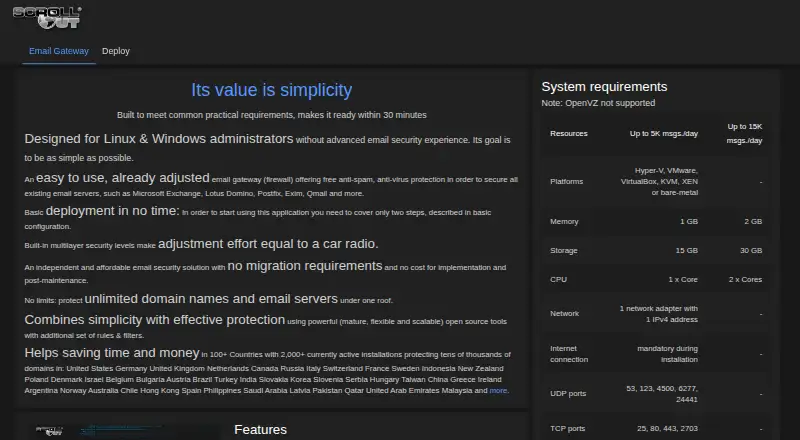
What Scrollout F1 is
Scrollout F1 is a free email gateway that provides anti-spam and anti-virus protection for existing email servers. The maker lists compatibility with Microsoft Exchange, Lotus Domino, Postfix, Exim, and Qmail, and says one installation can cover unlimited domain names and email servers. Mail controls include DKIM verification and signing, SPF verification with SRS for forwarding, DMARC policies, and recipient checks through Active Directory or LDAP. Filtering targets executable files, malicious content, scripts, forged domains, and invalid or unknown hosts. Routing options include outbound smarthost relaying, per-domain outbound IP pools, backup delivery, and fallback to alternative servers. The gateway supports separate quarantines, per-domain spam scoring, TLS 1.2, and an option to enforce encrypted server connections. Deployment options include Hyper-V, VMware, VirtualBox, KVM, XEN, and bare metal; OpenVZ is unsupported. It is available as a 64-bit ISO or install-from-scratch option, both requiring internet access during installation. The maker says basic deployment involves two configuration steps and is designed to be ready within 30 minutes.
Who it suits
Scrollout F1 is aimed at Linux and Windows administrators who want email security for existing servers without advanced email security experience. It may suit organizations that need to protect multiple domains and servers under one installation.
What it does well
- Free plan covers unlimited domain names and email servers.
- Supports Exchange, Domino, Postfix, Exim, and Qmail.
- DKIM, SPF, and DMARC mail controls are included.
- Deployment options include virtual machines and bare metal.
- Separate quarantines and per-domain spam scores are supported.
What to know first
- OpenVZ is not supported.
- Installation requires an internet connection.
- No free trial is listed.
Limits
The free plan is listed as free and covers unlimited domain names and email servers. Published capacity guidance specifies 1 GB memory and 15 GB storage for up to 5,000 messages per day, or 2 GB memory and 30 GB storage for up to 15,000 messages per day.
Plans
| Plan | Billed and limits | Price |
|---|---|---|
| Free | Unlimited domain names and email servers · available as 64-bit ISO image or install from scratch | Free |
As scrolloutf1.com lists them, read 9 Oct 2026. The maker's own page has the final word.
Getting started
- Visit https://scrolloutf1.com/.
- Choose the 64-bit ISO image or install-from-scratch option.
- Provide an internet connection during installation.
- Deploy on a listed platform such as Hyper-V, VMware, VirtualBox, KVM, XEN, or bare metal.
- Use the two configuration steps for the basic deployment.
Scrollout F1 is a self-hosted email gateway that adds spam and virus protection to existing mail servers. It is best suited to administrators who want broad mail controls across multiple domains without per-domain charges. Its main trade-off is the need to install and operate a gateway on compatible infrastructure.
Overview
Rather than replace a mail server, Scrollout F1 sits in the mail path to filter and route messages. It supports Microsoft Exchange, Lotus Domino, Postfix, Exim, and Qmail, and a single installation can protect unlimited domain names and email servers. That makes it attractive for organizations with multiple domains or established mail systems; it is not a hosted service for teams looking to hand off gateway operations.
The maker says basic deployment uses two configuration steps and is designed to be ready within 30 minutes. That target may appeal to Linux and Windows administrators without advanced email-security experience, although installation still requires an internet connection and a supported host environment.
Key features
Mail authentication covers DKIM verification and signing, SPF verification with SRS for forwarding, and DMARC policy support. Recipient verification can use Active Directory or LDAP, which lets administrators connect checks to an existing directory rather than manage recipient validation separately.
Filtering targets executable files, malicious content, scripts, forged domains, and invalid or unknown hosts; impersonation protection is also included. Quarantine can be separated by domain, with domain-specific spam tagging and blocking scores. This gives administrators room to tune handling across domains, though it also means they must manage those policies themselves.
Routing controls include outbound smarthost relaying, per-domain outbound IP pools, backup delivery, and fallback delivery to alternative mail servers. TLS 1.2 is supported, with an option to require encrypted connections to mail servers. Together these controls make Scrollout F1 more than a basic spam filter: it can also help manage delivery paths and connection security.
Pricing
The Free plan costs free and includes unlimited domain names and email servers. It is available as a 64-bit ISO image or through an install-from-scratch option. There is no free trial because the product is free, and no per-domain or per-server cap is stated for the plan.
The absence of a plan charge is compelling for administrators covering many domains. The cost is operational rather than subscription-based: you need to provide compatible infrastructure and manage the gateway. Capacity guidance is 1 GB of memory and 15 GB of storage for up to 5,000 messages per day, or 2 GB of memory and 30 GB of storage for up to 15,000 messages per day.
Platforms
Scrollout F1 supports Linux and Windows environments and is self-hosted. Deployment options include Hyper-V, VMware, VirtualBox, KVM, XEN, and bare metal; OpenVZ is not supported. Both the ISO image and install-from-scratch route require internet access during installation, so it is a poor fit for an isolated setup that cannot connect while being installed.
Who it's for
Choose Scrollout F1 if you administer existing mail servers and want authentication, filtering, quarantine, and routing controls in one gateway, especially across multiple domains. Its unlimited domain and server coverage makes the free plan unusually practical for larger multi-domain deployments. Look elsewhere if you want a hosted security service or cannot support a self-hosted installation.
Pros and cons
- Pro: One free installation covers unlimited domain names and email servers, avoiding per-domain plan charges.
- Pro: Authentication, directory-based recipient verification, quarantine, filtering, and delivery controls cover several parts of mail operations in one gateway.
- Pro: Deployment can use common hypervisors or bare metal, with capacity guidance for two daily message volumes.
- Con: OpenVZ is unsupported, limiting options for administrators using that virtualization platform.
- Con: Installation requires internet access, and the product needs to be hosted and administered rather than consumed as a hosted service.
- Con: The maker points users to its Discussion forum as the best way to get help, which may not suit teams expecting another support channel.
Alternatives
Compare email security gateways if you want to survey the category before committing to a self-hosted gateway.
- Xeams is worth considering if you want a freemium option with a free trial; its Community Edition is free for up to five users for personal hobby use, with spam filtering limited to five users.
- VM Backup is a different category choice: its free edition covers two VMs per host, so choose it for VM backup rather than mail security.
- Mailprotector offers a free email security check and paid products, making it an alternative to assess if you prefer a paid offering.
- Rspamd is a self-hosted, open-source alternative for Linux, macOS, and self-hosted environments.
- Hermes Secure Email Gateway offers a free, open-source self-hosted Docker Compose community edition and a paid Pro edition.
- MailScanner is another free, open-source email gateway for Linux and self-hosted use.
- Spamihilator is a free Windows alternative.
- Mimecast Data Leak Prevention is a paid web option for readers evaluating data leak prevention rather than a self-hosted mail gateway.
Verdict
Scrollout F1 is a strong fit for Linux or Windows administrators who want a free, self-hosted gateway with broad authentication, filtering, quarantine, and routing controls across unlimited domains and mail servers. Its breadth and uncapped coverage are the main reasons to choose it; the need to provide compatible infrastructure and operate the gateway is the clearest reason to look elsewhere.
Verdict
Scrollout F1 offers a free gateway with mail authentication, filtering, routing, and quarantine controls. Check platform compatibility and installation requirements before choosing it.
Questions
How much does Scrollout F1 cost?
The Free plan costs nothing and covers unlimited domain names and email servers.
Is there a free trial?
No. Scrollout F1 has a free plan and no free trial.
Which email servers can it protect?
The maker lists Microsoft Exchange, Lotus Domino, Postfix, Exim, and Qmail.
Where can Scrollout F1 run?
It is listed for Linux, Windows, and self-hosted use. Deployment options include Hyper-V, VMware, VirtualBox, KVM, XEN, and bare metal; OpenVZ is not supported.
How do I get help?
The project’s support page identifies its Discussion forum as the best way to get help.
Facts from Scrollout F1's own pages
- Capacity guidance
- The maker lists 1 GB memory and 15 GB storage for up to 5,000 messages per day, and 2 GB memory and 30 GB storage for up to 15,000 messages per day. · scrolloutf1.com, 9 Oct 2026
- Deployment
- The maker says basic deployment involves two configuration steps and is designed to be ready within 30 minutes. · scrolloutf1.com, 9 Oct 2026
- Directory integration
- Recipient verification can use Active Directory or LDAP. · scrolloutf1.com, 9 Oct 2026
- Domain capacity
- The maker says it can protect unlimited domain names and email servers under one installation. · scrolloutf1.com, 9 Oct 2026
- Download requirements
- The software is available as a 64-bit ISO image or install-from-scratch option, and both require an internet connection during installation. · scrolloutf1.com, 9 Oct 2026
- Encryption
- The maker lists TLS 1.2 and an option to enforce encrypted connections with email servers. · scrolloutf1.com, 9 Oct 2026
- Filtering
- The maker lists protection against executable files, malicious content, scripts, forged domains, and invalid or unknown hosts. · scrolloutf1.com, 9 Oct 2026
- Intended users
- The maker describes the product as designed for Linux and Windows administrators without advanced email security experience. · scrolloutf1.com, 9 Oct 2026
- Mail authentication
- Features include DKIM verification and signing, SPF verification with SRS for forwarding, and DMARC policy support. · scrolloutf1.com, 9 Oct 2026
- Mail routing
- Features include outbound smarthost relaying, per-domain outbound IP pools, backup delivery, and fallback delivery to alternative email servers. · scrolloutf1.com, 9 Oct 2026
- Purpose
- Scrollout F1 is an email gateway offering anti-spam and anti-virus protection for existing email servers. · scrolloutf1.com, 9 Oct 2026
- Quarantine
- The gateway supports separate quarantines and spam tagging and blocking scores for each domain. · scrolloutf1.com, 9 Oct 2026
- Server compatibility
- The maker lists Microsoft Exchange, Lotus Domino, Postfix, Exim, and Qmail among the email servers it can protect. · scrolloutf1.com, 9 Oct 2026
- Support
- The project’s support page identifies its Discussion forum as the best way to get help. · sourceforge.net, 9 Oct 2026
- Supported deployment platforms
- The maker lists Hyper-V, VMware, VirtualBox, KVM, XEN, and bare-metal deployment; OpenVZ is not supported. · scrolloutf1.com, 9 Oct 2026
Where Scrollout F1 stands on Freedom251
- Email Security Gateways#5 of 35