Scoop
What Scoop is
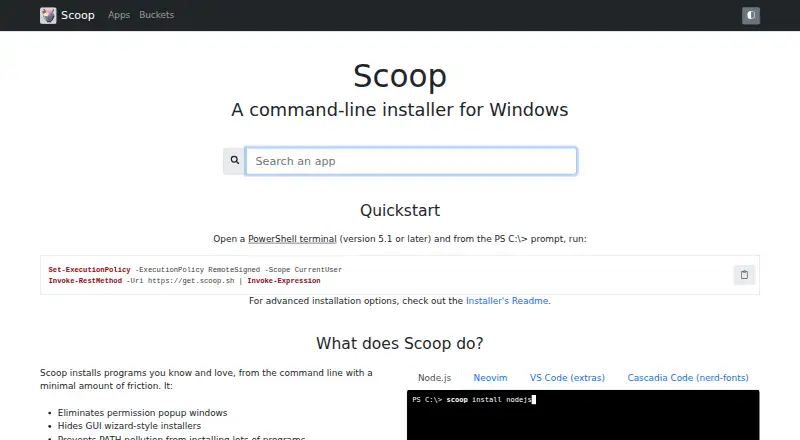
Scoop is a free command-line installer for Windows. It installs applications from PowerShell commands and resolves dependencies automatically. Typical setup uses a regular, non-administrator PowerShell terminal, avoids User Account Control prompts, hides wizard-style installers, and helps keep applications out of PATH. Files normally go to C:\Users\<YOUR USERNAME>\scoop. Scoop handles portable apps, installer files, single-file applications, PowerShell scripts, and ZIP, 7z, TAR, GZ, LZMA, and LZH archives. Apps are distributed through buckets: the main bucket is included by default, and other known buckets can be added. Script-friendly commands support repeatable environment setup and grouped installations. Aria2 can provide multi-connection downloads when installed through Scoop. The Quick Start requires PowerShell 5.1 or later. Windows 10 and newer plus Windows Server 2016 and newer are supported, while some older systems qualify with PowerShell 5.1. Portable apps are described as the formats most likely to install successfully.
Who it suits
Scoop suits Windows command-line users and developers who want repeatable installs or want to distribute software using an archive and JSON manifest.
What it does well
- Free command-line installation
- Automatically resolves dependencies
- Supports repeatable setup scripts
- Uses buckets for app distribution
- Works with many app formats
What to know first
- Windows-focused
- Requires PowerShell 5.1 or later
- Portable apps are most likely to install successfully
- Administrator-console installation is disabled by default
Verdict
Scoop offers free, scriptable Windows installation with dependency handling and bucket-based distribution. It is most suitable for users comfortable with PowerShell and command-line workflows.
Facts from Scoop's own pages
- App catalog
- Scoop includes a default main bucket and supports adding other known buckets. · github.com, 11 Oct 2026
- App formats
- Scoop supports portable apps, installer files, single-file apps, and PowerShell scripts. · github.com, 11 Oct 2026
- Buckets
- Apps are distributed through buckets; the main bucket is installed by default, and users can add other buckets. · github.com, 12 Oct 2026
- Dependencies
- Scoop resolves and installs app dependencies automatically. · github.com, 12 Oct 2026
- Dependency resolution
- Yes · github.com, 22 Sept 2026
- Download integration
- Scoop can use aria2 for multi-connection downloads when aria2 is installed through Scoop. · github.com, 12 Oct 2026
- Downloads
- Scoop can use aria2 for multi-connection downloads. · github.com, 11 Oct 2026
- Free plan
- Yes · github.com, 22 Sept 2026
- Install apps
- Scoop installs apps from the command line and resolves and installs dependencies automatically. · github.com, 11 Oct 2026
- Install behavior
- It avoids User Account Control prompts for typical installs, hides wizard-style installers, and helps keep apps from cluttering PATH. · github.com, 12 Oct 2026
- Install limitation
- The installer documentation says installation from an administrator console is disabled by default for security considerations. · github.com, 12 Oct 2026
- Install location
- By default, Scoop installs to C:\Users\<YOUR USERNAME>\scoop. · github.com, 11 Oct 2026
- Intended users
- The README presents Scoop for command-line users and developers who want to install apps or distribute software using a ZIP file and JSON manifest. · github.com, 12 Oct 2026
- Notable limitation
- The project describes portable apps as the apps most likely to install successfully with Scoop. · github.com, 11 Oct 2026
- Package creation
- App makers can provide a compressed app and a JSON manifest describing how to install it. · github.com, 11 Oct 2026
- Package formats
- Scoop supports portable apps, installer files, single-file apps, and PowerShell scripts. · github.com, 12 Oct 2026
- Permissions
- The installation instructions use a regular, non-admin PowerShell terminal. · github.com, 11 Oct 2026
- Product
- Scoop is a command-line installer for Windows. · github.com, 11 Oct 2026
- Repeatable setup
- The project describes Scoop as script-friendly and gives examples of installing groups of apps through commands. · github.com, 12 Oct 2026
- Requirements
- The Quick Start requires PowerShell 5.1 or later and says Windows 10 or Windows Server 2016 and newer are supported; some Windows 7/8 and Server 2008/2012 systems can qualify with PowerShell 5.1. · github.com, 12 Oct 2026
- Security reporting
- The project asks users to report security vulnerabilities through its GitHub security page. · github.com, 12 Oct 2026
- Setup scripts
- Scoop supports repeatable, script-friendly setups for configuring an environment. · github.com, 11 Oct 2026
- Support
- The project invites users to support its development and maintenance through one-time PayPal donations. · github.com, 11 Oct 2026
- Support and documentation
- The README points users to the installer repository for installation questions and links to the project documentation wiki. · github.com, 12 Oct 2026
Where Scoop stands on Freedom251
- App Installation#14 of 24
- Package Managers#75 of 93
- Package Management Software#16 of 16