Freedom251 › Remote Work Software
Ryver
by Ryver
What Ryver is
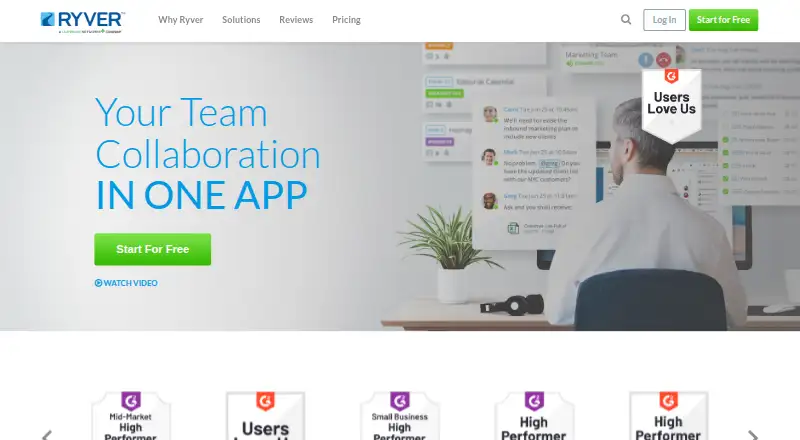
Ryver is a team collaboration app that combines group messaging, task management, and workflow automation. It organizes conversation into Forums for open discussions, Groups for private conversations, and People for one-to-one exchanges. Collaboration spaces also support topic-focused discussions, tasks, and voice and video calls with screen sharing; calls are labeled beta. Teams can assign, track, and complete projects with tasks, checklists, and tags. Ryver can bring social media posts, news articles, and RSS content into team activity. It supports guest access and unlimited message history, with integrations for Google Drive, Dropbox, Box.com, Zapier, an API, and webhooks. The app is available on the web, Windows, macOS, Linux, iOS, and Android. Its free plan covers 1–6 users, and a 14-day trial is listed. Paid options include Starter for up to 12 users, Standard for up to 30, Medium Pack for teams of 30 or more, and Enterprise. Enterprise lists single sign-on, premium support, advanced team management, and a testing sandbox. Ryver says server connections use SSL with 256-bit RSA encryption and stored data is kept in encrypted database files.
Who it suits
Ryver suits teams that want messaging, project tasks, and workflow automation in one collaboration app. Its plans cover small groups as well as teams of 30 or more, and it supports guest access.
What it does well
- Free plan covers 1–6 users.
- Unlimited message history.
- Available on desktop, mobile, and web.
- Tasks support checklists, tags, and assignments.
- Connects with Google Drive, Dropbox, and Zapier.
What to know first
- Voice and video calls are labeled beta.
- Starter is limited to 12 users.
- Standard is limited to 30 users.
Limits
The free plan covers 1–6 users. Starter supports up to 12 users, Standard up to 30, Medium Pack 30 or more users, and Enterprise includes advanced controls and features.
Plans
| Plan | Billed and limits | Price |
|---|---|---|
| Free | 1–6 users | Free |
| Starter | $69/mo or $828/year; page also shows $34.50/mo and $621/year, with 3 Months Free! · Up to 12 users · unlimited chat · unlimited file sharing · task management · voice and video calls (beta) | $69 a month |
| Standard | $129/mo or $1548/year; page also shows $64.50/mo and $1161/year, with 3 Months Free! · Up to 30 users · custom invite links · unlimited chat · unlimited file sharing · task management · voice and video calls (beta) | $129 a month |
| Medium Pack | $4/user; page also shows $2/user for the first 3 months · 30+ users · custom invite links · unlimited chat · unlimited file sharing · task management · voice and video calls (beta) | $4 a month |
| Enterprise | Starting at $199/mo; page also shows $149/mo with discount automatically applied at checkout · Single sign-on · premium support · advanced team management · testing sandbox · custom invite links · unlimited chat · file sharing · tasks · calls (beta) | $149 a month |
As ryver.com lists them, read 11 Oct 2026. The maker's own page has the final word.
Getting started
- Open the Ryver website
- Choose the free plan or a paid plan
- Create an account for the required team size
- Use Ryver on the web or supported desktop and mobile platforms
- Connect services such as Google Drive, Dropbox, Box.com, Zapier, API, or webhooks
Verdict
Ryver brings multiple conversation types, project tasks, and workflow automation into shared collaboration spaces. The free plan covers up to six users, while larger teams have paid plan options.
Questions
Does Ryver have a free plan?
Yes. The Free plan costs nothing and covers 1–6 users. Ryver also lists a 14-day trial.
Which platforms support Ryver?
Ryver supports web, Windows, macOS, Linux, iOS, Android, and an extension.
What integrations does Ryver offer?
Listed connections are Google Drive, Dropbox, Box.com, Zapier, an API, and webhooks.
What does Enterprise include?
Enterprise lists single sign-on, premium support, advanced team management, a testing sandbox, custom invite links, chat, file sharing, tasks, and beta calls.
Does Ryver support guest access and message history?
Yes. Ryver lists guest access and unlimited message history.
Facts from Ryver's own pages
- Channels
- Yes · ryver.com, 20 Sept 2026
- Cloud controls
- Ryver says its AWS virtual private cloud requires employee two-factor authentication and uses AWS Identity Access Management to limit employee access to services and servers. · ryver.com, 11 Oct 2026
- Collaboration spaces
- Its collaboration spaces include chat, topic-focused discussions, tasks, and voice and video calls with screen sharing; calls are labeled beta. · ryver.com, 11 Oct 2026
- Company history
- Ryver's About page says the company set out to solve the email problem in 2014. · ryver.com, 11 Oct 2026
- Conversation channels
- Ryver offers Forums for open team discussions, Groups for private group conversations, and People for one-to-one interactions. · ryver.com, 11 Oct 2026
- Enterprise SSO
- Ryver lists single sign-on for Enterprise customers using identity providers such as Google Apps, Microsoft ADFS, OneLogin, and Okta. · ryver.com, 11 Oct 2026
- Founded
- 2014 · ryver.com, 28 Sept 2026
- Free plan
- Yes · ryver.com, 20 Sept 2026
- Guest access
- Yes · ryver.com, 20 Sept 2026
- Integrations
- Ryver supports file sharing from Google Drive, Dropbox, and Box, plus Zapier, APIs, webhooks, custom integrations, and bots. · ryver.com, 11 Oct 2026
- Message history
- unlimited · ryver.com, 20 Sept 2026
- News streaming
- Ryver can automatically receive social media posts, news articles, and RSS feed content. · ryver.com, 11 Oct 2026
- Platforms
- Ryver's downloads page lists desktop apps for Mac OS X, Windows, and Linux, mobile apps for iOS and Android, and Zapier and Outlook plugins. · ryver.com, 11 Oct 2026
- Premium support
- Ryver describes Enterprise premium support as phone, email, and chat-based direct support during regular business hours, one-on-one setup help, and a dedicated sandbox. · ryver.com, 11 Oct 2026
- Product
- Ryver describes itself as a team collaboration app combining group messaging, task management, and workflow automation. · ryver.com, 11 Oct 2026
- Security
- Ryver states that connections to its servers use SSL with 256-bit RSA encryption and that data at rest is stored in encrypted database files. · ryver.com, 11 Oct 2026
- Support channels
- Ryver Support asks users to submit a request through its support form or use the site's Chat tab. · support.ryver.com, 11 Oct 2026
- Task management
- Ryver says tasks can be used to assign, track, and complete projects, and its home page lists checklists, tags, and assignments for tasks. · ryver.com, 11 Oct 2026
Where Ryver stands on Freedom251
- Remote Work Software#8 of 26
- Team chat apps#26 of 63
- Business Instant Messaging - Midmarket Software#12 of 22
- Team Communication Software#13 of 23