Freedom251 › Bootable USB Software

Rufus
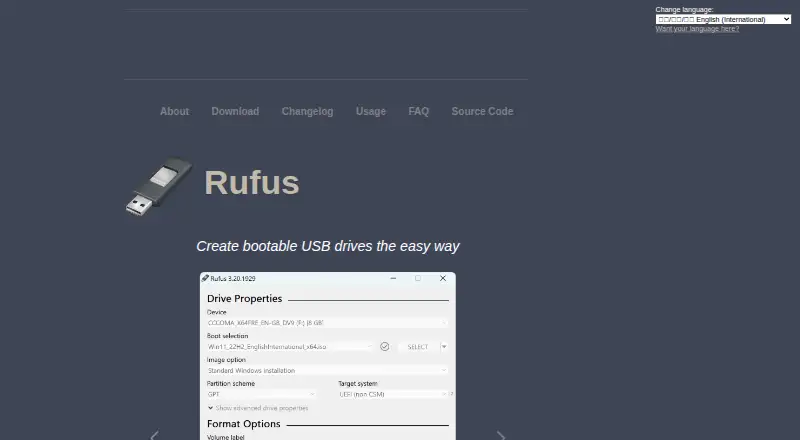
What Rufus is
Rufus is a free Windows utility for formatting drives and preparing bootable USB flash drives. It can create boot media from Windows, Linux, and other bootable ISO images, as well as disk images. For formatting, it supports USB drives, flash cards, and virtual drives, with FAT, FAT32, NTFS, UDF, exFAT, ReFS, ext2, and ext3 options. Rufus can also prepare Windows 11 installation drives with options for PCs that lack TPM or Secure Boot, and set out-of-box setup choices such as a local account and privacy settings. Other capabilities include Windows To Go drives, persistent Linux partitions, bad-block checks, image checksum checks, and downloads of official Microsoft Windows ISOs. The program is portable and does not require installation, and its interface natively supports 38 languages. Rufus is free software under GPL v3; its source is published for users who want to compile it. The project describes security measures that include digitally signed executables, verified GitHub commits, hardware-based two-factor authentication, and static analysis. It runs on Windows. The project points users to its GitHub issue tracker for reporting problems or suggesting features.
Who it suits
Rufus suits Windows users who need to format drives or create bootable media from ISO and disk images. It also fits people preparing Windows 11 installation drives or Linux media who want options such as persistent storage, image checks, or Windows To Go.
What it does well
- Formats USB drives, flash cards, and virtual drives in eight listed formats.
- Creates boot media from Windows, Linux, ISO, and disk images.
- Offers Windows 11 setup options for PCs without TPM or Secure Boot.
- Supports persistent Linux partitions and Windows To Go drives.
- Portable, requires no installation, and supports 38 interface languages.
- Free software under GPL v3 with published source code.
What to know first
- Runs on Windows; there is no macOS or Linux app.
- Windows XP, Vista, and 7 are no longer supported.
- Multiboot support is not available.
Limits
The free plan is free software released under GPL v3. Windows XP, Vista, and 7 are no longer supported; versions 2.18 and 3.22 are the last listed for XP and Windows 7, respectively.
Plans
| Plan | Billed and limits | Price |
|---|---|---|
| Free Software | 100% free software · GPL v3 | Free |
As rufus.ie lists them, read 30 Sept 2026. The maker's own page has the final word.
Getting started
- Visit the Rufus website.
- Download the Windows app.
- Run the portable program; installation is not required.
- Choose a drive and a supported image or format option.
Verdict
Choose Rufus if you use Windows and need a free tool for drive formatting or bootable media, especially when Windows 11 setup options or persistent Linux storage matter. Look elsewhere if you need a native macOS or Linux app, or multiboot support.
Questions
How much does Rufus cost?
Rufus is free software. Its plan is listed as free.
Is there a free plan or trial?
The free plan is available. There is no free trial.
Which platforms does Rufus support?
Rufus runs on Windows. Its FAQ says there are no plans for Linux or macOS ports.
Is Rufus open source?
Yes. It is released under GPL v3, and the project publishes source code users may compile.
What can Rufus create or format?
It creates bootable drives from Windows, Linux, other bootable ISO images, and disk images. It formats USB drives, flash cards, and virtual drives.
Where can I get help with Rufus?
The project directs users to its GitHub issue tracker to report problems or suggest features.
Facts from Rufus's own pages
- Boot media
- It creates bootable drives from Windows, Linux, and other bootable ISO images, as well as disk images. · github.com, 30 Sept 2026
- Drive formats
- It can format USB drives, flash cards, and virtual drives to FAT, FAT32, NTFS, UDF, exFAT, ReFS, ext2, or ext3. · github.com, 30 Sept 2026
- Languages
- The interface natively supports 38 languages. · github.com, 30 Sept 2026
- License
- Rufus is free software released under GPL v3, and the project says users may compile it from its published source. · github.com, 30 Sept 2026
- Other features
- It supports Windows To Go drives, persistent Linux partitions, bad-block checks, image checksums, and downloading official Microsoft Windows ISOs. · github.com, 30 Sept 2026
- Other platforms
- The FAQ says there are no plans to port Rufus to Linux or macOS, and says an Android app using the Rufus name is unofficial. · github.com, 30 Sept 2026
- Portable
- The project describes Rufus as portable, small, and requiring no installation. · github.com, 30 Sept 2026
- Purpose
- Rufus formats drives and creates bootable USB flash drives. · github.com, 30 Sept 2026
- Security
- The project describes measures including digitally signed executables, verified GitHub commits, hardware-based two-factor authentication, and static analysis. · github.com, 30 Sept 2026
- Support
- The project directs users to its GitHub issue tracker to report problems or suggest features. · github.com, 30 Sept 2026
- Windows installation
- It can create Windows 11 installation drives with options for PCs without TPM or Secure Boot, and can set OOBE options such as a local account and privacy settings. · github.com, 30 Sept 2026
- Windows support limit
- The FAQ says Windows XP, Vista, and 7 are no longer supported; versions 2.18 and 3.22 are the last listed for XP and Windows 7, respectively. · github.com, 30 Sept 2026
Where Rufus stands on Freedom251
- Bootable USB Software#19 of 38