Freedom251 › Cartoon Maker Software
RoughAnimator
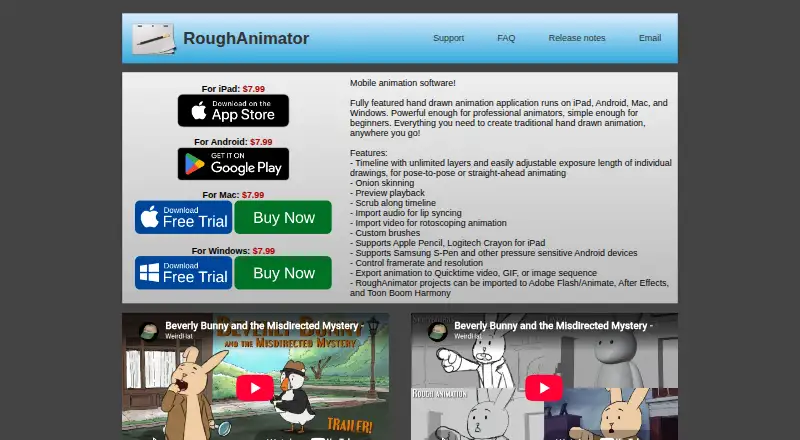
What RoughAnimator is
RoughAnimator is a frame-by-frame app for making hand-drawn animation on tablets and desktop computers. Its timeline supports unlimited layers and adjustable exposure lengths, so animators can work pose to pose or draw each frame in sequence. Onion skinning, playback preview, timeline scrubbing, and custom brushes support drawing and review. Users can bring in audio for lip syncing or video for rotoscoping, then export as MP4, GIF, PNG image sequence, or QuickTime video. Projects can also be imported into Adobe Flash/Animate, After Effects, and Toon Boom Harmony. It is available for Android, iOS, macOS, and Windows. RoughAnimator costs $7.99 as a one-time payment, with operating-system versions sold separately on Mac and Windows; there is no free plan or trial. The app offers basic freehand drawing and coloring, not simulated paintbrushes. It has no keyframing or tweening, so each frame must be drawn. Artwork is bitmap-based, and project performance can depend on device memory, drawing count, and image resolution.
Who it suits
RoughAnimator suits beginners and professional animators who want a frame-by-frame workflow for practice or a professional pipeline. It is less suited to people looking for a design or illustration program or automatic tweening.
What it does well
- Unlimited timeline layers and adjustable exposure lengths
- Imports audio for lip syncing and video for rotoscoping
- Exports MP4, GIF, PNG sequences, and QuickTime video
- Projects can be imported into three named animation tools
What to know first
- No free plan or trial
- No keyframing or tweening; each frame is drawn
- Bitmap artwork has resolution limits
- Projects may slow or crash depending on device and artwork
Limits
There is no hard animation-length limit, but projects may slow down or crash depending on device memory, drawing count, and image resolution. The app has no keyframing or tweening, and its bitmap artwork has limited resolution.
Plans
| Plan | Billed and limits | Price |
|---|---|---|
| iPad | One-time payment · Separate app purchase | $7.99, paid once |
| Windows | One-time payment · Separate app purchase | $7.99, paid once |
| Mac | One-time payment · Separate app purchase | $7.99, paid once |
| Android | One-time payment · Separate app purchase | $7.99, paid once |
As roughanimator.com lists them, read 2 Oct 2026. The maker's own page has the final word.
Getting started
- Visit the RoughAnimator website or choose its app for Android, iOS, macOS, or Windows.
- Choose the version for your platform; Mac and Windows versions are sold separately.
- Purchase the app for $7.99 a month, billed as a one-time payment.
- Use the timeline to draw animation, with adjustable exposure lengths and unlimited layers.
Verdict
RoughAnimator provides a frame-by-frame workflow with useful import, export, and timeline tools across four listed platforms. Its bitmap limits and lack of tweening matter if you need scalable artwork or automatic frame interpolation.
Questions
Which platforms does RoughAnimator support?
It is available for Android, iOS, macOS, and Windows.
How much does it cost?
The listed platform plans are $7.99 a month, billed as a one-time payment. Mac and Windows versions are sold separately.
Does RoughAnimator have a free plan or trial?
No. It is listed as paid, with no free plan and no free trial.
What formats can it export?
It exports MP4, GIF, PNG image sequences, and QuickTime video.
Can projects move into other animation software?
RoughAnimator projects can be imported into Adobe Flash/Animate, After Effects, and Toon Boom Harmony.
Does it support lip syncing?
Yes. You can import audio for lip syncing.
Facts from RoughAnimator's own pages
- Animation limits
- It has no hard animation-length limit, but projects can become slow or crash depending on device memory, drawing count, and image resolution. · roughanimator.com, 2 Oct 2026
- Bitmap format
- The app uses bitmap images rather than vectors, so resolution is limited and scaling or rotating can reduce image quality. · roughanimator.com, 2 Oct 2026
- Desktop checkout
- Mac and Windows purchases are handled through FastSpring, which stores the name, email, and address entered at checkout; the maker says they cannot access payment information. · roughanimator.com, 2 Oct 2026
- Drawing and playback
- Features include onion skinning, playback preview, timeline scrubbing, and custom brushes. · roughanimator.com, 2 Oct 2026
- Export formats
- MP4,GIF,PNG image sequence,QuickTime video · roughanimator.com, 20 Sept 2026
- Free plan
- No · roughanimator.com, 20 Sept 2026
- Import and export
- Users can import audio for lip syncing and video for rotoscoping, and export animations as QuickTime video, GIF, or image sequences. · roughanimator.com, 2 Oct 2026
- Integrations
- RoughAnimator projects can be imported into Adobe Flash/Animate, After Effects, and Toon Boom Harmony. · roughanimator.com, 2 Oct 2026
- Not an illustration tool
- The maker says the app is not intended as a design or illustration program and offers basic freehand drawing and coloring rather than simulated paintbrushes. · roughanimator.com, 2 Oct 2026
- No tweening
- The maker says RoughAnimator has no keyframing or tweening, so users draw each frame themselves. · roughanimator.com, 2 Oct 2026
- Supported platforms
- iOS,Android,macOS,Windows · roughanimator.com, 20 Sept 2026
- Privacy
- The maker says the software itself collects no personal information; the website logs visit times and IP addresses, and platform providers may collect payment details or anonymous usage data such as crash logs. · roughanimator.com, 2 Oct 2026
- Support
- Support is provided through the user guide and email; the maker says they may not be able to reply personally to every support email. · roughanimator.com, 2 Oct 2026
- Timeline
- Its timeline supports unlimited layers and adjustable exposure lengths for pose-to-pose or straight-ahead animation. · roughanimator.com, 2 Oct 2026
- What it does
- RoughAnimator is a hand-drawn animation app for creating traditional animation on tablets and desktop computers. · roughanimator.com, 2 Oct 2026
- Who it is for
- The maker describes it as suitable for professional animators and beginners, and says it can fit into a professional pipeline or be used for doodling and practice. · roughanimator.com, 2 Oct 2026
Where RoughAnimator stands on Freedom251
- Cartoon Maker Software#25 of 31
- 2D Character Animation Software#42 of 48
- Animation Software#94 of 106