
Riverside Video Editor
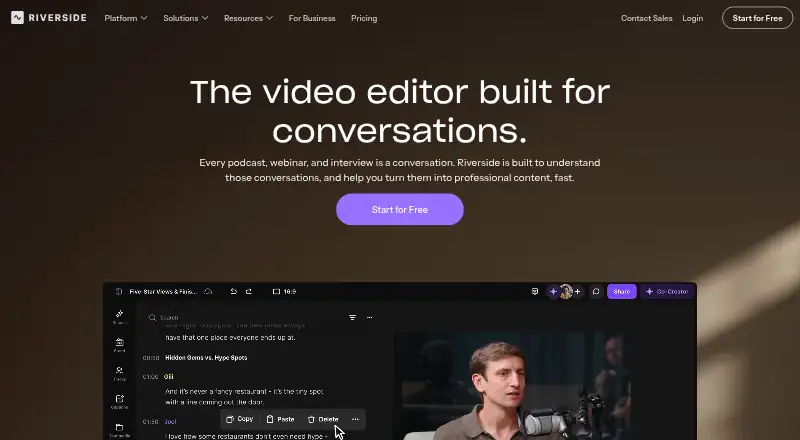
What Riverside Video Editor is
Riverside Video Editor is an online editor for conversations, podcasts, webinars and interviews. Its text-based editing lets users remove a transcript line or correct a word and apply that change to the video. Separate speaker tracks are available for recordings made in Riverside or files uploaded to the editor. One-click tools cover speaker layouts, eye contact, audio enhancement and B-roll generation. Editors can use a timeline, share files with teammates, assign roles, comment and give feedback. Timelines can be exported as XML for Adobe Premiere Pro or Final Cut Pro. Riverside lists integrations including Spotify for Creators, Spotify, Transistor, Castos, HubSpot, Salesforce and webinar webhooks. It supports web, macOS, iOS and Android, and its app allows editing on a phone. Computer recording supports Chrome, Edge and Safari; Linux computers are unsupported for recording. The free plan costs nothing, billed $0/month, with two hours of multi-track recordings as a one-off, up to 720p, a watermark and 44.1 kHz audio. Standard is $15 a month billed annually; Pro is $24 a month billed annually.
Who it suits
Riverside suits people editing conversations, podcasts, webinars or interviews, including teams that need speaker tracks and in-editor feedback. It also fits editors who want to continue work in Adobe Premiere Pro or Final Cut Pro via XML export.
What it does well
- Transcript changes can be applied directly to video
- Separate tracks for each speaker
- One-click tools include audio enhancement and B-roll generation
- Team collaboration includes roles, comments and feedback
- Mobile app supports editing
What to know first
- Free plan recordings are limited to two hours one-off
- Free plan output has a watermark and is capped at 720p
- Linux computers are unsupported for recording
Limits
The free plan includes a one-off two hours of multi-track recordings, exports up to 720p, a watermark, and 44.1 kHz audio. Standard allows five recording hours per month; Pro and Live allow 15 hours per month. Business lists unlimited multi-track recording, but its price is available by contacting sales.
Plans
| Plan | Billed and limits | Price |
|---|---|---|
| Free | Billed annually · 2 hours multi-track recording one-off · 720p export · Riverside watermark · 44.1 kHz audio · unlimited single-track recording/editing · Magic Clips | Free |
| Standard | Billed $180 annually (regular $19/month) · 5 hours multi-track recordings · up to 4K · no watermark · 48 kHz audio · Smooth Speech and Set Pace · image and text overlays | $15 a month |
| Pro | Billed $288 annually (regular $29/month) · 15 hours multi-track recordings · unlimited edits · 4K · Magic Audio · AI transcriptions in 100+ languages · AI Show Notes · AI Voice · teleprompter · brand kit · live chat | $24 a month |
| Live | Billed $408 annually · 15 hours multi-track recordings · 1080p live streaming · multistreaming · Omnichat · custom RTMP · lower thirds · live call-ins | $34 a month |
| Business | Contact sales · unlimited multi-track recording · unlimited studios · unlimited separate-track downloads · collaborative editing · SSO · API access · SOC 2 and ISO 27001 · dedicated CSM | On request |
As riverside.com lists them, read 15 Oct 2026. The maker's own page has the final word.
Getting started
- Open the Riverside Video Editor website.
- Use the web version in Chrome, Edge, or Safari on a computer, or use the app on iOS or Android.
- Choose the free plan or review the paid plans; a 14-day trial is available.
- Record with Riverside or upload a file to work with speaker tracks.
- Edit on the timeline or change the video through transcript edits, then share feedback or export the timeline as XML.
Verdict
Riverside combines transcript-based editing, speaker tracks and collaboration for conversation-focused video. Check the recording-hour limits and Linux recording restriction against your workflow before choosing a plan.
Questions
Is Riverside Video Editor free?
Yes. The Free plan is $0 per month and includes a one-off two hours of multi-track recordings, up to 720p, a watermark, and 44.1 kHz audio.
What do the paid plans cost?
Standard is $15.00 per month billed annually ($180 annually), Pro is $24.00 per month billed annually ($288 annually), and Live is $34.00 per month billed annually ($408 annually). Business pricing requires contacting sales.
Is there a free trial?
Yes. Riverside lists a 14-day trial.
Which platforms does Riverside support?
The listed platforms are web, macOS, iOS, and Android. Riverside supports computer recording in Chrome, Edge, and Safari, and says Linux computers are unsupported for recording.
Can Riverside export to other editing software?
Yes. Edited timelines can be exported as XML files for Adobe Premiere Pro or Final Cut Pro.
What integrations are listed?
Riverside lists Spotify for Creators, Spotify, Transistor, Castos, HubSpot, Salesforce, and webinar webhooks.
Facts from Riverside Video Editor's own pages
- AI editing
- AI tools remove pauses and filler words, find fluff, apply Magic Audio, smart mute, smart layouts, gaze correction, video enhancement and color correction. · support.riverside.com, 15 Oct 2026
- API availability
- API access requires enablement by a customer success manager on some Business plans and permits only one active API key. · support.riverside.com, 15 Oct 2026
- API restriction
- Riverside says its Business API cannot currently be used to build new applications or integrations on top of the platform. · support.riverside.com, 15 Oct 2026
- Aspect ratios and scenes
- Editors can change aspect ratio, rotate, crop, resize and layer elements, save scene designs and apply templates. · support.riverside.com, 15 Oct 2026
- Business API
- The Business API lists productions, recordings, tracks, edits and webinars, downloads media and transcripts, deletes content and creates timeline exports. · support.riverside.com, 15 Oct 2026
- Captions and transcripts
- Users can correct transcripts, remove filler or crosstalk, style caption presets, search transcripts and download edited transcripts. · support.riverside.com, 15 Oct 2026
- Collaboration
- Projects, drafts and review links can be shared so collaborators comment and provide feedback in the editor. · riverside.com, 15 Oct 2026
- Company founding
- Riverside says it was founded in 2020 by brothers Gideon and Nadav Keyson. · riverside.com, 15 Oct 2026
- Company legal identity
- The mobile app listings identify the developer as RIVERSIDEFM, INC. at 1111B S Governors Ave, Dover, Delaware. · play.google.com, 15 Oct 2026
- Documentation and support
- The Help Center covers recording setup, equipment, studio use, editing, publishing, mobile and Mac apps, billing and business administration. · support.riverside.com, 15 Oct 2026
- Export workflow
- Edited timelines can be exported as synchronized packages for Adobe Premiere Pro, Final Cut Pro or other AAF-compatible editors. · support.riverside.com, 15 Oct 2026
- External editing
- Edited timelines can be exported as XML files for Adobe Premiere Pro or Final Cut Pro. · riverside.com, 5 Oct 2026
- Founded
- 2020 · riverside.com, 28 Sept 2026
- Funding
- TechCrunch reported a $30 million Series C in December 2024 and total funding of $80 million. · techcrunch.com, 15 Oct 2026
- Integrations
- Official integrations include Spotify for Creators, Transistor, Castos, HubSpot, Salesforce, Marketo, webinar webhooks, Premiere Pro and Final Cut Pro exports. · support.riverside.com, 15 Oct 2026
- Licence
- Riverside is delivered as a proprietary hosted service; its Business API documentation does not provide an open-source licence for the editor. · support.riverside.com, 15 Oct 2026
- Limit: editing depth
- Reviewers cite limited transitions, imprecise Magic Clip boundaries, transcription errors and a need to move advanced editing to another application. · getapp.co.uk, 15 Oct 2026
- Limit: reliability and support
- Reviewers report buffering, glitches, crashes, upload or processing delays, occasional sync problems and slow or unhelpful support responses. · trustpilot.com, 15 Oct 2026
- MCP extensibility
- Riverside MCP connects Claude, ChatGPT, Cursor and other MCP assistants to search transcripts, edit recordings, create clips and publish posts; it is included on Grow and higher plans. · riverside.com, 15 Oct 2026
- Mobile editing
- Riverside says users can edit content on a mobile phone using its app. · riverside.com, 5 Oct 2026
- Mobile requirements
- The iOS app recommends recent iOS on iPhone X or newer and the Android app requires Android 7.0 minimum, with Android 10 recommended. · support.riverside.com, 15 Oct 2026
- Notable news
- Riverside's product-updates page lists its MCP launch on August 31, 2026 and a native Mac editor release on September 7, 2026. · riverside.com, 15 Oct 2026
- Overlays and media
- The editor accepts image, video, music, sound-effect and motion-graphic overlays, including assets from a royalty-free library. · support.riverside.com, 15 Oct 2026
- Platform requirements
- Riverside supports computer browsers Chrome, Edge, and Safari, and says Linux computers are unsupported for recording. · support.riverside.com, 5 Oct 2026
Where Riverside Video Editor stands on Freedom251
- AI Video Editors#28 of 80