Freedom251 › Construction Time Tracking Software
Rhumbix
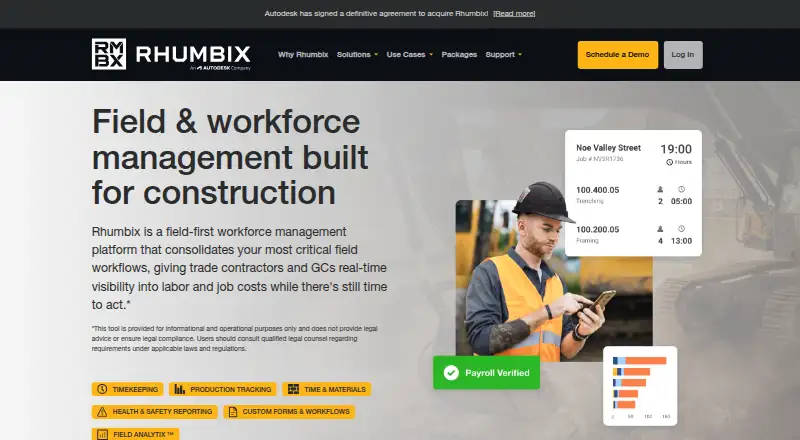
What Rhumbix is
Rhumbix is a workforce management platform for construction teams, with tools for timekeeping, job costs, and field reporting. Workers can clock in and out, track hours, overtime, and required breaks, and submit detailed timecards for payroll. A shared-device Kiosk Mode supports clocking in with identifiers such as PIN codes. Field teams can also track production and materials, prepare daily construction reports, manage labor compliance reporting, and use configurable customer forms. Phone users can capture timecards offline and sync them after reconnecting. Field Analytix provides reporting and performance insights; Data Explorer supports building custom reports and dashboards without code. Rhumbix lists integrations with construction, finance, and project-management systems, with bidirectional data flows, and says nearly all its data has REST API endpoints. It supports Android, iOS, web, and API access. Pricing is provided on request, there is no free plan, and each login counts as a user license.
Who it suits
Rhumbix suits owners, general contractors, and specialty contractors coordinating field teams, project managers, and payroll or accounting teams. It is relevant to teams that need field timekeeping alongside job-cost and construction reporting workflows.
What it does well
- Captures payroll-ready timecards in the field.
- Offline timecards sync after reconnection.
- Kiosk Mode supports shared-device clock-ins.
- Includes production, materials, and compliance workflows.
- Provides reporting and custom dashboard tools.
What to know first
- No free plan is listed.
- Pricing requires contacting Rhumbix.
- Each login counts as a user license.
Plans
| Plan | Billed and limits | Price |
|---|---|---|
| Essential — Timekeeping | Timekeeping · Production Tracking | On request |
| Advanced | Plus features · Data Explorer · Enterprise Features | On request |
| Essential — Time & Materials | Time & Materials Tracking | On request |
| Plus | Timekeeping · Production Tracking · Time & Materials Tracking · Daily Construction Reporting · Labor Compliance Reporting · Active Customer Forms | On request |
As rhumbix.com lists them, read 4 Oct 2026. The maker's own page has the final word.
Getting started
- Visit the Rhumbix website.
- Contact Rhumbix for pricing.
- Choose a plan: Essential Timekeeping, Essential Time & Materials, Plus, or Advanced.
- Use the Android, iOS, or web platform, or connect through the API.
- Create user logins, counting each individual login as a license.
Verdict
Rhumbix combines field timekeeping with construction reporting and job-cost workflows. Teams should account for its per-login licensing and request pricing directly.
Questions
How much does Rhumbix cost?
Rhumbix directs prospective customers to contact the company for pricing. Each individual with a login counts as a user license.
Does Rhumbix have a free plan?
No. Rhumbix is a paid product and has no free plan.
Which platforms does Rhumbix support?
It supports Android, iOS, web, and API access.
Which plans are described?
The listed plans are Essential — Timekeeping, Essential — Time & Materials, Plus, and Advanced.
What systems does Rhumbix integrate with?
It lists Procore, Autodesk, Oracle, SAP, Sage, Viewpoint, COINS, QuickBooks, and ComputerEase.
Can field timecards be entered without a connection?
Users can capture timecards offline on a phone and sync them after reconnecting.
Facts from Rhumbix's own pages
- Analytics
- Field Analytix provides reporting and performance insights, while Data Explorer is a no-code custom report and dashboard builder. · rhumbix.com, 4 Oct 2026
- API
- The integrations page says nearly all Rhumbix data has publicly available REST API endpoints and mentions standard file exports. · rhumbix.com, 4 Oct 2026
- Clock and kiosk
- Clock-in and clock-out tracks hours, overtime, and mandated breaks, while Kiosk Mode lets workers clock using a shared device and unique identifiers such as PIN codes. · rhumbix.com, 4 Oct 2026
- Company status
- The homepage states that Autodesk has signed a definitive agreement to acquire Rhumbix. · rhumbix.com, 4 Oct 2026
- Field workflows
- The platform includes production tracking, time and materials tracking, daily construction reports, labor compliance reporting, and configurable customer forms. · rhumbix.com, 4 Oct 2026
- Integrations
- Rhumbix lists integrations with Procore, Autodesk, Oracle, SAP, Sage, Viewpoint, COINS, QuickBooks, and ComputerEase, and describes bidirectional data flows with ERP and project management systems. · rhumbix.com, 4 Oct 2026
- Offline capture
- The pricing page says users can capture timecards offline on a phone and sync them after reconnecting. · rhumbix.com, 4 Oct 2026
- Pricing constraint
- The pricing page directs prospective customers to contact Rhumbix for pricing; each individual with a login counts as a user license. · rhumbix.com, 4 Oct 2026
- Product
- Rhumbix is a field-first workforce management platform for construction that gives contractors real-time visibility into labor and job costs. · rhumbix.com, 4 Oct 2026
- Security
- Rhumbix says it is SOC 2 Type 2 compliant, encrypts data in transit and at rest, and stores data in a SOC, FISMA, and PCI DSS Level 1 compliant cloud; it also states a commitment to GDPR compliance. · rhumbix.com, 4 Oct 2026
- Support
- Rhumbix offers support by email at [email protected] and lists phone support at 855-748-6249. · rhumbix.com, 4 Oct 2026
- Timekeeping
- The timekeeping tools capture and submit detailed payroll-ready timecards from the field. · rhumbix.com, 4 Oct 2026
- Who it serves
- Rhumbix describes its customers as owners, general contractors, and specialty contractors, including field teams, project managers, and payroll and accounting teams. · rhumbix.com, 4 Oct 2026
Where Rhumbix stands on Freedom251
- Construction Time Tracking Software#10 of 19