Freedom251 › AI Paraphrasing Tools

RewritePal
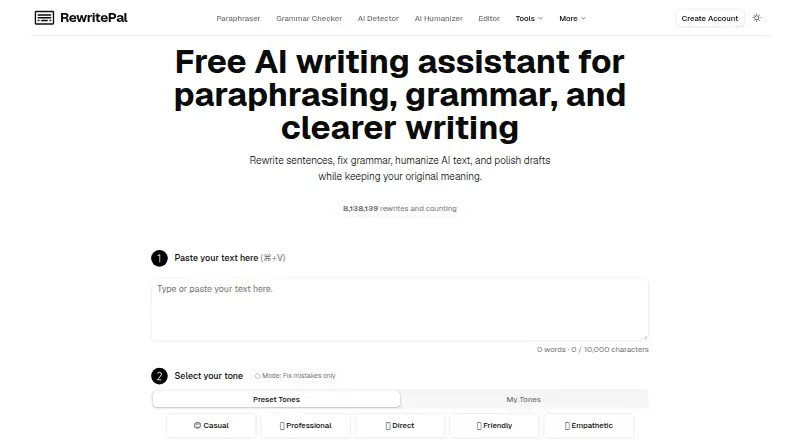
What RewritePal is
RewritePal is a writing assistant for paraphrasing, grammar correction, text humanization, and editing longer documents. Its editor supports preset and custom tones, role and language choices, and controls for making output shorter or longer. The service is aimed at students, professionals, marketers, and others seeking clearer writing. It is available on Android, iOS, Linux, macOS, Windows, web, and as an extension. The Chrome extension can rewrite selected text in supported fields, run optional local English Inline Fix checks, or open a popup when an editor is unsupported. In Google Docs, Selection Rewrite and Inline Fix are not supported, though the popup remains available. AI writing actions require internet access, including in the installed web app. RewritePal says submitted text is not used to train its own models and is not intentionally retained in its app database or logs after processing, except for saved documents and custom tones. AI providers may process submitted text, and the policy does not promise zero retention for every request. The free plan permits rewrites up to 10,000 characters. Paid options include $4.99 a month or $34.99 a year.
Who it suits
RewritePal may suit students, professionals, and marketers who want adjustable rewriting and editing tools across several platforms. Users who work in Google Docs can use the extension popup, but not Selection Rewrite or Inline Fix there.
What it does well
- Offers paraphrasing, grammar correction, and longer-document editing
- Custom tones and controls for output length
- Available across mobile, desktop, web, and extension
- Free plan supports rewrites up to 10,000 characters
What to know first
- AI writing actions require internet access
- Google Docs lacks Selection Rewrite and Inline Fix
- AI providers may process submitted text
Limits
The Free plan has a 10,000-character rewrite limit. Pro plans allow 40,000-character rewrites; the monthly plan costs $4.99 a month, the annual plan costs $34.99 a year, and the lifetime plan costs $49, paid once.
Plans
| Plan | Billed and limits | Price |
|---|---|---|
| Free | 10 rewrites/day for guests · 40 rewrites/day for free accounts · 10,000-character requests | Free |
| RewritePal Pro annual | $34.99 USD / year · Unlimited personal-use rewrites · 40,000-character requests · 14-day refund on first charge | $34.99 a year |
| Rewrite Pal Pro (annual) | $34.99 USD / year · That's $2.92 / month · Unlimited rewrites for personal use · 40,000-character rewrites · 14-day refund on first charge | $34.99 a year |
| Rewrite Pal Lifetime | $49 USD once · Unlimited rewrites for normal personal use · 40,000-character rewrites · 14-day refund | $49, paid once |
| RewritePal Lifetime | $49 USD once · Unlimited normal personal-use rewrites · 40,000-character requests · 14-day refund | $49, paid once |
| RewritePal Pro monthly | $4.99 each month · Unlimited personal-use rewrites · 40,000-character requests · 14-day refund on first charge | $4.99 a month |
| Rewrite Pal Pro (monthly) | $4.99 each month · Unlimited rewrites for personal use · 40,000-character rewrites · 14-day refund on first charge | $4.99 a month |
As rewritepal.com lists them, read 21 Oct 2026. The maker's own page has the final word.
Getting started
- Open https://www.rewritepal.com/.
- Choose the free plan or a paid plan.
- Enter writing and select a paraphrasing, grammar correction, humanization or document-editing action.
- Set tone, role, language and desired output length.
- For extension use, select text in a supported field and choose a rewrite action; use the popup in Google Docs.
RewritePal brings paraphrasing, grammar correction, AI text humanization, and longer-document editing into one writing assistant. It is best suited to students, professionals, and marketers who want to shape revisions for different audiences. Its broad editing controls and inexpensive personal plans are appealing, but it is a poor fit for offline work or workflows that depend on full Google Docs extension support.
Overview
RewritePal covers more than rewording: preset and custom tones, role and language options, and controls to shorten or expand output let users adapt revisions to a particular purpose. That range is useful when one tool needs to serve several writing contexts; it may be more than someone needs if the only goal is occasional paraphrasing.
The Chrome extension rewrites selected text in supported fields and offers optional local English Inline Fix checks. When an editor is unsupported, a popup provides a fallback. In Google Docs, however, Selection Rewrite and Inline Fix are not supported, so users must rely on that popup rather than the extension’s direct editing features.
Key features
Writing controls
Paraphrasing, grammar correction, humanization, and longer-document editing give RewritePal a wider role than a single-purpose paraphraser. Tone presets and custom tones, role and language choices, and length controls provide practical ways to shape output. Those options are most useful to people who regularly adapt drafts; they do not remove the need to review the result.
Extension and privacy
AI rewriting runs only after the user chooses a rewrite action, and the text is sent for processing at that point. RewritePal says submitted writing and generated output are not intentionally retained in its application database or logs after processing, except for documents and custom tones saved to an account. It also says it does not use submitted writing to train its own AI models. AI providers may process submitted text, and the policy does not promise zero retention for every request, so users handling sensitive material should consider those terms before submitting it.
The privacy policy describes administrative, technical, and organizational safeguards but does not guarantee absolute security. AI-powered writing actions require internet access, including in the installed web app; the optional local English Inline Fix checks are a narrower exception, not an offline mode for the writing assistant.
Pricing
The free plan costs nothing and caps rewrites at 10,000 characters. A free account also unlocks a higher extension allowance, making it a reasonable starting point for light use, but the character cap may constrain longer submissions.
Rewrite Pal Pro (monthly) costs $4.99 a month, billed $4.99 each month. It includes unlimited rewrites for personal use, 40,000-character rewrites, and a 14-day refund on the first charge. The annual plan costs $34.99 a year, billed $34.99 USD / year, or $2.92 / month, with the same stated rewrite allowance and first-charge refund. The annual option lowers the effective monthly cost for someone ready to commit for a year; the monthly plan costs more over time but avoids that longer billing commitment.
Rewrite Pal Lifetime costs $49, paid once, billed $49 USD once, and includes unlimited rewrites for normal personal use, 40,000-character rewrites, and a 14-day refund. It may suit a user who expects sustained personal use, while the paid plans’ personal-use wording makes them unsuitable to assume coverage for team or business-wide seats.
Platforms
RewritePal is available on Android, iOS, Linux, macOS, web, Windows, and as an extension. Platform breadth helps users who switch devices, but AI-powered actions still need an internet connection. Extension users who work mainly in Google Docs should account for the missing Selection Rewrite and Inline Fix support.
Who it's for
Students, professionals, and marketers are the clearest fit, particularly if they need several kinds of revision and value control over tone and length. The free tier supports occasional use, while the paid personal plans raise the rewrite limit to 40,000 characters and allow unlimited rewrites for personal use. Users who need offline AI editing, direct Google Docs extension actions, or a plan for multiple seats should look elsewhere.
Pros and cons
- Pros: Multiple writing actions in one assistant make it useful beyond paraphrasing alone.
- Pros: Tone, role, language, and length controls let users tailor revisions rather than accept a single default style.
- Pros: Paid personal plans include unlimited rewrites and 40,000-character rewrites, with monthly, annual, and one-time payment options.
- Cons: AI writing actions require internet access, including through the installed web app, ruling out offline AI revision.
- Cons: Selection Rewrite and Inline Fix do not work in Google Docs, limiting the extension’s usefulness for Docs-centered editing.
- Cons: Submitted text may be processed by AI providers, and zero retention is not promised for every request, a consideration for sensitive writing.
Alternatives
AI Paraphrasing Tools is the broader category to browse if you want to compare paraphrasing options.
- StealthWriter is worth considering if you want a free plan with daily humanization and AI-scan allowances, though its free inputs are capped at 1,000 words.
- Sapling may fit better if AI detection checks, snippets, or its API, extension, self-hosted, and Windows options matter more than RewritePal’s editing controls.
- Clever AI Humanizer is a web-only alternative with a free offering, no fixed monthly word allowance, and requests up to 3,000 words, subject to service availability.
- Phrasit is another freemium web option; consider it if its maker’s independently maintained product is a priority.
- Wordtune may suit users who want a free daily allowance for rewrites and AI suggestions plus spelling and grammar checks across web, iOS, and extension platforms.
- Paraphaser.ai is a free, web-based option if you want online tools without signup.
- QuillBot is an alternative if its free paraphraser’s 125-word limit, 1,200-word summarizer limit, and two paraphrasing modes suit your needs.
- Rewriter AI may be preferable if you need API access and a 50,000-words-per-month Starter plan billed annually.
Verdict
Choose RewritePal if you want a broad personal writing assistant with meaningful tone and length controls, and the 40,000-character paid rewrite allowance suits your work. Its main advantages are range and flexible personal pricing. Look elsewhere if you need offline AI editing, direct Google Docs extension support, or clearer coverage for team use.
Verdict
RewritePal offers a broad set of writing actions with tone and length controls, plus a free option. Consider its online requirement and Google Docs extension limitations if those affect your workflow.
Questions
Is RewritePal free?
Yes. Its Free plan costs nothing and has a 10,000-character rewrite limit.
What do the paid plans cost?
Rewrite Pal Pro is $4.99 a month or $34.99 a year. Rewrite Pal Lifetime is $49, paid once.
Which platforms are available?
RewritePal lists Android, extension, iOS, Linux, macOS, web and Windows.
Does the Chrome extension work in Google Docs?
Selection Rewrite and Inline Fix are not supported in Google Docs. The extension popup remains available there.
Does RewritePal use submitted writing to train its models?
RewritePal says submitted writing is not used to train its own AI models. AI providers may process submitted text, and the policy does not promise zero retention for every request.
Facts from RewritePal's own pages
- AI detector
- The detector accepts English text of at least 50 words and returns a probability percentage with likely-human, uncertain or likely-AI bands; it is presented as a clue rather than proof. · rewritepal.com, 21 Oct 2026
- AI humanizer
- The AI Humanizer rewrites text from ChatGPT, Claude, Gemini and other generators to sound more natural while retaining intended meaning. · rewritepal.com, 21 Oct 2026
- AI submission control
- The extension says AI rewriting runs only after the user chooses a rewrite action, and submitted text is sent for processing at that point. · rewritepal.com, 4 Oct 2026
- AI training and providers
- RewritePal says it does not use submitted writing to train its own AI models, while AI providers may process submitted text and the policy does not promise zero retention for every request. · rewritepal.com, 4 Oct 2026
- API availability
- SoftwareWorld lists RewritePal as having no API. · softwareworld.co, 21 Oct 2026
- App-store availability
- RewritePal states that it has no native app-store listing and installs directly as a browser progressive web app. · rewritepal.com, 21 Oct 2026
- Chrome extension
- The extension provides Selection Rewrite, local Inline Fix grammar checks and a popup fallback for unsupported editors. · rewritepal.com, 21 Oct 2026
- Company legal name
- The Terms identify DFM TECH DESENVOLVIMENTO DE SOFTWARES LTDA, trading as DFM TECH, as the Brazilian contracting company. · rewritepal.com, 21 Oct 2026
- Data retention
- RewritePal says submitted writing and generated output are not intentionally retained in its application database or logs after processing, except for documents and custom tones saved to an account. · rewritepal.com, 4 Oct 2026
- Document editor
- The editor supports selection or full-document AI actions, highlighted difference review, formatting and export to DOCX, PDF, Markdown or plain text. · rewritepal.com, 21 Oct 2026
- Extension privacy behavior
- Inline Fix text stays on the device, while selected or popup text is sent for AI processing only after the user chooses an AI action. · chromewebstore.google.com, 21 Oct 2026
- Founded and size
- SoftwareWorld lists RewritePal as founded in 2024 with 1–10 employees and headquarters in Brazil. · softwareworld.co, 21 Oct 2026
- Founder
- The Org lists Pedro Kondak as RewritePal founder. · theorg.com, 21 Oct 2026
- Google Docs limitation
- Selection Rewrite and Inline Fix do not support Google Docs, although the extension popup remains available there. · rewritepal.com, 21 Oct 2026
- Google Docs support
- Selection Rewrite and Inline Fix do not support Google Docs yet, though the extension popup remains available there. · rewritepal.com, 4 Oct 2026
- Grammar and spelling
- RewritePal provides grammar, spelling, punctuation and awkward-phrasing corrections. · rewritepal.com, 21 Oct 2026
- Headquarters
- The legal terms place the registered office in Porto Alegre, Rio Grande do Sul, Brazil. · rewritepal.com, 21 Oct 2026
- Independent listing limitation
- Independent directory reviews repeatedly flag daily limits on free AI use, the Google Docs extension gap, internet dependence and lack of native app-store apps. · mobilestalk.net, 21 Oct 2026
- Independent listing praise
- iTechGuides highlights the no-signup free plan, tone controls, lifetime option and broad web, desktop, mobile and extension coverage. · itechguides.com, 21 Oct 2026
- Integrations
- The published product pages describe the Chrome extension and browser editors but do not list third-party productivity integrations. · rewritepal.com, 21 Oct 2026
- Intended users
- The site describes it as designed for students, professionals, marketers, and anyone seeking clearer writing. · rewritepal.com, 4 Oct 2026
- Length controls
- Rewrite controls include simplifying, shortening and choosing shorter, similar or longer output. · rewritepal.com, 21 Oct 2026
- No campus plan
- The student page says there is no campus plan for schools buying one login for everyone. · rewritepal.com, 21 Oct 2026
- No plagiarism report
- The student page says RewritePal does not provide plagiarism reports or generate citations. · rewritepal.com, 21 Oct 2026
Where RewritePal stands on Freedom251
- AI Paraphrasing Tools#1 of 24