Freedom251 › Game Gear Emulators
Retropa
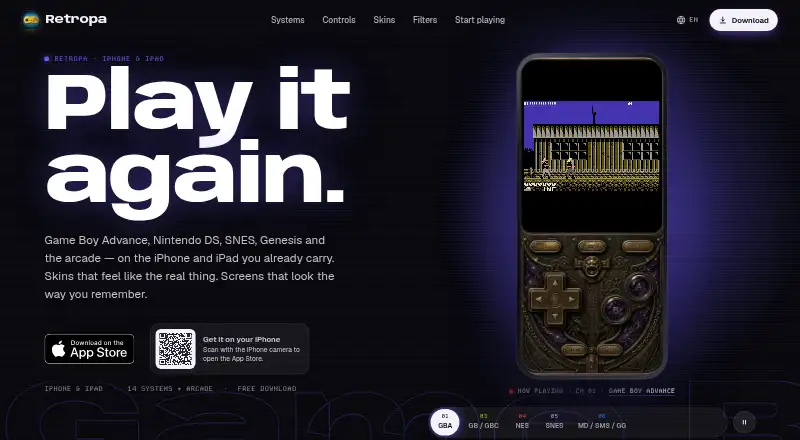
What Retropa is
Retropa is an emulator for handheld and arcade games on iPhone and iPad. It supports 14 handheld and console systems, along with arcade families; listed systems include GBA, Nintendo DS, NES, Super NES, Genesis, WonderSwan, and Neo Geo Pocket. The free plan includes the handheld and console systems, game imports, controller templates, Delta skin import, save states, and rewind. Arcade families, premium skins, advanced display filters, console mode, and advanced save workflows are included with Retropa Plus. Its price and billing terms are shown in the App Store, where availability and regional pricing can vary.
Import games from Files, AirDrop, a browser, a local Wi-Fi Portal, or the Homebrew catalog. Retropa does not provide games or BIOS files, and users import content they are entitled to use. Compatible external controllers are supported, with ready-made templates. Retropa Plus adds adaptive touch controls with five styles and 64 listed display filters. Save states can be backed up and restored through iCloud Drive. Game files stay on the device, and an account is not required to play. Retropa is available on iPhone and iPad running iOS 18 or later, and its supported platforms also include Mac.
Who it suits
Retropa suits iPhone and iPad users who want to play games from its supported handheld, console, and arcade systems using imported game files. It also fits players who want save states, rewind, controller support, or optional display and touch-control features through Retropa Plus.
What it does well
- Free plan includes 14 handheld and console systems.
- Imports work through Files, AirDrop, browser, local Wi-Fi Portal, or Homebrew catalog.
- Supports compatible external controllers and ready-made templates.
- Save states and rewind are included.
- Game files stay on the device; no account is needed to play.
- Source available.
What to know first
- Users must provide their own game and BIOS files.
- Retropa Plus price and billing terms are shown in the App Store.
- iPhone and iPad require iOS 18 or later.
Limits
The free plan covers 14 handheld and console systems, imports, controller templates, Delta skin import, save states, and rewind. Arcade families, premium skins, advanced filters, console mode, and advanced save workflows are included with Retropa Plus.
Plans
| Plan | Billed and limits | Price |
|---|---|---|
| Free | 14 handheld and console systems · imports · controller templates · Delta skin import · save states and rewind | Free |
| Retropa Plus | Plans and regional prices are shown in the App Store; the page does not list prices or billing terms. · Arcade families · premium skins · advanced filters · console mode · advanced save workflows | On request |
As retropa.com lists them, read 29 Sept 2026. The maker's own page has the final word.
Getting started
- Visit https://retropa.com/.
- Use an iPhone or iPad running iOS 18 or later.
- Import entitled game files through Files, AirDrop, a browser, the local Wi-Fi Portal, or the Homebrew catalog.
- Use the free plan, or check the App Store for Retropa Plus availability and regional pricing.
- Connect a compatible external controller and choose a controller template if desired.
Verdict
Choose Retropa if you want an iPhone or iPad emulator with broad listed system support, multiple import routes, and save states on its free plan. Look elsewhere if you need an emulator that supplies games or BIOS files, or if you need Retropa Plus pricing before viewing the App Store.
Questions
Is Retropa free?
Yes. Its Free plan is listed as free.
Which devices does Retropa support?
Its supported platforms are iPhone, iPad, and Mac. iPhone and iPad availability requires iOS 18 or later.
Does Retropa include games or BIOS files?
No. Users import game files they are entitled to use; Retropa does not include games or BIOS files.
What does Retropa Plus add?
It includes arcade families, premium skins, advanced filters, console mode, advanced save workflows, and adaptive touch controls with five styles.
Does Retropa require an account?
An account is not needed to play. Game files stay on the device.
How are purchases handled?
Purchases and renewals are handled by the App Store. Plan availability can differ by region.
Facts from Retropa's own pages
- Controls
- Retropa supports compatible external controllers and offers ready-made controller templates. · retropa.com, 29 Sept 2026
- Device requirements
- Retropa is available for iPhone and iPad running iOS 18 or later. · retropa.com, 29 Sept 2026
- Display
- Retropa Plus includes advanced display filters, and the site lists 64 filters. · retropa.com, 29 Sept 2026
- Game files
- Retropa does not include games or BIOS files; users import content they are entitled to use. · retropa.com, 29 Sept 2026
- Imports
- Games can be imported from Files, AirDrop, a browser, a local Wi-Fi Portal, or the Homebrew catalog. · retropa.com, 29 Sept 2026
- Integrations
- The site describes iCloud Drive for save backup, Files and AirDrop for importing, and controller support; it does not list third-party service integrations. · retropa.com, 29 Sept 2026
- Privacy
- The product page says game files stay on the device and an account is not needed to play. · retropa.com, 29 Sept 2026
- Product
- Retropa is an emulator for handheld and arcade games on iPhone and iPad. · retropa.com, 29 Sept 2026
- Purchases
- Purchases and renewals are handled by the App Store, and plan availability can differ by region. · retropa.com, 29 Sept 2026
- Save features
- Retropa supports save states and rewind, and says saves can be backed up and restored with iCloud Drive. · retropa.com, 29 Sept 2026
- Supported systems
- The site lists 14 handheld and console systems and arcade support, including GBA, Nintendo DS, NES, Super NES, Genesis, WonderSwan, Neo Geo Pocket, and arcade families. · retropa.com, 29 Sept 2026
- Touch controls
- Retropa Plus includes adaptive touch controls with five styles for different game genres. · retropa.com, 29 Sept 2026
Where Retropa stands on Freedom251
- Game Gear Emulators#24 of 31
- Multi-System Emulators#45 of 54