Freedom251 › AI Video Restoration Software
RestoraX
What RestoraX is
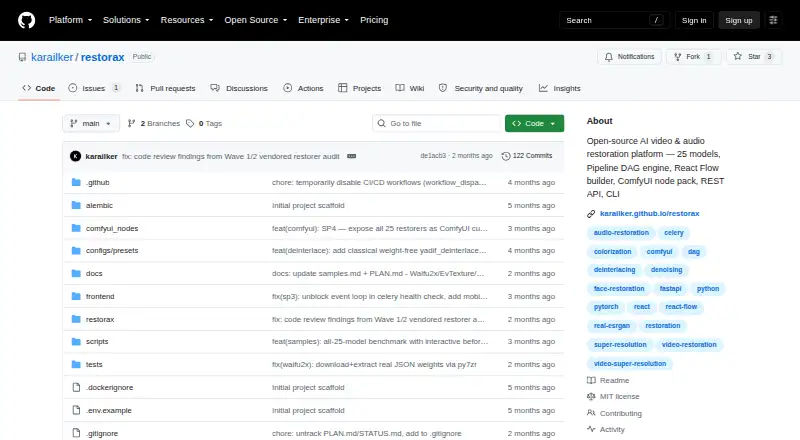
RestoraX is an open-source toolkit for restoring old films, home videos and archival footage with video and audio processing models. It describes 25 models covering tasks such as upscaling, colorization, face restoration, frame interpolation, scratch and dust removal, deinterlacing, stabilization, SDR-to-HDR conversion and audio restoration. A visual pipeline builder connects processing steps with parallel branches, merge strategies, retry policies and progress tracking. Interfaces include a React web UI, a FastAPI REST API with WebSocket progress, a command-line interface and a ComfyUI node pack. The project is designed for self-hosting and documents Docker Compose setups for development and production. Third-party restorers can be added as separate PyPI plugins; model weights download from HuggingFace Hub on first use. The stated minimums are Python 3.11, 8 GB RAM, 5 GB disk and FFmpeg. CPU processing works; CUDA 12.1 or later with at least 8 GB of GPU VRAM is recommended. RestoraX is released under the MIT License.
Who it suits
RestoraX may suit people restoring films, home videos, anime, VHS recordings or newsreels who want a self-hosted toolkit. It also offers API, command-line and ComfyUI interfaces for different workflows.
What it does well
- Describes 25 video and audio restoration models
- Visual pipeline builder supports branches and retries
- Provides web, REST API, command-line and ComfyUI interfaces
- Third-party restorers can be added as plugins
What to know first
- Requires Python 3.11 and FFmpeg
- Minimum requirements include 8 GB RAM and 5 GB disk
- GPU recommendation requires CUDA 12.1 or later and 8 GB VRAM
Limits
The free plan is open-source MIT software for self-hosted GPU or CPU processing. Stated minimums are Python 3.11, 8 GB RAM, 5 GB disk, and FFmpeg; CUDA 12.1 or later with at least 8 GB GPU VRAM is recommended.
Plans
| Plan | Billed and limits | Price |
|---|---|---|
| RestoraX | Open-source MIT software · self-hosted · GPU/CPU processing | Free |
As github.com lists them, read 3 Oct 2026. The maker's own page has the final word.
Getting started
- Open the RestoraX GitHub website
- Choose a documented Docker Compose setup for development or production
- Prepare Python 3.11, at least 8 GB RAM, 5 GB disk, and FFmpeg
- Use the web UI, REST API, or command-line interface
- Allow model weights to download from HuggingFace Hub on first use
Overview
RestoraX is a self-hostable toolkit for restoring video and audio, best suited to people managing varied film, home-video, or archival material on their own infrastructure. Its range of models and interfaces is a strong fit for configurable workflows; it is less suitable if you want a ready-to-run desktop enhancer with little setup.
Key features
The project describes 25 models spanning enlargement, colorization, face restoration, frame interpolation, scratch and dust removal, deinterlacing, stabilization, SDR-to-HDR conversion, and audio restoration. That breadth is useful when a collection has different kinds of damage, rather than one consistent need. The free plan supports upscaling up to 4x, artifact removal, frame interpolation, and face recovery.
A visual pipeline builder links processing steps in a directed acyclic graph. Typed ports, parallel branches, merge strategies, retry policies, and per-branch progress support more controlled, repeatable workflows. That flexibility is valuable when restoration involves several stages, but requires more planning than a one-purpose enhancement app.
Users can access RestoraX through a React web UI, a FastAPI REST API with WebSocket progress, or a command-line interface. A ComfyUI node pack adds an option for people already working in that environment. Model weights download automatically from HuggingFace Hub on first use. Plugins distributed as separate PyPI packages allow third-party restorers to extend the toolkit.
The documented stack uses Celery and Redis for background jobs, PostgreSQL or SQLite for data storage, and MinIO in the production Docker setup. Docker Compose configurations are documented for development and production. These choices give operators several ways to fit the software into a self-hosted setup, but they make deployment and maintenance part of the decision.
Pricing
RestoraX costs nothing. The open-source MIT software is self-hosted and supports GPU or CPU processing, with a 4x maximum upscale plus artifact removal, frame interpolation, and face recovery. There is no trial to weigh against a paid tier: the free plan is the offering described.
That price makes it accessible for personal archives and teams prepared to operate their own system. The trade-off is not a paid-plan feature cap but the responsibility of providing compatible hardware and managing deployment. The MIT license permits use, modification, and distribution subject to its terms.
Platforms
RestoraX supports web access, an API, Linux, and self-hosted deployment. The stated minimum requirements are Python 3.11, 8 GB of RAM, 5 GB of disk space, and FFmpeg. CPU processing works; CUDA 12.1 or later with at least 8 GB of GPU VRAM is recommended. The GPU recommendation matters for users planning regular or demanding restoration work, while CPU support offers an entry point for those without that setup.
Who it's for
RestoraX is aimed at technically capable users restoring old films, home videos, archival footage, anime, VHS, or newsreels. It is a particularly strong fit when users need several restoration methods, want to assemble multi-stage workflows, or need API and command-line access. People seeking a simple desktop workflow, or unwilling to provision and maintain a self-hosted system, should look elsewhere. The maker pages provide an MIT license but state no security certification or compliance standard, so organizations requiring a named standard should assess that requirement separately.
Pros and cons
- Pros: Twenty-five described models address a wide range of video and audio restoration needs, rather than only upscaling.
- Pros: Web, API, CLI, and ComfyUI access offer several ways to integrate restoration into existing work.
- Pros: The free, self-hosted MIT offering permits use and modification under the license terms.
- Cons: Python, FFmpeg, storage, and memory requirements make setup more involved than a turnkey enhancer.
- Cons: The recommended GPU configuration calls for CUDA 12.1 or later and at least 8 GB of VRAM, a meaningful hardware commitment for intensive workflows.
Alternatives
AI Video Restoration Software is the broader category to browse if RestoraX's self-hosted approach is not the right fit.
Choose Vapourkit if you want a free, open-source option for Linux or Windows. Aiarty Video Enhancer may suit Windows or macOS users who prefer a desktop product with a trial: its free version limits videos to under 120 seconds, adds watermarks, and excludes batch export. Choose Klarity for a free, local and offline image/video restoration tool on Linux or Windows.
TensorPix is a web, API, and self-hosted alternative with a free tier based on weekly login credits, up to 720p input, 1 GB storage, and basic models. HitPaw VikPea is an option if you need a product spanning desktop, mobile, and web platforms; its 1 Month License is $43.19 a month and automatically renews, with cancellation at any time.
Intelion Video Lab is worth considering for Windows or self-hosted deployment, with standalone and Intelion Analytics Bus module options at custom pricing. Refocused offers local processing on Linux, macOS, or Windows; its free trial includes all models and full processing but watermarks output, while the full license is 64.99 USD. SeedVR2 is another free option for Linux, macOS, Windows, or self-hosted use.
Verdict
Choose RestoraX if you want a free, extensible toolkit for diverse restoration work and can manage its self-hosted deployment and hardware. Its strongest reason to choose it is the combination of broad restoration models with configurable pipelines and multiple interfaces. Look elsewhere if you need a simpler desktop product or do not want to take responsibility for the runtime and infrastructure.
Verdict
RestoraX brings multiple restoration tasks and interfaces into a self-hostable toolkit. Its stated software and hardware requirements are important to check before setting up a workflow.
Questions
How much does RestoraX cost?
The listed plan is free. It is described as open-source MIT software.
Is RestoraX available as a hosted service?
The project describes RestoraX as self-hostable and documents Docker Compose setups for development and production.
Which interfaces does RestoraX provide?
It provides a React web UI, a FastAPI REST API with WebSocket progress, a command-line interface, and a ComfyUI node pack.
What hardware and software does RestoraX require?
Stated minimums include Python 3.11, 8 GB RAM, 5 GB disk, and FFmpeg. CPU works; CUDA 12.1 or later with at least 8 GB GPU VRAM is recommended.
Can developers extend RestoraX?
Yes. Third-party restorers can be added through plugins distributed as separate PyPI packages.
Facts from RestoraX's own pages
- ComfyUI
- The project describes a ComfyUI node pack as part of its platform. · github.com, 3 Oct 2026
- Deployment
- The maker documents Docker Compose setups for development and production and describes the software as self-hostable. · github.com, 3 Oct 2026
- Extensibility
- Third-party restorers can be added through plugins distributed as separate PyPI packages. · github.com, 3 Oct 2026
- Integrations
- The documented stack uses Celery and Redis for background jobs, PostgreSQL or SQLite for data storage, and MinIO in the production Docker setup. · github.com, 3 Oct 2026
- Intended users
- The README names old-film, home-video, archival-footage, anime, VHS, and newsreel restoration as use cases. · github.com, 3 Oct 2026
- Interfaces
- RestoraX provides a React web UI, a FastAPI REST API with WebSocket progress, and a command-line interface. · github.com, 3 Oct 2026
- License
- The repository is released under the MIT License, which grants use, modification, and distribution subject to its terms. · github.com, 3 Oct 2026
- Model weights
- Model weights download automatically from HuggingFace Hub on first use. · github.com, 3 Oct 2026
- Pipeline builder
- Its visual pipeline builder uses a DAG engine with typed ports, parallel branches, merge strategies, retry policies, and per-branch progress. · github.com, 3 Oct 2026
- Purpose
- RestoraX is an open-source AI video and audio restoration toolkit for old films, home videos, and archival footage. · github.com, 3 Oct 2026
- Requirements
- The stated minimums include Python 3.11, 8 GB RAM, 5 GB disk, and FFmpeg; the page says CPU works and recommends CUDA 12.1 or later with 8 GB or more of GPU VRAM. · github.com, 3 Oct 2026
- Restoration models
- The project describes 25 models for super-resolution, colorization, face restoration, frame interpolation, scratch and dust removal, deinterlacing, stabilization, SDR-to-HDR conversion, and audio restoration. · github.com, 3 Oct 2026
- Security and compliance
- The opened maker pages provide an MIT license but do not state a security certification or compliance standard. · github.com, 3 Oct 2026
Where RestoraX stands on Freedom251
- AI Video Restoration Software#4 of 25