Freedom251 › AI Video Effects Generators
Reface Unboring Animate
What Reface Unboring Animate is
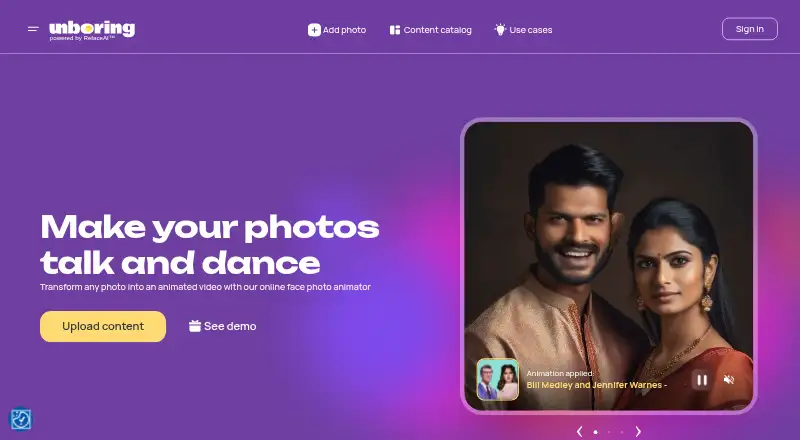
Reface Unboring Animate turns a photo into a video with animated movement, including singing and dancing effects. Its catalog includes ready-made styles, with song-based examples, and the maker says pet photos can also be animated. The FAQ recommends JPG or JPEG files and says the image content must include a face. The service is available on Android, iOS, macOS, web, and Windows. It has a free trial but no free plan. Basic is listed at $7.58/mo (annual) and Premium at $9.99/mo (annual); both include unlimited photos to Animate, priority processing, premium support, and Video Restyle. Video Restyle is limited to 60 seconds, and another restyle cannot start until the current one finishes. Subscriptions are billed yearly, can be cancelled anytime, and include VAT where applicable. A full refund is available within 24 hours of purchase if no tokens have been used. Sexual, violent, political, or criminal scenes are prohibited and may be removed with a warning. For unsatisfactory results, users can contact website support or [email protected].
Who it suits
It suits people who want to animate face-containing photos, including pet photos, and choose from ready-made styles. The annual subscriptions may suit users who need unlimited photo animations and Video Restyle.
What it does well
- Ready-made styles include song-based examples.
- Pet photos can be animated.
- Available on Android, iOS, macOS, web, and Windows.
- Both plans include unlimited photos to Animate.
- Free trial is available.
What to know first
- No free plan.
- Video Restyle is limited to 60 seconds.
- A restyle must finish before another can start.
- Restricted scenes may be removed.
Limits
There is no free plan. Video Restyle is limited to 60 seconds, and only one restyle can run at a time; a new one must wait for the current result.
Plans
| Plan | Billed and limits | Price |
|---|---|---|
| Basic | $7.58 / month, billed annualy as $90.99 ($113.99 shown as the comparison price) · Unlimited photos to Animate · Priority processing queue · Premium support · Video Restyle | $7.58 a month |
| Premium | $9.99 / month, billed annualy as $119.99 ($171.99 shown as the comparison price) · Unlimited photos to Animate · Priority processing queue · Premium support · Video Restyle | $9.99 a month |
As reface.ai lists them, read 8 Oct 2026. The maker's own page has the final word.
Getting started
- Open the Reface Unboring Animate website
- Start the available free trial
- Choose Basic or Premium billing
- Upload a JPG or JPEG image containing faces
- Select a ready-made animation style
- Wait for processing to finish before starting another restyle
Verdict
Reface Unboring Animate offers photo animation with ready-made styles and pet-photo support across five platforms. Check the annual subscription terms, face requirement, and restrictions on content before choosing it.
Questions
What platforms support Animate?
Animate is available on Android, iOS, macOS, web, and Windows.
Does Animate have a free plan?
No. It is paid, but a free trial is available.
What does Basic cost?
Basic is listed at $7.58/mo billed annually, shown as $90.99 yearly.
What image format should I use?
The FAQ recommends JPG or JPEG images, and the content must include faces.
Can I get a refund?
A full refund is available within 24 hours of purchase if no tokens have been used.
What content is prohibited?
Sexual, violent, political, or criminal scenes are prohibited and may be removed with a warning.
Facts from Reface Unboring Animate's own pages
- Animation styles
- The page offers a catalog of ready-made animation styles, including song-based examples. · reface.ai, 8 Oct 2026
- Content restrictions
- The FAQ says sexual, violent, political, or criminal scenes are prohibited and may be removed, with a warning to the uploader. · reface.ai, 8 Oct 2026
- Founded
- 2018 · reface.ai, 28 Sept 2026
- Free trial
- A Reface blog post says Unboring offered a five-token free trial to let users try the service before subscribing. · reface.ai, 8 Oct 2026
- Pet photos
- The maker says its AI can animate pet photos into videos. · reface.ai, 8 Oct 2026
- Photo format
- The FAQ recommends JPG/JPEG images and says animation requires content that includes faces. · reface.ai, 8 Oct 2026
- Platforms
- The page lists Android, iOS, Windows, and macOS as system requirements and describes the product as online. · reface.ai, 8 Oct 2026
- Processing limit
- The FAQ says video restyling is limited to 60 seconds and that users must wait for one restyle to finish before starting another. · reface.ai, 8 Oct 2026
- Refund details
- The FAQ says a full refund is available within 24 hours of purchase if no tokens have been used. · reface.ai, 8 Oct 2026
- Subscription terms
- The listed subscriptions are billed yearly, can be cancelled anytime, include VAT where applicable, and have a 24-hour money-back guarantee if idle. · reface.ai, 8 Oct 2026
- Support
- The maker directs users to website support or [email protected] for help with unsatisfactory results. · reface.ai, 8 Oct 2026
- What it does
- Animate transforms a photo into an animated video, including singing and dancing animations. · reface.ai, 8 Oct 2026
Where Reface Unboring Animate stands on Freedom251
- AI Video Effects Generators#20 of 27
- Fun Tools#21 of 27
- Photo Animation Software#22 of 27