Freedom251 › AI Video Effects Generators

Swapface
What Swapface is
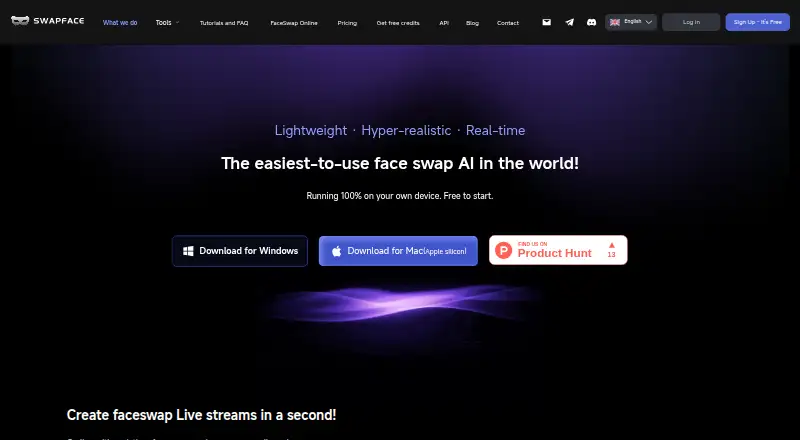
Swapface is an AI face-swapping tool for live streams, videos, and images, with desktop processing described as running locally on the user's device. Its live feature swaps faces in real time and can route the result through a virtual camera to apps that support webcams. For video, it accepts MP4, MOV, or WebM files and supports multiple-face replacement, frame-by-frame tracking, and video or GIF output. The image tool accepts JPG, PNG, or WEBP files with a clear face, supports multiple-face replacement, and handles high-resolution images. Swapface also offers image and video APIs for integration with existing platforms and applications. Its privacy policy says media is not collected or stored, except face images users save as reusable templates, which they can delete. The policy also says the service may collect email addresses and usage data, including IP addresses, login times, device identifiers, and diagnostic data. A free plan is available, and users can earn free credits by inviting friends or sharing Swapface on social media. The listed Windows baseline requires Windows 10 64-bit (22H2) or later, 16 GB RAM, a qualifying NVIDIA RTX graphics card with at least 6 GB VRAM, and 10 GB SSD space.
Who it suits
Swapface is aimed at content creators, with listed uses including streaming, video meetings, social media, marketing, and creative content. Its APIs may also suit teams integrating image or video face swapping into existing applications.
What it does well
- Free plan and credits earned through referrals or sharing.
- Real-time swapping can output through a virtual camera.
- Video tools support tracking and multiple-face replacement.
- Offers image and video APIs.
What to know first
- Listed Windows baseline requires an NVIDIA RTX GPU.
- Windows baseline includes 16 GB RAM and 10 GB SSD.
- Privacy policy says the service may collect usage data.
Limits
The free plan is available, and free credits can be earned by inviting friends or sharing Swapface on social media. Windows use is limited by the listed requirements of Windows 10 64-bit (22H2) or later, 16 GB RAM, a qualifying NVIDIA RTX card with at least 6 GB VRAM, and 10 GB SSD space.
Getting started
- Open the Swapface website
- Choose the macOS or Windows desktop app, or use the API
- Select the live, video, or image tool
- Connect the live output to a webcam-compatible app through the virtual camera
- Upload supported media formats for video or image processing
- Save reusable face templates only when needed
Verdict
Swapface covers live, video, and image face swapping, alongside APIs and local desktop processing. Check the Windows requirements and privacy policy's listed data collection before using it.
Questions
Which platforms support Swapface?
Swapface lists API, macOS, and Windows availability.
What video files can I upload?
The video tool accepts MP4, MOV, and WebM files.
What image files can I upload?
The image tool accepts JPG, PNG, and WEBP files with a clear face.
Does Swapface offer a free plan?
Yes. A free plan is listed, and users can earn free credits by inviting friends or sharing on social media.
Are photos and videos stored?
The privacy policy says face-swap media stays on the user’s machine and is not collected or stored. Face images explicitly saved as reusable templates can be deleted.
Facts from Swapface's own pages
- API
- Swapface offers image and video APIs designed for integration with platforms and applications. · swapface.org, 5 Oct 2026
- Audience
- The maker describes Swapface as a generative AI tool for content creators and presents use cases including streaming, video meetings, social media, marketing, and creative content. · swapface.org, 4 Oct 2026
- Data collection
- The privacy policy says the service may collect email addresses and usage data, including IP addresses, login times, time spent, device identifiers, and diagnostic data. · swapface.org, 4 Oct 2026
- Free credits
- The pricing page says users can invite friends or share Swapface on social media to earn free credits. · swapface.org, 5 Oct 2026
- Image features
- The image tool supports replacing one or multiple faces and high-resolution images. · swapface.org, 5 Oct 2026
- Image input formats
- The image tool accepts JPG, PNG, or WEBP uploads. · swapface.org, 4 Oct 2026
- Image inputs
- The image tool accepts JPG, PNG, or WEBP files with a clear face. · swapface.org, 5 Oct 2026
- Live streaming
- The live tool supports real-time face swapping through a virtual camera in apps that support webcams. · swapface.org, 4 Oct 2026
- Live swapping
- Its live tool swaps faces in real time and can send output through a virtual camera to apps that support webcams. · swapface.org, 5 Oct 2026
- Local processing
- The site says the desktop product runs on the user's device and that AI processing and data stay local. · swapface.org, 5 Oct 2026
- Maker
- The About page describes its team as AI enthusiasts from different countries and does not state a company name, headquarters, or founding date. · swapface.org, 5 Oct 2026
- Platforms
- The homepage provides downloads for Windows and Mac (Apple silicon). · swapface.org, 5 Oct 2026
- Pricing model
- The pricing page describes pay-as-you-go for one-off needs and subscriptions for larger or ongoing needs, but its page text does not show prices or plan details. · swapface.org, 5 Oct 2026
- Privacy
- The privacy policy says face-swap processing and media stay on the user's machine and photos and videos are not collected or stored, except face images explicitly saved as reusable templates, which users can delete. · swapface.org, 4 Oct 2026
- Product
- Swapface offers AI face swapping for live streams, videos, and images. · swapface.org, 5 Oct 2026
- Support contact
- The site lists [email protected] as its contact email. · swapface.org, 5 Oct 2026
- System requirements
- The listed Windows baseline includes Windows 10 64-bit (22H2) or later, 16 GB RAM, an NVIDIA RTX 2060 or RTX 3060 or better with 6 GB+ VRAM, and 10 GB SSD space. · swapface.org, 4 Oct 2026
- Video features
- The video tool supports multi-face replacement and face swaps in videos and animated GIFs. · swapface.org, 5 Oct 2026
- Video input formats
- The video tool accepts MP4, MOV, or WebM uploads. · swapface.org, 4 Oct 2026
- Video inputs
- The video tool accepts MP4, MOV, or WebM files. · swapface.org, 5 Oct 2026
- Web privacy policy
- The privacy policy says the service may collect email addresses and usage data, including IP address, login time, time spent, and diagnostic data. · swapface.org, 5 Oct 2026
- Windows requirements
- The listed Windows minimums include Windows 10 64-bit (22H2) or later, 16 GB RAM, an NVIDIA RTX 2060 or RTX 3060 with 6GB+ VRAM, and 10 GB of SSD space. · swapface.org, 5 Oct 2026
Where Swapface stands on Freedom251
- AI Video Effects Generators#16 of 27
- Face Swap Software#21 of 30