Freedom251 › Emulator Software

Redream
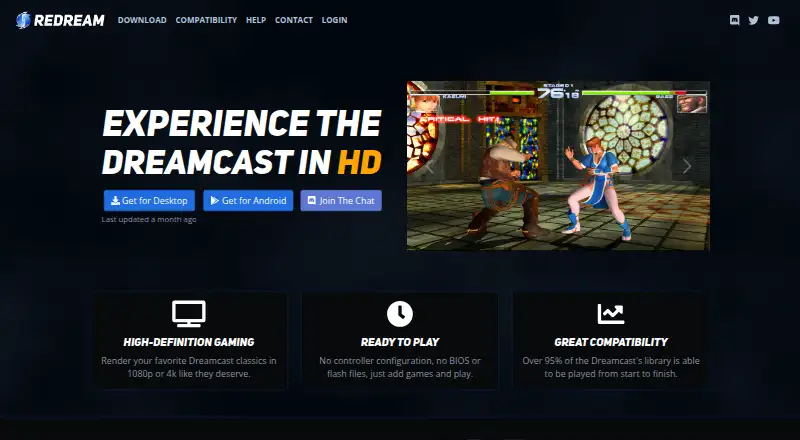
What Redream is
Redream is a Dreamcast emulator for playing Sega Dreamcast games on Android, Linux, macOS, and Windows. It can render games at 1080p or 4K, and the homepage says users can add games and start playing without setting up a controller or adding BIOS or flash files. The download page says more than 96% of the Dreamcast library can be played from start to finish; the homepage puts the figure above 95%. Redream is free to use on supported platforms, and the download page says that library coverage is available at no cost. Listed features include widescreen codes, automatic cover art, save states, and cheat support. The package is under 4 megabytes, and the homepage says it can deliver smooth 60 Hz on decade-old desktops and mobile phones. Premium is a one-time purchase that works across supported platforms, with pay-what-you-want amounts of $6, $8, $10, or $20. Premium includes high-definition rendering, multiple save-state slots per game, and a custom Discord server role.
Who it suits
Redream suits Dreamcast players who want to play on Android, Linux, macOS, or Windows, including those who want to start without setting up controller or system files. Premium may suit players who want multiple save-state slots or high-definition rendering.
What it does well
- Free play on supported platforms
- Available for Android, Linux, macOS, and Windows
- Renders games at 1080p or 4K
- Lists widescreen codes, save states, and cheat support
What to know first
- Premium features require a one-time payment
- Premium amounts listed are $6, $8, $10, or $20
Limits
The free plan provides access to more than 96% of the Dreamcast library at no cost. High-definition rendering and multiple save-state slots per game are included with Premium, which costs $6, $8, $10, or $20 as a one-time payment.
Plans
| Plan | Billed and limits | Price |
|---|---|---|
| Premium | One-time payment; all amounts are equal, pay what you want. The page lists $6, $8, $10, and $20. · High-definition rendering · Multiple save state slots per game · Custom Discord server role | $6, paid once |
As redream.io lists them, read 30 Sept 2026. The maker's own page has the final word.
Getting started
- Visit the Redream website.
- Choose the download for Android, Linux, macOS, or Windows.
- Add Dreamcast games to Redream.
- Play without configuring a controller or adding BIOS or flash files.
- Choose the one-time Premium upgrade if you want its additional features.
Redream is a Sega Dreamcast emulator for Android, Linux, macOS, and Windows. It is best for players who want a compact, cross-platform way to run their own Dreamcast games with minimal preparation. The free edition covers most of the library, while Premium is aimed at users who want higher-resolution output and more save-state flexibility.
Overview
Redream concentrates on removing the setup commonly associated with emulation. The homepage says you can add games and start playing without configuring a controller or supplying BIOS or flash files. That makes it a sensible first emulator for newcomers and a convenient option when moving between desktop and mobile systems.
The download page says more than 96% of the Dreamcast library can be played from start to finish, while the homepage claims more than 95%. Either figure represents broad coverage, but Redream remains a single-console solution rather than a general-purpose emulator. Its package is under 4 MB, and the homepage says it can produce smooth 60 Hz performance on decade-old desktops and mobile phones. That stated combination of small size and modest hardware requirements favors older devices, although individual games and systems can still differ.
Key features
Rendering and display
Redream can render games at 1080p or 4K. This is the clearest reason to consider Premium: modern-display owners can get a sharper presentation than the original Dreamcast output. High-definition rendering is not included in the free experience, so users mainly seeking broad access rather than image quality can stay on the no-cost tier.
Convenience features
Widescreen codes, automatic cover art, save states, and cheat support are included. Automatic artwork makes a game collection easier to browse, while save states and cheats suit players who want to pause progress outside the console's original save structure. Premium adds multiple save-state slots per game; the free version is therefore a better fit for straightforward play than for users who keep several parallel saves.
Support and community
Development-release issues are directed to a GitLab issue tracker, and the homepage links to a Discord chat. Premium also grants a custom Discord server role. Those channels provide ways to follow or report development, but the role itself is a community benefit rather than an emulation feature.
Pricing
Redream is freemium. The free plan costs nothing and, according to the download page, can play more than 96% of the Dreamcast library on supported platforms. It is the strongest choice for budget-conscious players who can accept the standard rendering options and a more limited save-state setup.
Premium costs $6, paid once as a one-time payment. The upgrade works across supported platforms, and the page says all amounts are equal and pay what you want, listing $6, $8, $10, and $20. Premium includes high-definition rendering, multiple save-state slots per game, and a custom Discord server role. There is no recurring renewal to manage, and the cross-platform license suits someone using Redream on more than one supported operating system. Paying more does not add another console; it primarily buys visual quality, save management, and the Discord role.
Platforms
Redream runs on Android, Linux, macOS, and Windows, with Sega Dreamcast as its supported console system. That spread is useful for households combining mobile and desktop hardware. Its cross-platform Premium payment also avoids buying the upgrade separately for each supported platform.
Who it's for
Choose Redream if you want Dreamcast emulation with a small installation, broad stated game compatibility, and no requirement to configure a controller or add BIOS and flash files. It also suits owners of older computers or phones who value the stated 60 Hz target.
Look elsewhere if you need emulation for several console families, or if you require an entirely free path to high-definition rendering and multiple save slots. Redream's paid features are focused and useful, but its scope is deliberately limited to Dreamcast.
Pros and cons
- Pros: Free access covers over 96% of the library according to the download page, making the core emulator unusually usable without payment.
- Pros: Games can be added without controller configuration or BIOS and flash files, reducing setup work.
- Pros: The under-4 MB package and stated 60 Hz performance on decade-old hardware favor lightweight installations.
- Pros: Widescreen codes, cover art, save states, and cheats provide useful quality-of-life tools.
- Cons: High-definition rendering and multiple save-state slots require the one-time Premium upgrade.
- Cons: It supports Sega Dreamcast only, so it cannot replace a multi-system emulator.
Alternatives
For a broader comparison, see Dreamcast Emulators, Game Console Emulators, and Emulator Software.
- nullDC 2.0.0 is a free alternative with Linux, macOS, web, and Windows builds.
- Flycast is free on Android, Linux, macOS, and Windows, with no ads; you must provide games you own.
- Flycast is the better fit when you also want Naomi, Naomi 2, and Atomiswave emulation.
- MAME is free and GPL-2.0-or-later, but ROMs and copyrighted software are generally not included.
- WashingtonDC is a free, open-source Dreamcast option for Linux and Windows.
- Flycast is a free open-source choice on Android, Linux, macOS, and Windows.
- Deecy is a free Linux and Windows alternative.
- Nitrocast is a free Linux alternative.
Verdict
Redream is the right choice for anyone who wants broad Dreamcast coverage, a tiny install, and unusually little setup across Android and desktop systems. Premium is worthwhile when 1080p or 4K rendering and multiple save slots matter. Choose another emulator when your library extends beyond Dreamcast or when you want those premium conveniences without a payment.
Verdict
Redream offers a free way to play most of the Dreamcast library on several platforms, with setup that does not require controller configuration or BIOS and flash files. Consider Premium if you want multiple save-state slots or high-definition rendering.
Questions
Is Redream free?
Yes. Redream says it is free to use on supported platforms, and more than 96% of the Dreamcast library can be played at no cost.
How much does Premium cost?
Premium is a one-time payment. The listed amounts are $6, $8, $10, and $20, and Redream says users can pay what they want.
Which platforms does Redream support?
Redream lists Android, Linux, macOS, and Windows.
What does Premium include?
Premium includes high-definition rendering, multiple save-state slots per game, and a custom Discord server role.
Do I need a controller setup or BIOS files to start?
Redream says users can add games and play without configuring a controller or adding BIOS or flash files.
Facts from Redream's own pages
- Community
- The homepage links to a Discord chat, and the premium upgrade includes a custom Discord server role. · redream.io, 30 Sept 2026
- Compatibility
- The homepage says over 95% of the Dreamcast library can be played from start to finish; the download page says over 96%. · redream.io, 30 Sept 2026
- Features
- The homepage lists widescreen codes, automatic cover art, save states, and cheat support. · redream.io, 30 Sept 2026
- Free use
- The download page says Redream is completely free to use on supported platforms and can play over 96% of the Dreamcast library at no cost. · redream.io, 30 Sept 2026
- Performance
- The homepage says the package is less than 4 megabytes and can produce a smooth 60 Hz on decade-old desktops and mobile phones. · redream.io, 30 Sept 2026
- Platforms
- The homepage lists Windows, Mac, Linux, Android, and Raspberry Pi 4; the download page lists Windows, Mac, Linux, Android, and Raspberry Pi. · redream.io, 30 Sept 2026
- Premium purchase
- The premium upgrade is a one-time payment that works across supported platforms, and the page says users can pay what they want. · redream.io, 30 Sept 2026
- Product
- Redream is a Dreamcast emulator for experiencing Dreamcast games. · redream.io, 30 Sept 2026
- Setup
- The homepage says users can add games and play without configuring a controller or adding BIOS or flash files. · redream.io, 30 Sept 2026
- Support
- The download page directs users to the GitLab issue tracker to report issues with development releases. · redream.io, 30 Sept 2026
- Video quality
- The homepage says games can be rendered in 1080p or 4K. · redream.io, 30 Sept 2026
Where Redream stands on Freedom251
- Emulator Software#23 of 39
- Game Console Emulators#22 of 35
- Dreamcast Emulators#7 of 9