Freedom251 › Dreamcast Emulators
Flycast
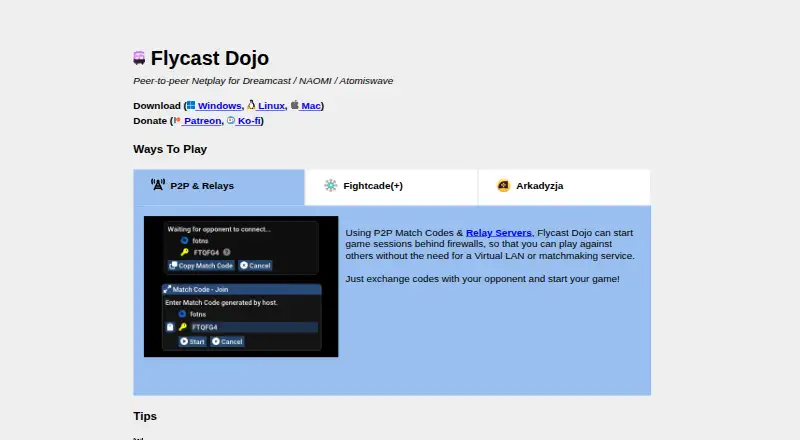
What Flycast is
Flycast Dojo is a free, open-source emulator fork for Sega Dreamcast, Naomi, Naomi 2, and Atomiswave, with its focus on online play and replay. Players can connect through Match Codes, direct IP connections, or virtual LANs such as ZeroTier and Radmin. Match Codes use an internet relay to set up peer-to-peer sessions through firewalls without an account or extra software. Netplay sessions can be recorded and played back in the emulator, or sent to a replay server or a listening spectator. Training Mode supports RetroArch .cht cheats, savestates, and input recording and playback for supported games, and it can be used offline. Players can compare ROM MD5 checksums, but both opponents need matching ROM and BIOS files to play successfully. Flycast Dojo is bundled with Fightcade and Arkadyzja. It is available for Android, Linux, macOS, and Windows. Match Codes may have trouble on some cloud gaming services or corporate networks.
Who it suits
It suits players seeking netplay and replay for supported Sega systems, as well as tournament players who want training tools. Players need appropriate, matching ROM and BIOS files for peer-to-peer play.
What it does well
- Free and open source.
- Match Codes support sessions through firewalls.
- Record, replay, and spectate netplay sessions.
- Offline Training Mode includes savestates and input playback.
- Available on Android, Linux, macOS, and Windows.
What to know first
- Requires matching ROM and BIOS files for peer-to-peer play.
- Match Codes may have issues on some corporate networks or cloud gaming services.
Getting started
- Visit the Flycast Dojo website.
- Choose a platform; the site links downloads for Windows, Linux, and Mac.
- Obtain the appropriate ROM and BIOS files, ensuring both players have matching files for netplay.
- Start a multiplayer session with Match Codes, a direct IP connection, or a virtual LAN.
- Use the Replays screen to play back recorded sessions or configure session transmission for a replay server or spectator.
Flycast Dojo is a free, open-source fork of Flycast for Dreamcast, Naomi, Naomi 2, and Atomiswave emulation. It is best suited to players who organize retro multiplayer, review matches, or need dedicated training tools rather than a basic offline emulator. The main trade-off is that online play depends on matching ROM and BIOS files and a network that allows the chosen connection method.
Overview
Dojo keeps the multi-platform emulation foundation of Flycast while concentrating on netplay, replay, and tournament-oriented quality-of-life features. Downloads cover Android, Linux, macOS, and Windows, and graphics upscaling is supported. It can also run offline, so training does not require a live opponent.
Players must supply appropriate ROM and BIOS files. For peer-to-peer sessions, both opponents need identical game files; MD5 checksum comparison provides a practical way to verify ROMs before trying to connect. The emulator does not remove that file-management responsibility.
Key features
Multiplayer connections
Match Codes start peer-to-peer sessions through an internet matchmaking relay. They can get players behind many firewalls connected without an account, extra software, a virtual LAN, or a separate matchmaking service. That is the most convenient route for many home networks, although some cloud-gaming services and corporate networks can still interfere.
Direct IP connections are available for users who control their network setup, while virtual LAN tools such as ZeroTier or Radmin offer another way to present players as if they were on the same network. Firewalls and antivirus software may block connections; allowing Flycast through the firewall or forwarding ports can be necessary troubleshooting steps.
Dojo is bundled with Fightcade, an online matchmaking service for retro games, and with Arkadyzja, whose platform uses Dojo's peer-to-peer and relay capabilities. These integrations broaden the ways players can find or join sessions, but they do not remove the requirement for compatible game files.
Replay and spectating
Netplay sessions can be recorded and replayed from the emulator's Replays screen. That makes it useful for reviewing tournament rounds, studying mistakes, or preserving matches instead of treating multiplayer as a one-time event. Sessions can also be transmitted to a replay server or to a listening spectator, supporting organized viewing and event workflows.
Offline training
Training Mode supports RetroArch .cht cheat files, savestates, and recording and playback of inputs in supported games. These tools let players practice repeatable situations offline and inspect execution without another participant. Support is game-dependent, so it is not a universal replacement for a dedicated training mode.
Pricing
Flycast Dojo is free, with no paid tier or subscription. That makes the full feature set accessible to casual players, tournament organizers, and developers evaluating a netplay-focused emulator without a purchase decision. You still need to obtain your own compatible ROM and BIOS files, and the software does not solve network or file-compatibility problems for you.
Platforms
Flycast Dojo supports Android, Linux, macOS, and Windows. The broad desktop coverage suits mixed-platform groups, while Android support gives mobile users the same emulator project. The official downloads cover Windows, Linux, and Mac; platform-specific setup and network behavior can still vary.
Who it's for
Choose Dojo if online play is central to your use of Dreamcast, Naomi, Naomi 2, or Atomiswave emulation, particularly when you want relay-assisted connections, replay files, spectating, or tournament-style training. It is also a strong fit for players who want offline practice with savestates and input playback.
It is less suitable if you only want the simplest possible emulator launch, do not have legally obtained matching game files, or play from a network where Match Codes are blocked. Users who prefer to manage connections entirely through a standard emulator may find Dojo's extra netplay options unnecessary.
Pros and cons
- Pro: Match Codes can establish peer-to-peer play through a relay without accounts, extra software, or a virtual LAN.
- Pro: Replay recording, playback, and spectator output support match review and organized events.
- Pro: Training Mode combines cheats, savestates, and input recording for offline practice in supported games.
- Pro: Free, open-source software spans Android, Linux, macOS, and Windows.
- Con: Players must provide appropriate ROM and BIOS files, and peer-to-peer opponents must have matching files.
- Con: Corporate networks, cloud-gaming services, firewalls, and antivirus tools can prevent connections or require manual fixes.
- Con: Training features and input playback depend on game support rather than applying universally.
Alternatives
For a conventional emulator without Dojo's stated netplay emphasis, Flycast is free, ad-free, and supports Android, Linux, macOS, and Windows; you supply your own game files. The similarly named Flycast is also free across those platforms and covers Dreamcast, Naomi, Naomi 2, and Atomiswave emulation.
nullDC 2.0.0 is a free downloadable build for Linux, macOS, Windows, and the web. Pick MAME instead when you want a broad, GPL-licensed emulation project; ROMs and copyrighted software are generally not included. WashingtonDC is a free, open-source Dreamcast option for Linux and Windows. Redream offers Android, Linux, macOS, and Windows support with a free plan plus a one-time Premium payment of $6.00 (pay-what-you-want amounts of $6, $8, $10, and $20 are listed), so it suits readers willing to pay for its premium feature set. Deecy is a free Linux and Windows alternative. Nitrocast is a free Linux alternative.
For broader comparisons, see the Dreamcast Emulators and Game Console Emulators lists.
Verdict
Flycast Dojo is the right choice for retro players and organizers who value relay-assisted netplay, replay review, spectating, and structured training in one free emulator. Choose it when those multiplayer and practice tools matter; look elsewhere if you want a minimal emulator experience or cannot ensure matching files and a network compatible with its connection methods.
Verdict
Flycast Dojo combines multiplayer connection options with replay and offline training features. Check that your game files match and that your network supports the chosen connection method.
Questions
Is Flycast Dojo free?
Yes. It has a free plan and is open source.
Which systems and platforms does it support?
It supports Sega Dreamcast, Naomi, Naomi 2, and Atomiswave. Listed platforms are Android, Linux, macOS, and Windows.
How can players connect for multiplayer?
They can use Match Codes, direct IP connections, or virtual LANs such as ZeroTier or Radmin. Match Codes use an internet relay and do not require an account.
Do players need matching game files?
Yes. Successful peer-to-peer play requires both players to have matching ROM and BIOS files. ROM MD5 checksums can be compared to check whether game files match.
Can sessions be recorded or watched?
Netplay sessions can be recorded and played back from the Replays screen. Sessions can also be transmitted to a replay server or a listening spectator.
Where can users get help?
The product site directs users to its FAQ and the Flycast, Fightcade, and Dojo Project Discord communities.
Facts from Flycast's own pages
- Arkadyzja
- Flycast Dojo is bundled in Arkadyzja, which provides matchmaking and a game management interface using Flycast Dojo's P2P and relay features. · flycast.dojo.ooo, 3 Oct 2026
- Connection options
- The documentation describes Match Codes, direct IP connections, and virtual LANs such as ZeroTier or Radmin for multiplayer sessions. · dojo-project.gitbook.io, 2 Oct 2026
- Fightcade
- Flycast Dojo is bundled in Fightcade, an online matchmaking service for retro games. · flycast.dojo.ooo, 3 Oct 2026
- Firewall support
- Match Codes and relay servers can start game sessions behind firewalls without requiring a virtual LAN or matchmaking service. · flycast.dojo.ooo, 3 Oct 2026
- Match codes
- Match Codes can start peer-to-peer game sessions behind firewalls using an internet matchmaking relay, without requiring an account or extra software. · github.com, 2 Oct 2026
- Matchmaking
- Players can start peer-to-peer sessions using Match Codes, direct IP connections, or a virtual LAN. · dojo-project.gitbook.io, 3 Oct 2026
- Network limits
- The documentation says Match Codes may encounter problems on some cloud gaming services or corporate networks. · github.com, 2 Oct 2026
- Network troubleshooting
- The FAQ says firewalls or antivirus software can block connections and describes allowing Flycast through the firewall or forwarding ports as troubleshooting steps. · dojo-project.gitbook.io, 3 Oct 2026
- Offline use
- Training Mode lets users practice offline. · dojo-project.gitbook.io, 3 Oct 2026
- Platforms
- The product site links Windows, Linux, and Mac downloads. · flycast.dojo.ooo, 2 Oct 2026
- Product
- Flycast Dojo is a fork of the Flycast emulator for Sega Dreamcast, NAOMI, and Atomiswave, focused on netplay and replay. · dojo-project.gitbook.io, 2 Oct 2026
- Purpose
- Flycast Dojo is a fork of Flycast, a multi-platform Sega Dreamcast, Naomi, and Atomiswave emulator focused on netplay and replay. · dojo-project.gitbook.io, 3 Oct 2026
- Replay
- Users can record netplay sessions and play them back from the emulator’s Replays screen. · github.com, 2 Oct 2026
- Requirements
- Players need appropriate ROM and BIOS files, and netplay requires both opponents to have matching game files. · dojo-project.gitbook.io, 2 Oct 2026
- ROM requirement
- Players need identical BIOS and ROM files to start a P2P session successfully. · dojo-project.gitbook.io, 3 Oct 2026
- ROM validation
- Users can calculate and compare ROM MD5 checksums to check whether opponents have matching game files. · github.com, 2 Oct 2026
- Spectating
- The documentation describes transmitting game sessions to a replay server or a listening spectator. · github.com, 2 Oct 2026
- Support
- The site directs users to the FAQ and to the Fightcade, Flycast, and Dojo Project Discord communities for help. · flycast.dojo.ooo, 3 Oct 2026
- Supported platform downloads
- The official site links downloads for Windows, Linux, and Mac. · flycast.dojo.ooo, 3 Oct 2026
- Training
- Training Mode supports cheats in RetroArch .cht format, save states, and recording and playback of inputs for supported Dreamcast, NAOMI, and Atomiswave games. · dojo-project.gitbook.io, 3 Oct 2026
- Who it is for
- The project describes its focus as netplay and replay, with quality-of-life improvements for training and online tournament play. · github.com, 3 Oct 2026
Where Flycast stands on Freedom251
- Dreamcast Emulators#5 of 9
- Game Console Emulators#20 of 35