Freedom251 › Digital Signage Software
Reddie Portal
What Reddie Portal is
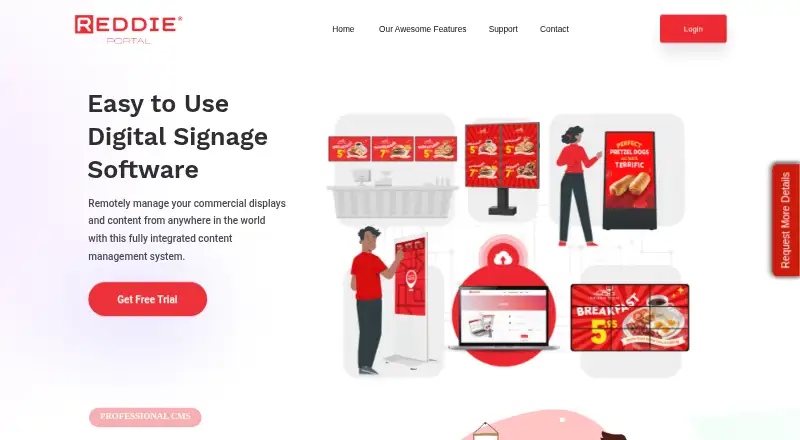
Reddie Portal is a content management system for creating, updating, and remotely managing digital displays. It runs on Android and the web, supports offline playback, and is intended for small, medium, and enterprise businesses with commercial screens. Content can include images, video, audio, HTML5 webpages, RSS feeds, text, weather, social media, Office documents, and PDFs. Users can build portrait or landscape layouts with zones for different content types, then run playlists immediately or at scheduled dates and times. Rapid Publishing sends material to displays from any internet connection. Remote commands include rebooting screens, formatting internal memory, controlling playback, and changing orientation. Content can be synchronized across multiple screens, while scrolling text and live RSS feeds support information displays. Accounts include configurable privileges and screen access, with action logs and playback reports. Offline playlists can be transferred by USB stick. The web console uses HTTPS and encrypted data tunnels. A free plan and free trial are listed, while paid pricing is available on request.
Who it suits
It suits businesses managing commercial digital signage across one or more screens. Teams needing scheduling, remote controls, user privileges, and offline playback may find its feature set relevant.
What it does well
- Runs on Android and the web
- Supports many content types
- Schedules and synchronizes playlists
- Provides remote screen commands
- Offers configurable user privileges
What to know first
- Paid pricing requires a request
- Designed for its digital-signage hardware
- Offline transfers require a USB stick
Plans
| Plan | Billed and limits | Price |
|---|---|---|
| Always Free | No limits stated | Free |
As reddieportal.com lists them, read 12 Oct 2026. The maker's own page has the final word.
Verdict
Reddie Portal covers content creation, scheduling, synchronization, and remote display administration. Its free option offers a starting point, while pricing details for paid use require contacting the maker.
Facts from Reddie Portal's own pages
- Content types
- images,video,audio,HTML5 webpages,RSS feeds,text,weather,social media,Office documents,PDFs · reddieportal.com, 22 Sept 2026
- Hardware fit
- The maker says the software was developed for its digital signage hardware and also offers media players for existing screens. · reddieportal.com, 12 Oct 2026
- Headquarters
- New York, New York, United States · reddieportal.com, 28 Sept 2026
- Intended users
- The maker describes it for small, medium, and enterprise businesses managing commercial displays. · reddieportal.com, 12 Oct 2026
- Layouts
- Users can create portrait or landscape layouts with zones for images, video, text, and live webpages. · reddieportal.com, 12 Oct 2026
- Media support
- The FAQ lists support for MP4, AVI, and MPG video containers, JPEG images, Office documents, and APK files for touch screens. · reddieportal.com, 12 Oct 2026
- Offline playback
- Yes · reddieportal.com, 22 Sept 2026
- Offline updates
- The FAQ describes packaging a playlist for download and transferring it to a screen using a USB stick. · reddieportal.com, 12 Oct 2026
- Publishing
- Its Rapid Publishing tool uploads and sends content to displays from anywhere with an internet connection. · reddieportal.com, 12 Oct 2026
- Purpose
- Reddie Portal is a content management system for creating, updating, and remotely managing digital displays. · reddieportal.com, 12 Oct 2026
- RSS
- Users can add customizable scrolling text and live RSS news feeds. · reddieportal.com, 12 Oct 2026
- Scheduling
- Playlists can display content immediately or at scheduled times and dates. · reddieportal.com, 12 Oct 2026
- Screen controls
- Remote commands include rebooting screens, formatting internal memory, controlling playback, and changing screen orientation. · reddieportal.com, 12 Oct 2026
- Security
- The maker says the web console uses HTTPS and encrypted data tunnels, and that the CMS server receives daily system snapshots. · reddieportal.com, 12 Oct 2026
- Support
- The site lists FAQs, video tutorials, training and support requests, and gives [email protected] as a contact email. · reddieportal.com, 12 Oct 2026
- Synchronization
- The maker says users can synchronize content across multiple screens to create content that flows between them. · reddieportal.com, 12 Oct 2026
- User management and reports
- The CMS supports user accounts with configurable privileges and screen access, plus action logs and playback reports. · reddieportal.com, 12 Oct 2026
- User roles
- advanced · reddieportal.com, 22 Sept 2026
Where Reddie Portal stands on Freedom251
- Digital Signage Software#43 of 207