Freedom251 › Screen Recording Software
RecCloud Online Screen Recorder
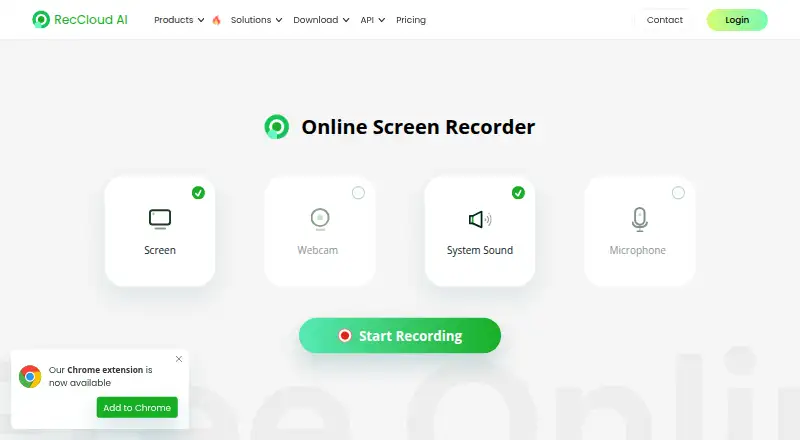
What RecCloud Online Screen Recorder is
RecCloud Online Screen Recorder is a browser tool for recording screen activity, webcam video, system sound, and microphone audio. Listed uses include desktop activity, video calls, online meetings, gameplay, and online lectures. Recordings can be saved or uploaded to RecCloud cloud storage. Uploaded videos may be password protected, shared by direct link, or embedded on a website. Uploading also supports video sharing, team collaboration, and cloud storage, with family, friends, or colleagues addable to collaborative playlists. The online recorder runs on the web, while RecCloud lists Android, iOS, macOS, and Windows among its platforms. Browser support can vary, and the product suggests trying Chrome if unsupported. The current Mac online version cannot capture system sound. RecCloud recommends its desktop version for recordings longer than 30 minutes because very long online recordings may fail to save. That desktop version adds customized recording, video editing, and more advanced features. The free online recorder costs 0.00 USD and allows one minute for non-VIP users, subject to a free storage limit.
Who it suits
It suits people who need quick browser recordings of screens, cameras, meetings, gameplay, or lectures. Longer recordings or editing needs may suit the desktop version instead.
What it does well
- Records screen, webcam, system sound, and microphone
- Uploads support password-protected sharing
- Direct links and website embeds available
- Collaborative playlists support added members
- Desktop version offers video editing
What to know first
- Free non-VIP recording time is one minute
- Free video storage limit applies
- Mac online version lacks system sound capture
- Recordings over 30 minutes may fail online
Plans
| Plan | Billed and limits | Price |
|---|---|---|
| Free online recorder | 1 min recording time for non-VIP · free video storage limit applies · recording longer than 30 mins may fail to save online | Free |
As reccloud.com lists them, read 12 Oct 2026. The maker's own page has the final word.
Verdict
RecCloud offers flexible browser capture and cloud sharing with collaboration options. The free online limits are significant, and Mac system audio plus very long recordings require attention before use.
Facts from RecCloud Online Screen Recorder's own pages
- Browser support
- The page says to try another browser if the online recorder is unsupported and suggests Chrome. · reccloud.com, 12 Oct 2026
- Cloud sharing
- Uploaded videos can be password protected, shared through direct links, or embedded on a website. · reccloud.com, 12 Oct 2026
- Collaboration
- RecCloud says users can add family, friends, or colleagues to playlists as collaborative members. · reccloud.com, 12 Oct 2026
- Desktop app
- The product page says the desktop version offers customized recording, video editing, and more advanced features. · reccloud.com, 12 Oct 2026
- Free plan
- No · reccloud.com, 22 Sept 2026
- Long recordings
- RecCloud suggests its desktop version for recordings longer than 30 minutes because extra-long online recordings may fail to save. · reccloud.com, 12 Oct 2026
- Mac limitation
- The online recorder does not support system sound recording on the current Mac version. · reccloud.com, 12 Oct 2026
- Microphone recording
- Yes · reccloud.com, 22 Sept 2026
- Supported platforms
- web,windows,macos · reccloud.com, 22 Sept 2026
- Privacy controls
- The privacy policy says users can access, amend, download, or delete personal information through account settings. · reccloud.com, 12 Oct 2026
- Recording modes
- The online recorder offers screen, webcam, system sound, and microphone recording. · reccloud.com, 12 Oct 2026
- Recording use cases
- RecCloud describes recording desktop activity, video calls, online meetings, gameplay, and online lectures. · reccloud.com, 12 Oct 2026
- Save and upload
- Users can save a recording or upload it to cloud storage. · reccloud.com, 12 Oct 2026
- Security certifications
- RecCloud states that it has ISO/IEC 27001 and ISO/IEC 27701 certifications and GDPR compliance. · reccloud.com, 12 Oct 2026
- Sharing
- The product page lists video sharing, team collaboration, and cloud storage as benefits of uploading recordings. · reccloud.com, 12 Oct 2026
- Support
- RecCloud offers ticket support for purchase and security, registration, product use, technical issues, refunds, and other inquiries. · reccloud.com, 12 Oct 2026
- System audio
- Yes · reccloud.com, 22 Sept 2026
- Webcam recording
- Yes · reccloud.com, 22 Sept 2026
Where RecCloud Online Screen Recorder stands on Freedom251
- Screen Recording Software#52 of 131