Freedom251 › Video Converter Software
QWinFF
by QWinFF
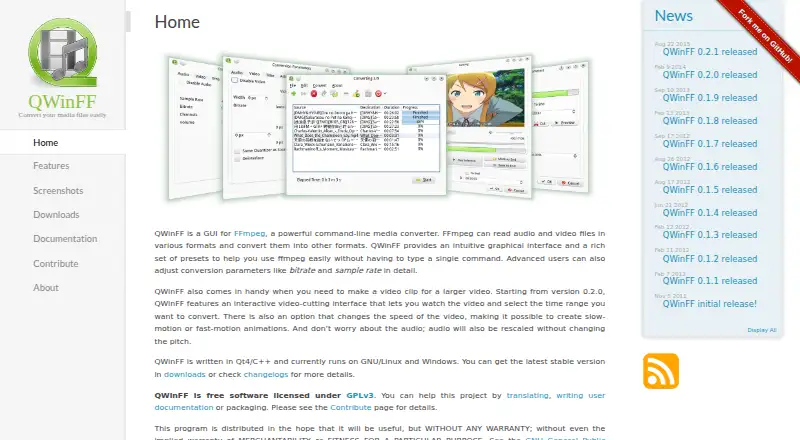
What QWinFF is
QWinFF is a graphical interface for FFmpeg that helps convert audio and video files on Linux and Windows. It provides presets for common formats and supports formats handled by FFmpeg. Users can convert batches, extract audio, and make visual cuts by setting start and end times. Speed adjustment preserves audio pitch; other controls cover volume and quality settings such as sample rate and bitrate. Additional parameters can be passed directly to FFmpeg. QWinFF requires FFmpeg and ffprobe at runtime. For optional tasks, ffplay or mplayer can preview cuts, while SoX can adjust audio speed. The maker lists a Windows installer and portable edition, along with Linux distribution packages and repositories. QWinFF is free software under GPLv3 and is distributed without warranty. Its downloads page identifies version 0.2.1, released 2015-08-22, as the latest stable release. Online user documentation is marked as a work in progress, and contributions to the documentation are invited through GitHub pull requests. The About page identifies Timothy Lin as its developer and maintainer.
Who it suits
QWinFF suits Linux and Windows users who want a graphical way to convert audio or video through FFmpeg. It can be useful for batch conversion, audio extraction, and basic cuts or speed adjustments.
What it does well
- Supports batch conversion and audio extraction.
- Provides presets for common formats.
- Includes visual cutting with start and end controls.
- Speed adjustment preserves audio pitch.
- Free software under GPLv3.
What to know first
- Requires FFmpeg and ffprobe at runtime.
- Latest stable release listed is version 0.2.1 from 2015-08-22.
- Online documentation is marked as a work in progress.
- Distributed without warranty.
Plans
| Plan | Billed and limits | Price |
|---|---|---|
| Free | Free software under GPLv3 | Free |
As qwinff.github.io lists them, read 11 Oct 2026. The maker's own page has the final word.
Verdict
QWinFF provides conversion controls, batch processing, audio extraction, and visual editing through a graphical interface. It is free under GPLv3, but depends on FFmpeg and ffprobe and its latest stable release is listed as version 0.2.1.
Facts from QWinFF's own pages
- Audio extraction
- Yes · qwinff.github.io, 20 Sept 2026
- Batch conversion
- Users can convert multiple files to the same output format at once or select different output formats for each input file. · qwinff.github.io, 11 Oct 2026
- Conversion controls
- Users can adjust audio volume, quality settings such as sample rate and bitrate, and pass additional parameters directly to FFmpeg. · qwinff.github.io, 11 Oct 2026
- Distribution
- The maker lists a Windows installer and portable edition, plus Linux distribution packages and repositories for several distributions. · qwinff.github.io, 11 Oct 2026
- Founded
- 2011 · qwinff.github.io, 28 Sept 2026
- Free plan
- Yes · qwinff.github.io, 20 Sept 2026
- Integrations
- QWinFF requires FFmpeg and ffprobe at runtime; ffplay or mplayer and SoX are optional for previewing cuts and adjusting audio speed, respectively. · qwinff.github.io, 11 Oct 2026
- Latest stable release
- The downloads page identifies version 0.2.1, released 2015-08-22, as the latest stable release. · qwinff.github.io, 11 Oct 2026
- License and warranty
- QWinFF is free software licensed under GPLv3 and is distributed without warranty. · qwinff.github.io, 11 Oct 2026
- Maintainer
- The About page says QWinFF is developed and maintained by Timothy Lin. · qwinff.github.io, 11 Oct 2026
- Platforms
- The maker says QWinFF runs on GNU/Linux and Windows; its downloads page also lists a port for OS/2 and eComStation. · qwinff.github.io, 11 Oct 2026
- Presets
- It provides predefined conversion settings for common formats and supports formats handled by FFmpeg. · qwinff.github.io, 11 Oct 2026
- Purpose
- QWinFF is a graphical interface for FFmpeg that helps users convert audio and video files. · qwinff.github.io, 11 Oct 2026
- Support and documentation
- The maker provides online user documentation marked as a work in progress and invites documentation contributions through GitHub pull requests. · qwinff.github.io, 11 Oct 2026
- Supported platforms
- cross-platform · qwinff.github.io, 20 Sept 2026
- Video and audio editing
- It provides visual video and audio cutting, start and end time controls, and speed adjustment while preserving audio pitch. · qwinff.github.io, 11 Oct 2026
Where QWinFF stands on Freedom251
- Video Converter Software#38 of 75