Quicksave
by Quicksave
What Quicksave is
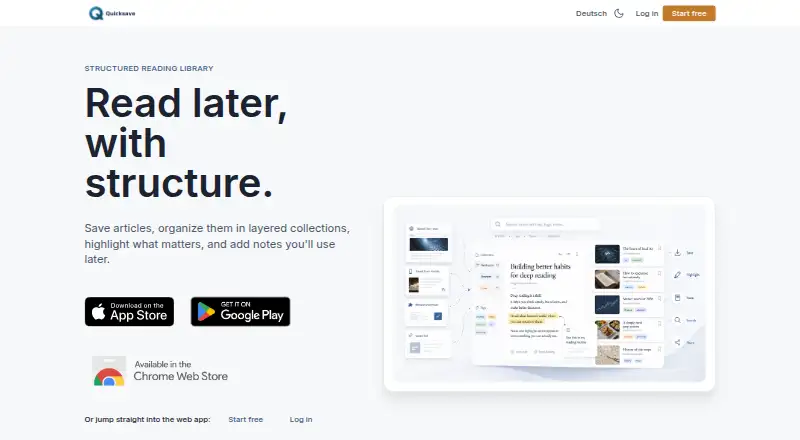
Quicksave is a freemium service for collecting and revisiting highlighted material across web and mobile platforms. It provides highlighting tools and full-text search, allowing saved content to be located through its text rather than only by browsing. Offline access supports use without an active connection. A browser extension offers another way to save or work with material, while mobile apps are available for iOS and Android. Highlight export lets users take highlighted passages beyond the service. Quicksave has a free plan and also names a QuickSave Premium plan, giving users a choice between the available tiers. The maker is Quicksave, headquartered in Frankfurt, Germany. Its combination of highlighting, search, offline access, extension support, mobile apps, and export is aimed at people who gather information from different places and want to return to selected passages later. The official website is quicksave.ai.
Who it suits
Quicksave suits readers, researchers, and information collectors who save highlighted material from the web or mobile devices. It is also useful for people who need offline access, full-text search, or exported highlights.
What it does well
- Free plan available
- Works on web, iOS, and Android
- Supports offline access
- Full-text search for saved content
- Browser extension included
- Exports highlights
What to know first
- A separate Premium tier is offered
- Freemium model requires choosing between available plans
Plans
| Plan | Billed and limits | Price |
|---|---|---|
| QuickSave Premium | — | On request |
As quicksave.ai lists them, read 22 Sept 2026. The maker's own page has the final word.
Getting started
- Open the Quicksave website
- Start with the free plan
- Use Quicksave on the web or install its iOS or Android app
- Add the browser extension
- Highlight material and search saved text
- Export highlights when needed
Verdict
Pick Quicksave if you want a cross-platform place to highlight, search, revisit, and export saved material. Look elsewhere if your workflow does not benefit from highlighting or from using a free-and-Premium tier structure.
Questions
Is Quicksave free to use?
Yes. Quicksave has a free plan and also offers a QuickSave Premium plan.
Which platforms does Quicksave support?
It is available on the web, iOS, and Android.
Can Quicksave work offline?
Yes. Offline access is included.
Does it provide search and highlighting?
Yes. It supports highlighting and full-text search.
Can highlights be exported?
Yes. Highlight export is available.
Is there a browser extension?
Yes. Quicksave includes a browser extension.
Facts from Quicksave's own pages
- Browser extension
- Yes · quicksave.ai, 22 Sept 2026
- Free plan
- Yes · quicksave.ai, 22 Sept 2026
- Full-text search
- Yes · quicksave.ai, 22 Sept 2026
- Headquarters
- Frankfurt, Germany · quicksave.ai, 28 Sept 2026
- Highlight export
- Yes · quicksave.ai, 22 Sept 2026
- Highlighting
- Yes · quicksave.ai, 22 Sept 2026
- Mobile apps
- Yes · quicksave.ai, 22 Sept 2026
- Offline access
- Yes · quicksave.ai, 22 Sept 2026
Where Quicksave stands on Freedom251
- Read-later apps#9 of 28
- Read-It-Later Apps#14 of 28