Freedom251 › Cold Email Software
Quickly
What Quickly is
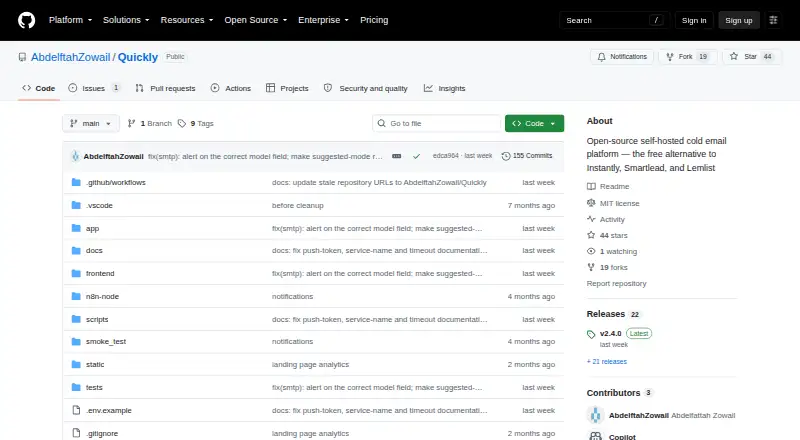
Quickly is a free, open-source platform for self-hosted cold email outreach. It lets teams build multi-step sequences with unlimited follow-up steps, set wait periods between messages, and thread replies automatically. Sending can rotate across Gmail and Microsoft 365 inboxes while honoring each inbox’s daily limits. Quickly also connects to Outlook and SMTP relays such as Amazon SES and Brevo, with optional IMAP reply sync. AI reply classification works with 19 providers, including Ollama for local offline use. Campaign analytics show performance by sequence step, along with open, click, and reply rates and timeline charts. For automation, Quickly includes a REST API with more than 90 endpoints, 15 webhook event types, an MCP server, and a custom n8n node. The project’s listed security stack includes JWT HS256, bcrypt, HMAC API keys, and Fernet token encryption. Deployment paths include Railway and other PaaS options, VPS using Docker Compose, existing servers with nginx, and local development. The first deployment allows creation of an initial admin account; that admin can invite more users from Settings after registration closes. The MIT license allows free use, modification, and self-hosting; hosting costs are paid by the operator.
Who it suits
Quickly suits sales teams, agencies, and independent hackers who want to run cold outreach on infrastructure they host themselves. It is also suited to teams that need inbox rotation, sequence analytics, or API and webhook automation.
What it does well
- MIT licensed for free use, modification, and self-hosting.
- Sequences allow unlimited follow-up steps and configurable wait days.
- Rotates Gmail and Microsoft 365 sends within daily inbox limits.
- Classifies replies through 19 providers, including offline Ollama.
- Provides campaign rates, per-step results, and timeline charts.
- Offers 90+ REST API endpoints and 15 webhook event types.
What to know first
- You pay for the server used to host it.
- The first deployment allows creation of an admin account; additional users need invitations.
- Personalization features are basic.
Limits
The Self-hosted plan costs nothing, with unlimited team members and contacts; the operator pays for the hosting server. Personalization features are basic.
Plans
| Plan | Billed and limits | Price |
|---|---|---|
| Self-hosted | MIT licensed · unlimited team members · unlimited contacts · you pay for the server you host it on | Free |
As github.com lists them, read 8 Oct 2026. The maker's own page has the final word.
Getting started
- Open the Quickly GitHub website.
- Choose a documented deployment path: Railway or another PaaS, VPS with Docker Compose, an existing server with nginx, or local development.
- Deploy Quickly; the first deployment allows creation of an initial admin account.
- Invite additional users from Settings after registration closes.
- Connect Gmail, Microsoft 365/Outlook, or an SMTP relay such as Amazon SES or Brevo.
- Configure sequences, inbox rotation, reply sync, and classification as needed.
Verdict
Choose Quickly if you want a free, MIT-licensed cold email platform that you can self-host and connect to Gmail, Microsoft 365, or SMTP relays. Its sequences, inbox rotation, reply classification, and automation interfaces suit teams building their own outreach setup. Look elsewhere if you need more than basic personalization or prefer not to manage hosting.
Questions
How much does Quickly cost?
The Self-hosted plan is free. You pay for the server you host it on.
Is there a free plan or trial?
Yes. Quickly has a free plan, and it is MIT licensed. There is no free trial.
Which platforms does it support?
The listed platforms are API, self-hosted, and web.
Is Quickly open source?
Yes. It is MIT licensed and can be used, modified, and self-hosted for free.
Which email services does it integrate with?
It supports Gmail, Microsoft 365/Outlook, and SMTP relays such as Amazon SES and Brevo. Optional IMAP reply sync is available.
How are new user accounts created?
The first deployment allows creation of an initial admin account. Registration then closes, and admins invite additional users from Settings.
Facts from Quickly's own pages
- Account setup
- The first deployment allows creation of an initial admin account; registration then closes and admins invite additional users from Settings. · github.com, 8 Oct 2026
- AI classification
- AI reply classification supports 19 providers, including Ollama for local, offline classification. · github.com, 8 Oct 2026
- Analytics
- Campaign analytics include per-step performance, open, click, and reply rates, and timeline charts. · github.com, 8 Oct 2026
- Automation
- The project provides a REST API with 90+ endpoints, 15 webhook event types, an MCP server, and a custom n8n node. · github.com, 8 Oct 2026
- Deployment
- The installation guide documents Railway/PaaS, VPS with Docker Compose, existing servers with nginx, and local development deployment paths. · github.com, 8 Oct 2026
- Inbox rotation
- It can rotate sends across Gmail and Microsoft 365 inboxes while respecting per-inbox daily limits. · github.com, 8 Oct 2026
- Integrations
- It supports Gmail, Microsoft 365/Outlook, and SMTP relays such as Amazon SES and Brevo, with optional IMAP reply sync. · github.com, 8 Oct 2026
- Intended users
- The README describes it as designed for sales teams, agencies, and indie hackers doing cold outreach. · github.com, 8 Oct 2026
- License
- Quickly is MIT licensed and can be used, modified, and self-hosted for free. · github.com, 8 Oct 2026
- Product
- Quickly is a free, open-source cold email platform designed for self-hosted cold outreach. · github.com, 8 Oct 2026
- Security
- The listed stack uses JWT HS256, bcrypt, HMAC API keys, and Fernet token encryption. · github.com, 8 Oct 2026
- Sequences
- It supports multi-step email sequences with unlimited follow-up steps, configurable wait days, and automatic reply threading. · github.com, 8 Oct 2026
Where Quickly stands on Freedom251
- Cold Email Software#5 of 35