Freedom251 › Continuous Integration Software
QuickBuild
What QuickBuild is
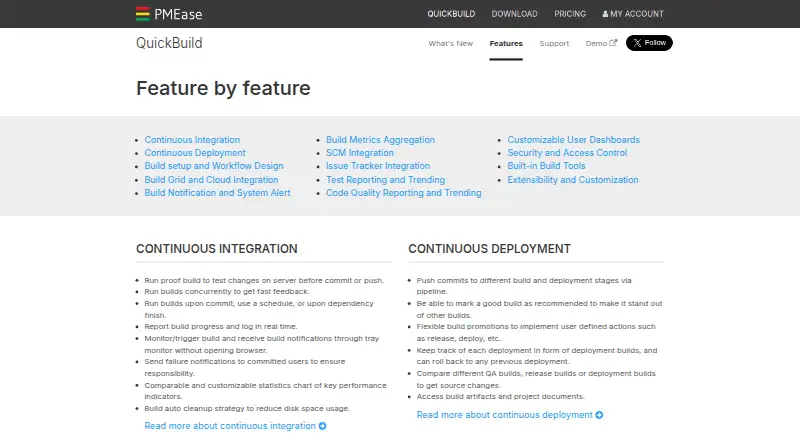
QuickBuild is a continuous integration and deployment server for DevOps teams, with visual workflow design, build automation and deployment controls. Builds can start after a code commit, on a schedule or when a dependency completes, while progress and logs appear in real time. Teams can promote builds through pipelines, track deployments and roll back to a previous deployment. Drag-and-drop workflow design supports reuse across projects through inheritance and variables. Its build grid scales across nodes and can launch on-demand nodes in AWS, Azure and Kubernetes environments. QuickBuild lists SCM support for Git, Subversion, Perforce, Mercurial and Team Foundation Server, plus issue tracker support for JIRA, Trac, Bugzilla, TeamForge and Redmine. It reports tests for frameworks such as JUnit and NUnit, and code inspection and coverage for tools including Checkstyle, FindBugs, PMD and Cobertura. Access controls include SSL, IP binding, role- and project-based access, LDAP and Active Directory integration, single sign-on and activity auditing. Custom plugins can extend SCM, issue tracking, build steps, reports, statistics, notifications and authentication; external systems can use its RESTful API. QuickBuild is available for web, Windows, Linux, macOS and self-hosted use. It has free licenses and an enterprise site license priced at $3,600, paid once.
Who it suits
QuickBuild suits DevOps teams that want visual build workflows, deployment tracking and rollback controls. It is also relevant to teams needing self-hosted installation, integrations with source control and issue trackers, and options for test and code-quality reporting.
What it does well
- Builds can run on commits, schedules or dependency completion.
- Visual workflows can be reused across projects.
- Deployment pipelines support tracking and rollback.
- Build grids can launch on-demand nodes in AWS, Azure and Kubernetes.
- Free Community and qualifying open-source licenses are available.
What to know first
- The Community License allows up to 16 configurations.
- The Enterprise Site License costs $3,600, paid once.
- The free licenses list forum support rather than prioritized email support.
Limits
The Community License permits up to 16 configurations and includes forum support. The Open Source License allows unlimited configurations for qualifying open-source projects and includes forum support; commercial service adds prioritized email support.
Plans
| Plan | Billed and limits | Price |
|---|---|---|
| Community License | Unlimited user accounts · unlimited servers · unlimited agents · up to 16 configurations · forum support | Free |
| Open Source License | Unlimited user accounts · unlimited servers · unlimited agents · unlimited configurations · forum support · qualifying open-source projects | Free |
| Commercial Service renewal | per year per site for additional years · Prioritized email support · licenses and source code for versions released before service expiration | $2,400 a year |
| Enterprise Site License | per physical site (including one year commercial service) · Unlimited user accounts · unlimited servers · unlimited agents · unlimited configurations · prioritized email support during commercial service | $3,600, paid once |
As pmease.com lists them, read 9 Oct 2026. The maker's own page has the final word.
Getting started
- Visit https://www.pmease.com/quickbuild.
- Choose the Community License, qualifying Open Source License or a commercial license.
- Download a package for Windows, Linux, Mac or Unix, or install on a physical server.
- Configure workflows visually with drag and drop.
- Connect source control and issue trackers as needed.
- For a free evaluation license, contact PMEase about the 60-day site evaluation.
Verdict
Pick QuickBuild if you need a configurable CI/CD server with visual pipelines, deployment rollback and broad listed integrations. Its free Community License may suit work within 16 configurations, while the Open Source License serves qualifying projects. Teams needing unlimited configurations and prioritized email support can consider the $3,600, paid once Enterprise Site License.
Questions
Is QuickBuild free?
Yes. The Community License is free and supports up to 16 configurations. A free Open Source License offers unlimited configurations for qualifying open-source projects.
What does the Enterprise Site License cost?
It costs $3,600, paid once, billed per physical site and including one year of commercial service.
Does QuickBuild have a free trial?
A 60-day site evaluation license with unlimited configurations is available by contacting PMEase.
Which platforms does QuickBuild support?
It is listed for web, Windows, Linux, macOS and self-hosted use. The download page offers Windows, Linux, Mac and Unix packages.
Is QuickBuild open source?
A free Open Source License is available for qualifying open-source projects. It includes unlimited configurations and forum support.
What integrations does QuickBuild list?
SCM support includes Git, Subversion, Perforce, Mercurial and Team Foundation Server. Issue tracker support includes JIRA, Trac, Bugzilla, TeamForge and Redmine.
Facts from QuickBuild's own pages
- Build automation
- It can run builds on commits, schedules, or dependency completion, and report progress and logs in real time. · pmease.com, 9 Oct 2026
- Build grid
- The build grid can scale across nodes and launch on-demand nodes in AWS, Azure, and Kubernetes environments. · pmease.com, 9 Oct 2026
- Deployment
- Build pipelines support promotions and deployment tracking, with rollback to a previous deployment. · pmease.com, 9 Oct 2026
- Extensibility
- Custom plugins can add SCM systems, issue trackers, build steps, reports, statistics, notifiers, and authentication systems; external systems can use its RESTful API. · pmease.com, 9 Oct 2026
- Free evaluation
- A 60-day site evaluation license with unlimited configurations is available by contacting PMEase. · pmease.com, 9 Oct 2026
- Integrations
- The product lists SCM support including Git, Subversion, Perforce, Mercurial, and Team Foundation Server, and issue tracker support including JIRA, Trac, Bugzilla, TeamForge, and Redmine. · pmease.com, 9 Oct 2026
- Platforms and deployment
- The download page offers Windows, Linux, Mac, and Unix packages, and describes an enterprise site license for installation on physical servers. · pmease.com, 9 Oct 2026
- Purpose
- QuickBuild is a flexible continuous integration and deployment server for DevOps teams. · pmease.com, 9 Oct 2026
- Security
- Listed access controls include SSL, IP address binding, role-based and per-project access, LDAP and Active Directory integration, single sign-on, and user activity auditing. · pmease.com, 9 Oct 2026
- Support
- Commercial service includes prioritized support by email with a guaranteed response time of two business days; community forum support is also listed. · pmease.com, 9 Oct 2026
- Testing and quality
- It provides test reporting for frameworks including JUnit and NUnit, plus code inspection and coverage reporting for tools including Checkstyle, FindBugs, PMD, and Cobertura. · pmease.com, 9 Oct 2026
- Version
- The download page lists QuickBuild version 16.0.26, released September 22, 2026. · pmease.com, 9 Oct 2026
- Workflow design
- Build workflows can be designed visually with drag and drop, and reused across projects through inheritance and variables. · pmease.com, 9 Oct 2026
Where QuickBuild stands on Freedom251
- Continuous Integration Software#25 of 58