Freedom251 › Test Analytics Software
QAI
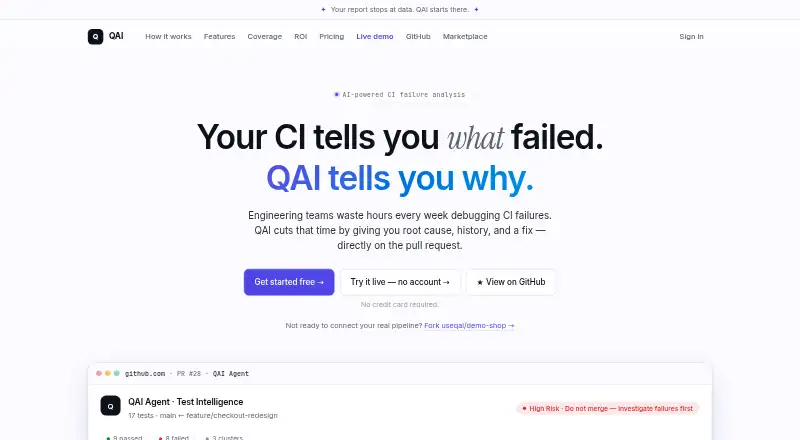
What QAI is
QAI is a web-based tool for analyzing continuous-integration test failures and bringing the findings to GitHub pull requests. It runs as a step in a GitHub Actions workflow after tests, then groups failures by likely root cause and shares history, suggested code fixes, and merge recommendations. QAI supports a wide range of test frameworks, including Playwright, Selenium configurations, Jest, Vitest, pytest, Maven/JUnit, Go, NUnit, RSpec, and WebdriverIO; it also accepts output in JUnit XML format. For Playwright traces, it provides confidence scores and can map pages, API calls, and paths as behavioral coverage.
Teams can review failure trends, a flakiness leaderboard, and cluster history. They can also mention @qai-agent on a pull request to ask about a failure’s history, severity, frequency, or fixes. Rules can send matching cluster alerts to GitHub issues, Slack, email, or webhooks. The Free plan covers one repository, 50 CI runs per month, one member, and 30-day cluster history. Pro costs $29 a month; Team costs $99 a month. A 7-day trial is available, and the service says it can return a first result in 60 seconds after setup.
Who it suits
QAI suits teams running automated tests in GitHub Actions that want failure analysis and suggested fixes on pull requests. It can also fit teams that need failure trends, flaky-test tracking, or alert rules across supported channels.
What it does well
- Groups test failures by root cause and provides confidence scores from Playwright traces.
- Posts suggested code fixes and merge recommendations on pull requests.
- Supports numerous frameworks and JUnit XML output.
- Tracks failure trends, flakiness, and cluster history.
- Rules can send alerts to GitHub issues, Slack, email, or webhooks.
What to know first
- The Free plan allows one repository, one member, and 50 CI runs monthly.
- Behavioral coverage is described for Playwright only.
- Pro is $29 a month; Team is $99 a month.
Limits
The Free plan includes one repository, 50 CI runs per month, one team member, and 30-day cluster history. Pro includes Ask QAI in PR up to 50 times monthly and up to three members; Team removes those Ask QAI and member caps.
Plans
| Plan | Billed and limits | Price |
|---|---|---|
| Pro | Unlimited repositories · Unlimited CI runs · Ask QAI in PR (50/month) · Up to 3 members | $29 a month |
| Team | Everything in Pro · Unlimited team members · Ask QAI in PR (unlimited) · Slack alerts · Priority support | $99 a month |
| Free | 1 repository · 50 CI runs/month · 1 team member · 30-day cluster history | On request |
As useqai.dev lists them, read 8 Oct 2026. The maker's own page has the final word.
Getting started
- Open https://useqai.dev/.
- Choose the Free plan or review the Pro and Team plans.
- Connect through the GitHub App and add QAI as a GitHub Actions workflow step after tests.
- Run tests in a supported format, including JUnit XML.
- Review the first result, then use pull-request analysis or configure alert rules.
Verdict
Choose QAI if your team uses GitHub Actions and wants test-failure context and proposed fixes directly on pull requests. Its free tier is limited in repositories, monthly runs, members, and history; larger teams may need Pro or Team.
Questions
Is there a free plan?
Yes. Free includes one repository, 50 CI runs per month, one team member, and 30-day cluster history.
How much do the paid plans cost?
Pro costs $29 a month. Team costs $99 a month.
Is a trial available?
Yes, QAI offers a 7-day trial.
Which platforms and CI/CD integration does QAI support?
QAI runs on the web and uses GitHub Actions as its CI/CD integration.
Which test frameworks are supported?
The listed frameworks include Playwright, Selenium variants, Jest, Vitest, pytest, Maven/JUnit, Go, NUnit, RSpec, and WebdriverIO. QAI also supports anything that emits JUnit XML.
What integrations or alert actions are available?
QAI describes GitHub Actions, the GitHub App, Slack alerts, email, and webhooks as integrations or actions.
Facts from QAI's own pages
- Ask QAI
- Teams can mention @qai-agent on a pull request to ask about failure history, severity, frequency, and fixes. · useqai.dev, 8 Oct 2026
- Automations
- Automated rules can trigger GitHub issues, Slack messages, email, or webhooks when a failure cluster matches specified conditions. · useqai.dev, 8 Oct 2026
- Coverage
- QAI maps pages, API calls, and paths from Playwright traces and describes its behavioral coverage feature as Playwright only. · useqai.dev, 8 Oct 2026
- Failure analysis
- QAI groups test failures by root cause and provides confidence scores from Playwright traces. · useqai.dev, 8 Oct 2026
- Fix suggestions
- QAI posts suggested code fixes for failing tests directly on the pull request. · useqai.dev, 8 Oct 2026
- Free tier limits
- The Free plan includes one repository, 50 CI runs per month, one team member, and 30-day cluster history. · useqai.dev, 8 Oct 2026
- History and trends
- QAI provides failure trends, a flakiness leaderboard, and cluster history. · useqai.dev, 8 Oct 2026
- Integrations
- The site describes GitHub Actions, the GitHub App, Slack alerts, email, and webhooks as integrations or actions. · useqai.dev, 8 Oct 2026
- Product
- QAI analyzes CI test failures and posts root cause, history, fix suggestions, and merge recommendations on pull requests. · useqai.dev, 8 Oct 2026
- Setup
- The site says QAI needs one workflow step and can return a first result in 60 seconds. · useqai.dev, 8 Oct 2026
- Support
- The Team plan includes priority support, and the pricing page directs questions to the listed support email. · useqai.dev, 8 Oct 2026
- Test formats
- The site says QAI supports Playwright, Jest, pytest, Maven, Go, and anything that emits JUnit XML. · useqai.dev, 8 Oct 2026
- Workflow
- QAI runs after tests through a GitHub Actions workflow step. · useqai.dev, 8 Oct 2026
Where QAI stands on Freedom251
- Test Analytics Software#18 of 30