Freedom251 › Physics Simulation Software
PyAutoLens
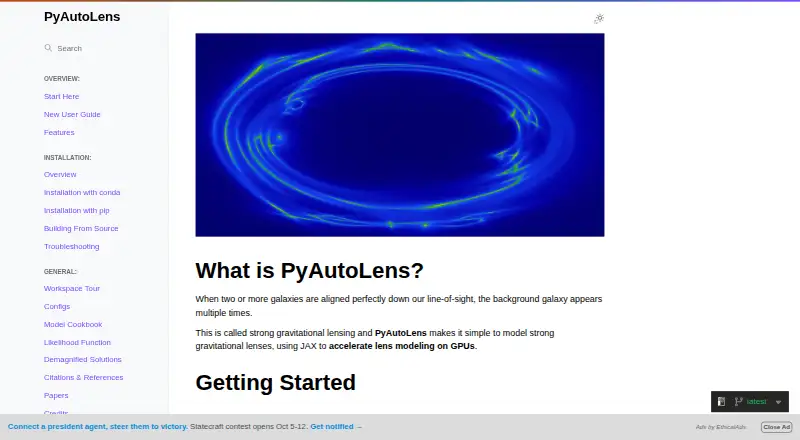
What PyAutoLens is
PyAutoLens is a free software package for analyzing strong gravitational lenses: systems in which the gravity of a foreground object bends light from a background galaxy. It models galaxy-scale, multi-galaxy, group-scale and cluster-scale systems using imaging, interferometer measurements or point-source observations. Its pixelized reconstruction represents a source galaxy on a grid, allowing irregular and clumpy light structures to be modeled. Point-source tools cover objects such as quasars, while interferometer data, including ALMA and LOFAR observations, can be modeled directly in the uv-plane.
For spectral-line data cubes, PyAutoLens fits each channel together with a shared lens model. It also supports multi-wavelength imaging, combinations of imaging and interferometer data, weak-lensing shear catalogues, and joint strong- and weak-lensing analyses of clusters. Its automated Source, Light and Mass pipelines develop models through searches of increasing complexity. JAX handles lensing calculations and can provide GPU acceleration; GPU support requires a separate JAX installation. The package works offline and can export data. It runs on Linux, macOS and Windows, requires Python 3.12 or later, and can be installed through Anaconda or pip from PyPI. Windows installation requires Anaconda. Intel Mac users follow a slower NumPy path because JAX wheels are unavailable for that hardware.
Who it suits
PyAutoLens is suited to researchers analyzing strong-lens systems with imaging, interferometer or point-source observations, from individual galaxies to clusters. It also serves work involving spectral-line cubes, multiple wavelengths or combined strong- and weak-lensing data.
What it does well
- Free package with offline access and data export.
- Models galaxy-, group- and cluster-scale lens systems.
- Reconstructs irregular source galaxies using pixelized models.
- Fits spectral-line data cubes across all channels with a shared lens model.
- Supports imaging, interferometer and point-source observations.
- JAX can accelerate calculations on supported GPUs.
What to know first
- Requires Python 3.12 or later.
- Windows installation requires Anaconda.
- GPU acceleration requires a separate JAX installation.
- Intel Macs use the slower NumPy path.
Limits
The free package requires Python 3.12 or later; Windows users must install through Anaconda. The default installation includes CPU-only JAX, and GPU acceleration requires a separate JAX installation. Intel Macs use the slower NumPy path because JAX wheels are unavailable.
Plans
| Plan | Billed and limits | Price |
|---|---|---|
| PyAutoLens | Python package · install with pip or conda · Python 3.12+ | Free |
As pyautolens.readthedocs.io lists them, read 8 Oct 2026. The maker's own page has the final word.
Getting started
- Install Python 3.12 or later.
- On Linux or macOS, install PyAutoLens with pip from PyPI or through Anaconda.
- On Windows, use Anaconda to install the package.
- For GPU acceleration, install JAX with GPU support separately.
- Optionally install Numba for faster performance.
Verdict
Choose PyAutoLens if you need a free, offline package for detailed gravitational-lensing analysis across imaging, interferometer or point-source data. Allow for its Python version requirement, and check the installation path for your operating system and hardware, especially if you need GPU acceleration.
Questions
How much does PyAutoLens cost?
PyAutoLens is free. Its listed plan is free.
Which operating systems does it support?
It supports Linux, macOS and Windows. Windows users must use Anaconda for installation.
Can I use PyAutoLens offline?
Yes. Offline access is listed, and the package can export data.
What Python version does it require?
PyAutoLens requires Python 3.12 or later. It can be installed with Anaconda or pip from PyPI, except Windows users must use Anaconda.
Does it support GPU acceleration?
Yes. It uses JAX for GPU acceleration, but the default installation includes CPU-only JAX. GPU support requires a separate JAX installation; Intel Macs use the slower NumPy path because JAX wheels are unavailable.
What does its AI Assistant require?
The assistant supports natural-language gravitational-lensing work inside an AI coding agent; Claude Code and Codex are recommended, while OpenCode is experimental. Sustained scientific use normally requires paid access to an AI coding agent.
Facts from PyAutoLens's own pages
- Acceleration
- It uses JAX for lensing calculations and can run significantly faster on GPUs. · pyautolens.readthedocs.io, 7 Oct 2026
- AI assistant
- The PyAutoLens AI Assistant supports natural-language gravitational-lensing work inside an AI coding agent; Claude Code and Codex are recommended, while OpenCode is described as experimental. · pyautolens.readthedocs.io, 7 Oct 2026
- Assessment tools
- No · github.com, 24 Sept 2026
- Assistant access
- The documentation says sustained scientific use of the assistant normally requires paid access to an AI coding agent, and browser chat routes through ChatGPT or Claude with a GitHub connector are no longer supported. · pyautolens.readthedocs.io, 7 Oct 2026
- Authoring tools
- No · github.com, 24 Sept 2026
- Automated modeling
- Its Source, Light and Mass pipelines build a lens model through a sequence of searches that gradually increase model complexity. · pyautolens.readthedocs.io, 8 Oct 2026
- Data cubes
- It can fit spectral-line data cubes with a shared lens model across channels and a separate source reconstruction for each channel. · pyautolens.readthedocs.io, 8 Oct 2026
- Data export
- Yes · github.com, 24 Sept 2026
- Delivery mode
- desktop · github.com, 24 Sept 2026
- Free plan
- Yes · github.com, 24 Sept 2026
- GPU acceleration
- It uses JAX for GPU acceleration, which the docs say can often run 50 times or more faster than CPUs. · pyautolens.readthedocs.io, 8 Oct 2026
- GPU requirements
- The default installation includes CPU-only JAX; GPU acceleration requires installing JAX with GPU support separately. · pyautolens.readthedocs.io, 7 Oct 2026
- Installation
- PyAutoLens requires Python 3.12 or later and can be installed with Anaconda or pip from PyPI. · pyautolens.readthedocs.io, 7 Oct 2026
- Installation limits
- PyAutoLens requires Python 3.12 or later and supports Linux, macOS and Windows; Windows users must use Anaconda. · pyautolens.readthedocs.io, 8 Oct 2026
- Integrations
- PyAutoLens uses PyAutoFit for probabilistic lens modeling and documents search options including dynesty and emcee. · pyautolens.readthedocs.io, 8 Oct 2026
- Intel Mac limitation
- On Intel Macs, JAX wheels are unavailable, so PyAutoLens uses the slower NumPy path; other supported platforms listed get JAX by default. · pyautolens.readthedocs.io, 7 Oct 2026
- Intended users
- The documentation recommends new users study its workspace examples and HowToLens Jupyter notebook lecture series on strong gravitational lensing. · pyautolens.readthedocs.io, 8 Oct 2026
- Interferometry
- It fits interferometer visibility data directly in the uv-plane, with examples involving ALMA and LOFAR data. · pyautolens.readthedocs.io, 8 Oct 2026
- Lens scales
- The docs describe tools for modeling multi-galaxy and group-scale lenses and state there is no limit on the number of lens or source galaxies. · pyautolens.readthedocs.io, 8 Oct 2026
- Lesson library
- No · github.com, 24 Sept 2026
- Multi-wavelength
- It supports simultaneous analysis of imaging datasets at different wavelengths and combinations of imaging and interferometer data. · pyautolens.readthedocs.io, 8 Oct 2026
- Offline access
- Yes · github.com, 24 Sept 2026
- Operating systems
- The documentation says PyAutoLens supports Linux, MacOS, and Windows. · pyautolens.readthedocs.io, 7 Oct 2026
- Optional dependency
- Interferometer analysis requires the optional nufftax dependency, which the docs recommend installing only for that analysis. · pyautolens.readthedocs.io, 8 Oct 2026
Where PyAutoLens stands on Freedom251
- Physics Simulation Software#25 of 89