Freedom251 › Special Education Software
Progress Desk
What Progress Desk is
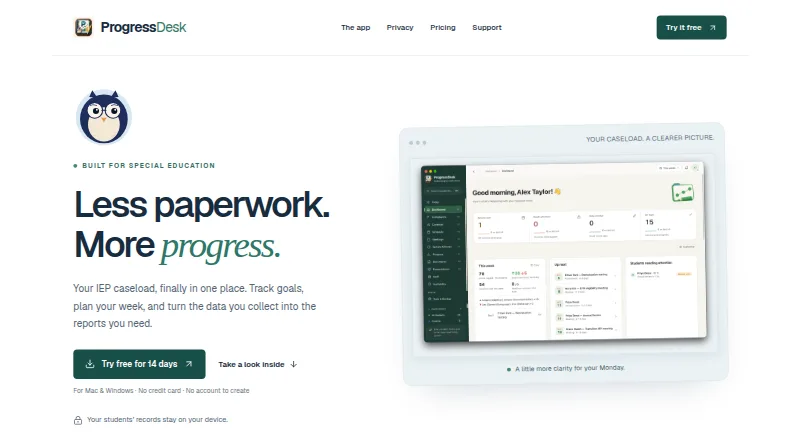
Progress Desk is a case management application for special education professionals, including case managers. It creates 18 documents, including PLAAFPs, quarterly progress reports, family summaries, prior written notices, and meeting invitations. For goal measurement, it offers 15 methods and presents a goal’s baseline, target, data points, and trend on a goal card.
The schedule combines sessions, meetings, deadlines, and class availability in one view. When a session moves, Progress Desk recalculates make-up time and service-minute totals. It also supports IEPs, accommodation tracking, goal progress monitoring, service logging, compliance reporting, and data import and export. Student records are stored and processed locally; the maker says the software does not collect, access, transmit, store, or process student data through the software. The Mac app requires internet for a one-time licence check, then can work offline. Its iPad edition costs $59, paid once, billed one-time per iPad, and requires iPadOS 16 or later. The Mac edition costs $99, paid once, billed one-time for up to two Macs, and requires macOS 12 or later. Progress Desk offers a 14-day trial and advertises a 30-day money-back guarantee.
Who it suits
Progress Desk suits special education professionals, especially case managers, who prepare student documentation, monitor goals, and coordinate service schedules. It may also suit districts seeking help with deployment, templates, workflow setup, and data agreements.
What it does well
- Builds 18 special education documents.
- Provides 15 methods for measuring goals.
- Combines sessions, meetings, deadlines, and class availability in one schedule.
- Moving sessions recalculates make-up time and service-minute totals.
- Student records are stored and processed locally.
What to know first
- The iPad edition requires iPadOS 16 or later.
- The Mac edition requires macOS 12 or later.
- District pricing tiers are not published.
Limits
The iPad edition is for iPadOS 16 or later, and the Mac edition is for macOS 12 or later. The Mac app needs internet for its one-time licence check, then can work offline.
Plans
| Plan | Billed and limits | Price |
|---|---|---|
| Progress Desk for iPad | One-time · Per iPad · iPadOS 16+ | $59, paid once |
| Progress Desk for Mac | One-time · Up to 2 Macs · macOS 12+ | $99, paid once |
As progressdesk.app lists them, read 29 Sept 2026. The maker's own page has the final word.
Getting started
- Visit https://progressdesk.app/
- Choose the iPad edition for an iPad running iPadOS 16 or later, or the Mac edition for macOS 12 or later.
- Use the 14-day trial to evaluate the application.
- Purchase the iPad edition for $59, paid once per iPad or the Mac edition for $99, paid once for up to two Macs.
- For district deployment, contact the maker about volume pricing and case-by-case setup help.
Verdict
Choose Progress Desk if you need special education case management with document creation, goal tracking, and service scheduling. The iPad and Mac editions have different device requirements, and districts seeking volume pricing must discuss arrangements with the maker.
Questions
How much does Progress Desk cost?
The iPad edition is $59, paid once, billed one-time per iPad. The Mac edition is $99, paid once, billed one-time for up to two Macs.
Is there a free trial?
Yes. Progress Desk offers a 14-day trial; it does not have a free plan.
Which platforms are supported?
The listed platforms are iOS, macOS, and Windows. The named plans are for iPad and Mac, with requirements of iPadOS 16+ and macOS 12+ respectively.
Can the Mac app work offline?
Yes. It needs internet for a one-time licence check and can work offline afterward.
How are student records handled?
Student records are stored and processed locally. The maker says the software does not collect, access, transmit, store, or process student data through the software.
Does Progress Desk offer district pricing?
The maker offers volume pricing and case-by-case deployment help, but does not publish district pricing tiers.
Facts from Progress Desk's own pages
- Connectivity
- The maker says the Mac app needs internet for a one-time licence check and can work offline afterward. · progressdesk.app, 29 Sept 2026
- Districts
- The maker offers volume pricing and case-by-case help with deployment, custom templates, workflow setup, and data agreements; it does not publish district pricing tiers. · progressdesk.app, 29 Sept 2026
- Documentation
- It builds 18 documents, including PLAAFPs, quarterly progress reports, family summaries, prior written notices, and meeting invitations. · progressdesk.app, 29 Sept 2026
- Founded
- 2025 · progressdesk.app, 28 Sept 2026
- Goal measurement
- It supports 15 ways to measure a goal and shows baseline, target, data points, and trend on a goal card. · progressdesk.app, 29 Sept 2026
- Headquarters
- Columbus, Ohio, United States · progressdesk.app, 28 Sept 2026
- Privacy
- Student records are stored and processed locally, and the maker says it does not collect, access, transmit, store, or process student data through the software. · progressdesk.app, 29 Sept 2026
- Purpose
- Progress Desk is a case management application for special education professionals, including case managers. · progressdesk.app, 29 Sept 2026
- Refunds
- The maker advertises a 30-day money-back guarantee. · progressdesk.app, 29 Sept 2026
- Scheduling
- Its schedule brings sessions, meetings, deadlines, and class availability into one view, and recalculates make-up time and service-minute totals when sessions move. · progressdesk.app, 29 Sept 2026
- Security
- The help center says data is encrypted at rest with a key sealed in the device’s macOS Keychain; backups can optionally be password-protected. · progressdesk.app, 29 Sept 2026
- Support
- Support is available by email at [email protected], and the same person who built the software answers the support inbox. · progressdesk.app, 29 Sept 2026
Where Progress Desk stands on Freedom251
- Special Education Software#6 of 21