Freedom251 › Virtual Staging Software

Pristage
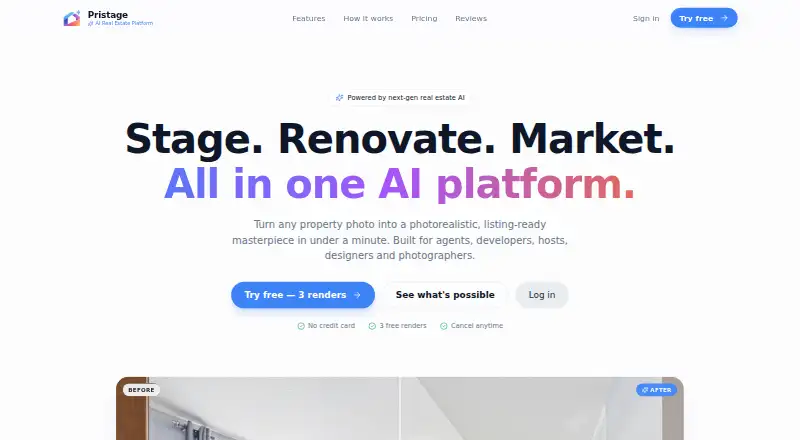
What Pristage is
Pristage is an AI platform for preparing and marketing real estate listings. It can furnish photos of empty rooms in designer styles, preview flooring, paint, kitchen, and bathroom changes, and enhance images with sky replacement, twilight conversion, and retouching. Its marketing studio makes ad creatives, social posts, and brochures from a listing; it also generates MLS-ready descriptions tuned to the user’s market and creates property videos from existing photos. The site describes more than 70 styles and batch uploads for a whole listing. It says renders include commercial usage rights for MLS, ads, brochures, and social media. The free plan costs nothing and provides three staged images at standard quality with watermarks. Pro costs $49 a month for 100 monthly renders, all styles, HD downloads, the marketing studio, and video tours. Business costs $149 a month and includes unlimited renders, API access, team seats, a priority queue, and priority support. Pristage says uploads use TLS and access-controlled storage, and photos and results are purged after 14 days.
Who it suits
Pristage may suit real estate agents, property developers, photographers, Airbnb hosts, and interior designers who need listing visuals or marketing materials. Its tiers range from a small watermarked free allowance to business features such as API access and team seats.
What it does well
- Can stage empty rooms in more than 70 styles.
- Previews flooring, paint, kitchen, and bathroom changes.
- Creates marketing materials and videos from listing photos.
- States renders include commercial usage rights.
- Business plan includes API access and team seats.
What to know first
- Free plan is limited to three staged images.
- Free results are standard quality and watermarked.
- Source photos and results are purged after 14 days.
- Pro costs $49 a month; Business costs $149 a month.
Limits
The free plan includes three staged images at standard quality, with watermarked results. Pro costs $49 a month and includes 100 renders per month; unlimited renders are listed under Business at $149 a month.
Plans
| Plan | Billed and limits | Price |
|---|---|---|
| Free | 3 staged images · standard quality · watermarked results | Free |
| Business | Billed monthly, cancel anytime · Unlimited renders · priority queue · API access · team seats · priority support | $149 a month |
| Pro | Billed monthly, cancel anytime · 100 renders per month · 70+ styles · HD downloads · marketing studio · video tours | $49 a month |
As pristage.com lists them, read 15 Oct 2026. The maker's own page has the final word.
Getting started
- Open pristage.com.
- Choose the Free, Pro, or Business plan.
- Use the web platform or API.
- Upload listing photos, including a batch for a whole listing.
- Create staging, renovation previews, or marketing outputs.
Overview
Pristage is an AI platform for preparing real estate listing images and marketing materials. It is best suited to agents and property teams who need more than virtual staging, though its free tier is too small and watermarked for routine listing work.
Alongside furnishing empty rooms, Pristage previews renovations, enhances photos, writes listing copy, and produces marketing assets and videos. That breadth can reduce the need to move between specialist tools; the trade-off is that users seeking only a few staged images may find its paid plans broader and more expensive than they need.
Its 70+ designer styles and batch uploads support work across a full listing. Commercial usage rights cover MLS, ads, brochures, and social media. Uploads travel over TLS to private, access-controlled storage; photos are not sold, shared, or used to train public models, and source photos and results are purged after 14 days. That retention period may not suit teams that need their project assets kept longer.
Key features
Visual preparation
Virtual staging furnishes empty rooms in designer styles, while renovation previews cover flooring, paint, kitchens, and bathrooms. Together, those tools help agents and developers present both a furnished look and possible improvements. Photo enhancement adds sky replacement, twilight conversion, and retouching, extending the workflow to existing listing images.
Listing marketing
The marketing studio generates ad creatives, social posts, and brochures from a listing, and the platform writes MLS-ready descriptions tuned to the user's market. It also creates cinematic property videos from existing photos, without filming. This combination is useful when a team needs multiple listing formats, but users wanting only one output may not benefit from the wider toolkit.
Pricing
Pristage offers a free tier, a free trial, and monthly paid plans. The free tier costs nothing and includes three staged images at standard quality with watermarked results. It is an evaluation option, not a practical allowance for repeated listing work.
Pro costs $49 a month, billed monthly, and can be canceled anytime. It includes 100 renders per month, all 70+ styles, HD downloads, the marketing studio, and video tours. The quota and watermark-free HD downloads make it the clearest fit for an individual or small operation with recurring but bounded needs; teams exceeding 100 renders would need to consider Business.
Business costs $149 a month, billed monthly, and can be canceled anytime. It includes unlimited renders, a priority queue, API access, team seats, and priority support. This is the plan for higher-volume teams or workflows that need API access and shared seats. Compared with Pro, its price buys scale and team infrastructure rather than a stated expansion of the marketing tools.
Platforms
Pristage is available on the web and via API. The API is part of Business, so customers on Free and Pro should not expect API access through those plans.
Who it's for
Pristage names real estate agents, property developers, photographers, Airbnb hosts, and interior designers as its audience. Its range of image and marketing outputs is especially relevant to professionals preparing listings across several channels. It is less compelling for occasional users who need only a few images, given the free tier's three-image cap and watermark.
Pros and cons
Pros
- One listing workflow spans images and copy. Staging, renovation previews, photo enhancement, descriptions, marketing assets, and video tours cover several common production needs.
- Commercial rights are included. Renders can be used for MLS, ads, brochures, and social media.
- Business supports team and high-volume work. Unlimited renders, API access, team seats, a priority queue, and priority support address needs beyond an individual workflow.
Cons
- The free tier is restrictive for finished listings. Three standard-quality staged images with watermarks are suited to evaluation rather than ongoing use.
- Pro has a firm monthly ceiling. Its 100-render allowance may not stretch to high-volume teams, which must weigh the $149 a month Business plan.
- Assets are not retained long term. Source photos and results are purged after 14 days, which limits the time available to revisit prior project files.
Alternatives
Virtual Staging Software is a useful place to compare the category if you are still deciding which kind of staging tool fits.
Choose StageHQ if mobile access matters: it supports Android and iOS as well as web, and its free offer provides three watermarked previews for evaluation.
BoxBrownie is worth considering for a pay-as-you-go approach to image services, with a free account that includes three image enhancements and one Day to Dusk edit.
Planua offers a web-based alternative with free staging options, including three staged images per month with watermarked HD previews and limited brand controls.
StageRight AI may suit buyers who want a free allowance without expiry: its free tier includes five photos with no plan or card required.
VirtualStage offers a free tier with five image transformations, basic staging styles, standard quality, and community support.
Stuccco is another freemium option for web users who want to consider its Pay As You Go service.
DreamStage Studio is a web alternative with one-time options for MLS-ready listing stories and social media kits, from $3, or decluttering and item removal, from $8.
Frameshift may fit users prioritizing a higher stated monthly credit allowance: its Starter plan is $35/month for 400 credits, about five rooms per month, unlimited projects, priority queue, and two-year image retention.
Verdict
Choose Pristage if you prepare real estate listings regularly and want staging, renovation previews, listing copy, and marketing outputs under one roof. Its broad workflow and commercial-use rights are persuasive, but the free plan is only a small, watermarked sample and the 14-day purge is a real constraint. Look elsewhere if you need longer asset retention, just a few occasional images, or a more narrowly priced service.
Verdict
Pristage brings image staging, listing copy, and marketing outputs into one platform. The free plan is limited, while Pro and Business offer larger render allowances and additional tools.
Questions
Is there a free plan?
Yes. Free costs nothing and includes three staged images at standard quality with watermarked results.
How much do the paid plans cost?
Pro is $49 a month, billed monthly with cancellation anytime. Business is $149 a month, also billed monthly with cancellation anytime.
Which platforms does Pristage support?
The listed platforms are web and API.
What does Pristage create?
It stages rooms, previews renovations, enhances photos, generates listing descriptions and marketing materials, and makes property videos from existing photos.
What does Business include?
Business includes unlimited renders, a priority queue, API access, team seats, and priority support.
How are uploaded photos handled?
Pristage says uploads travel over TLS to private, access-controlled storage and are not sold, shared, or used to train public models. Source photos and results are automatically purged after 14 days.
Facts from Pristage's own pages
- AI virtual staging
- Its virtual-staging tool furnishes empty rooms in designer styles. · pristage.com, 15 Oct 2026
- Audience
- The platform lists real estate agents, property developers, photographers, Airbnb hosts, and interior designers as its users. · pristage.com, 5 Oct 2026
- Batch processing
- Users can batch-upload a whole listing rather than processing only one image at a time. · pristage.com, 15 Oct 2026
- Business features
- The Business plan lists unlimited renders, API access, team seats, a priority queue, and priority support. · pristage.com, 5 Oct 2026
- Commercial rights
- The site says renders include commercial usage rights for MLS listings, advertisements, brochures and social media. · pristage.com, 15 Oct 2026
- Company identity
- The homepage identifies the maker only as Pristage and provides no legal company name, headquarters or founding year. · pristage.com, 15 Oct 2026
- Developer documentation
- No public API reference, SDK listing or developer documentation is provided on the opened homepage. · pristage.com, 15 Oct 2026
- Free access
- Visitors receive three free renders without entering a credit card. · pristage.com, 15 Oct 2026
- Free tier limit
- The free tier includes three staged images with standard quality and watermarked results. · pristage.com, 5 Oct 2026
- Funding and ownership
- The opened maker page provides no funding, ownership or investor information. · pristage.com, 15 Oct 2026
- Independent complaints
- No independently authored complaints about Pristage were available on the opened TrustRadius, Gartner Peer Insights or GetApp pages. · trustradius.com, 15 Oct 2026
- Independent praise
- No independently authored praise about Pristage was available on the opened TrustRadius, Gartner Peer Insights or GetApp pages. · trustradius.com, 15 Oct 2026
- Infrastructure
- The service describes GPU-backed cloud rendering and row-level access controls on records. · pristage.com, 15 Oct 2026
- Licence
- The opened maker page does not state an open-source licence or identify the software as open source. · pristage.com, 15 Oct 2026
- Limit: API availability
- API access is listed only with the Business plan. · pristage.com, 15 Oct 2026
- Limit: free tier
- Free output is restricted to three staged images, standard quality and watermarked results. · pristage.com, 15 Oct 2026
- Limit: source retention
- The 14-day automatic purge means uploaded sources and results are not presented as permanent storage. · pristage.com, 15 Oct 2026
- Limit: team features
- Team seats and priority support are listed only with Business. · pristage.com, 15 Oct 2026
- Listing descriptions
- A listings generator creates MLS-ready descriptions adjusted to the user’s market. · pristage.com, 15 Oct 2026
- Marketing studio
- The marketing studio produces advertising creatives, social posts and brochures from a listing. · pristage.com, 15 Oct 2026
- Photo enhancement
- Photo tools include sky replacement, twilight conversion and retouching. · pristage.com, 15 Oct 2026
- Photo security
- The site says uploads travel over TLS to private, access-controlled storage and photos are not sold, shared, or used to train public models. · pristage.com, 5 Oct 2026
- Platform delivery
- The site emphasizes browser use with no downloads, so the publicly described client is web-based. · pristage.com, 15 Oct 2026
- Privacy statement
- Pristage says customer photos are not sold, shared or used to train public models. · pristage.com, 15 Oct 2026
Where Pristage stands on Freedom251
- Virtual Staging Software#5 of 28