Freedom251 › Social Media Management Tools
Post Planner
by Post Planner
What Post Planner is
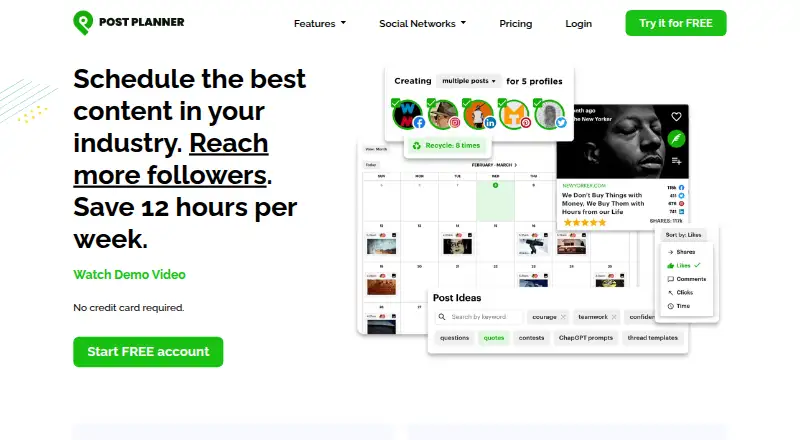
Post Planner is a social media application for planning and publishing posts for businesses and individuals. It schedules content to Facebook, Instagram, Google, TikTok, LinkedIn, Pinterest, Twitter, YouTube, Threads, and Bluesky; scheduled posts publish directly to connected networks without mobile approval. Users can gather popular posts and media, upload batches of images or posts, and rotate content by category. Analytics sort post history by likes, comments, shares, or clicks, and selected top performers can be queued again. Optional AI features assist with captions and content generation and can generate images. The service is available on the web, iOS, and Android. Its free plan includes one social account and one user, with limits of 10 scheduled posts and three daily posts per profile. Paid plans are listed from $9 per month when billed annually, and the pricing note includes a 7-day trial. Plans include customer support by email and in-app chat. Post Planner says it is built for small businesses and solopreneurs, with Agency plans for larger teams.
Who it suits
Post Planner may suit small businesses and solopreneurs coordinating posts across multiple social networks. Its Agency plans are also intended for larger teams.
What it does well
- Schedules posts across ten listed networks
- Direct publishing without mobile approval
- Analytics can sort posts by engagement activity
- Bulk uploads and content recycling
- Web, iOS, and Android apps
What to know first
- Free plan is limited to one social account
- Free plan allows 10 scheduled posts
- Free plan limits daily posts per profile to three
Limits
The free plan includes one social account, one user, 10 scheduled posts, three daily posts per profile, and one AI image per month. The pricing note lists paid plans from $9/mo (annual) and a 7-day trial.
Plans
| Plan | Billed and limits | Price |
|---|---|---|
| Free | 1 social account · 1 user · 10 scheduled posts · 3 daily posts per profile · 1 AI image/month | Free |
| Starter | annually or monthly · 3 social accounts · 1 user · 150 scheduled posts · 12 daily posts per profile · 15 AI images/month | On request |
| Growth | annually or monthly · 15 social accounts · 2 users · 1,500 scheduled posts · 24 daily posts per profile · 150 AI images/month | On request |
| Business | annually or monthly · 25 social accounts · 5 users · unlimited scheduled posts · unlimited daily posts per profile · 250 AI images/month | On request |
| Agency | billed monthly · 50 social accounts · 10 users · unlimited scheduled posts · unlimited daily posts per profile · 500 AI images per month | $179 a month |
| Agency + 50 | billed monthly · 100 social accounts · 20 users · unlimited scheduled posts · unlimited daily posts per profile · 1,000 AI images per month | $329 a month |
| Agency + 3 * 50 | billed monthly · 200 social accounts · 40 users · unlimited scheduled posts · 40 users · 2,000 AI images per month | $629 a month |
As postplanner.com lists them, read 30 Sept 2026. The maker's own page has the final word.
Getting started
- Visit the Post Planner website.
- Choose the free plan or review the paid plans and 7-day trial.
- Use Post Planner on the web, iOS, or Android.
- Connect social accounts on the networks you want to schedule for.
- Create or upload content, then schedule posts.
Post Planner is a cross-network social publishing tool aimed at small businesses, solopreneurs, and agencies that need scheduling, content discovery, and repeatable publishing in one workspace. It suits marketers managing several networks who want to fill queues quickly and identify posts worth reusing, but its account and posting caps make plan selection important.
Overview
Post Planner generates engagement by combining scheduling with a large discovery library. It can publish directly to connected networks, so scheduled posts do not require mobile approval. Supported destinations include Facebook, Instagram, Threads, Google Business, LinkedIn, Pinterest, TikTok, X/Twitter, YouTube, and Bluesky.
The service is available on web, iOS, and Android. Post Planner is headquartered in Ogden, Utah, and offers a freemium model with a seven-day trial for paid service.
Key features
Scheduling and publishing
You can schedule posts across all supported networks and publish them directly. That is useful for operators who need reliable cross-network distribution without returning to a phone for approval. Daily-post and scheduled-post quotas still vary sharply by plan, so high-volume calendars need a paid tier.
Discovery and creation
Post Planner surfaces tens of thousands of popular posts, images, videos, articles, GIFs, quotes, memes, and ideas. Sources include public Facebook pages, Twitter accounts, Reddit subreddits, RSS feeds, Google, YouTube, Giphy, Unsplash, Pixabay, and Pexels. Bulk tools accept multiple images, RSS articles, Post Planner content, or a spreadsheet with hundreds of posts, making it practical to build a queue in batches rather than one item at a time.
Content buckets can rotate posts automatically, while selected top performers can be recycled at a chosen frequency. Optional AI tools assist with captions and content generation and can create images; monthly image allowances are plan-dependent.
Analytics
Post history can be sorted by likes, comments, shares, or clicks. A one-click re-queue option turns those results into future scheduling material, which favors users who want a repeatable performance loop rather than one-off reporting.
Privacy and support
Post Planner says it does not sell personal data. It uses Stripe, Amazon Web Services, Intercom, and Google service providers to operate the service. Every listed plan includes email and in-app chat support.
Pricing
| Plan | Price and limits | Best fit |
|---|---|---|
| Free | free; 1 social account, 1 user, 10 scheduled posts, 3 daily posts per profile, 1 AI image/month. | Individuals testing the workflow or maintaining a very small queue. |
| Starter | $910,814 a month, billed annually or monthly; 3 social accounts, 1 user, 150 scheduled posts, 12 daily posts per profile, 15 AI images/month. | Single operators needing several profiles and a moderate calendar. |
| Growth | $3,946,859 a month, billed annually or monthly; 15 social accounts, 2 users, 1,500 scheduled posts, 24 daily posts per profile, 150 AI images/month. | Small teams with multiple brands and substantially larger queues. |
| Business | $6,982,899 a month, billed annually or monthly; 25 social accounts, 5 users, unlimited scheduled posts, unlimited daily posts per profile, 250 AI images/month. | Businesses that have outgrown quotas and need five seats. |
| Agency | $179 a month, billed monthly; 50 social accounts, 10 users, unlimited scheduled and daily posts, 500 AI images/month. | Agencies managing many client accounts. |
| Agency + 50 | $329 a month, billed monthly; 100 social accounts, 20 users, unlimited scheduled and daily posts, 1,000 AI images/month. | Larger agency operations requiring more accounts and seats. |
| Agency + 3 * 50 | $629 a month, billed monthly; 200 social accounts, 40 users, unlimited scheduled and daily posts, 2,000 AI images/month. | Very large teams with broad account portfolios. |
The Free tier’s single account and 10-post queue are restrictive for active brands. Starter and Growth add capacity, but the listed prices are substantially higher than the entry-level note of paid from $9/mo (annual), so confirm the applicable billing display before committing. Agency tiers are monthly and focus on seats and account volume.
Platforms
Post Planner runs on web, iOS, and Android. Network coverage spans Facebook, Instagram, Threads, Google Business, LinkedIn, Pinterest, TikTok, X/Twitter, YouTube, and Bluesky.
Who it's for
It is a strong match for small businesses and solopreneurs that value content curation, bulk uploads, recycling, and direct publishing. Agencies gain dedicated high-account plans and more seats. It is less suitable for a user who needs only occasional posting, because the free queue and account limits are tight.
Pros and cons
- Pros: Broad network support; direct publishing without mobile approval; large content-discovery library; spreadsheet and RSS bulk creation; recycling by bucket and performance; analytics tied to one-click re-queue; support on every plan.
- Cons: Free plan allows only one account, 10 scheduled posts, and three daily posts per profile; user seats remain limited on lower tiers; AI image allowances are capped except for scheduled-post and daily-post limits on upper plans; the published prices for Starter, Growth, and Business are unusually high relative to the $9 annual starting note.
Alternatives
Choose Social Media Scheduling Software or Social Media Management Tools lists when you want to compare a wider field.
Friends+Me suits users wanting Android, desktop, Linux, macOS, Windows, web, and extension access, with a free tier offering two queues and five scheduled posts per queue. Buffer is a simpler free option for up to three channels and 10 scheduled posts per channel. CoSchedule fits a user seeking a $29 monthly annual-billing starter plan with three social profiles. Later is worth considering for calendar-focused workflows and an $18.75 monthly yearly-billed Starter plan. Metricool offers a free brand with 20 posts per month. Planable starts with a free 50-total-post allowance and a Basic plan at $33 monthly on annual billing. Postcron provides a free tier with three accounts and 10 pending posts. Social Champ offers a free plan with three accounts, one user, and 15 scheduled posts per profile.
Verdict
Choose Post Planner if your priority is combining multi-network scheduling with content discovery, bulk production, recycling, and performance-led re-queuing. Its direct publishing and agency tiers are meaningful advantages for busy operators. Look elsewhere if you need generous free capacity, many lower-tier seats, or pricing that is easier to reconcile at a glance.
Verdict
Post Planner combines cross-network scheduling with content discovery, bulk creation, recycling, and post analytics. Its free plan has clear account and posting limits, while paid plans start at $9 per month when billed annually.
Questions
Is there a free plan?
Yes. The Free plan is free and includes one social account and one user.
What does the free plan include?
It includes 10 scheduled posts, three daily posts per profile, and one AI image per month.
Which platforms does Post Planner support?
It is available on web, iOS, and Android.
Which social networks can it schedule to?
The listed networks are Facebook, Instagram, Threads, Google Business, LinkedIn, Pinterest, TikTok, X/Twitter, YouTube, and Bluesky.
What is the listed starting price for paid plans?
The pricing note says paid plans start at $9/mo (annual) and includes a 7-day trial.
What support comes with the plans?
All listed plans include customer support by email and in-app chat.
Facts from Post Planner's own pages
- AI features
- Optional AI features provide assisted caption and content generation and AI image generation. · postplanner.com, 30 Sept 2026
- Analytics
- Analytics can sort post history by likes, comments, shares or clicks and re-queue top performers in one click. · postplanner.com, 30 Sept 2026
- Audience
- Post Planner says it is built for small businesses and solopreneurs and also offers Agency plans for larger teams. · postplanner.com, 30 Sept 2026
- Bulk creation
- Users can upload multiple images, RSS articles, Post Planner content or a spreadsheet containing hundreds of posts. · postplanner.com, 30 Sept 2026
- Content curation
- Post Planner surfaces tens of thousands of popular posts, viral images, videos, articles, GIFs, quotes, memes and post ideas. · postplanner.com, 30 Sept 2026
- Direct publishing
- Scheduled posts publish directly to connected networks without requiring mobile approval. · postplanner.com, 30 Sept 2026
- Free plan
- Yes · postplanner.com, 20 Sept 2026
- Headquarters
- Ogden, Utah, United States · postplanner.com, 28 Sept 2026
- Integrations
- Content sources include public Facebook pages, Twitter accounts, Reddit subreddits, RSS feeds, Google, YouTube, Giphy, Unsplash, Pixabay and Pexels. · postplanner.com, 30 Sept 2026
- Purpose
- Post Planner is a social media application that generates social media engagement for businesses and individuals. · postplanner.com, 30 Sept 2026
- Recycling
- Users can automatically rotate posts by content bucket and recycle selected top-performing posts at a chosen frequency. · postplanner.com, 30 Sept 2026
- Scheduling
- The service schedules posts to Instagram, Facebook, Google, TikTok, LinkedIn, Pinterest, Twitter, YouTube, Threads and Bluesky. · postplanner.com, 30 Sept 2026
- Security and privacy
- Post Planner says it does not sell personal data and uses Stripe, Amazon Web Services, Intercom and Google service providers to operate the service. · postplanner.com, 30 Sept 2026
- Social accounts
- 3 · postplanner.com, 20 Sept 2026
- Paid from
- 9 · postplanner.com, 20 Sept 2026
- Support
- All listed plans include customer support by email and in-app chat. · postplanner.com, 30 Sept 2026
- Supported networks
- Facebook,Instagram,Threads,Google Business,LinkedIn,Pinterest,TikTok,X/Twitter,YouTube,Bluesky · postplanner.com, 20 Sept 2026
Where Post Planner stands on Freedom251
- Social Media Management Tools#30 of 145
- Social Media Scheduling Software#16 of 43