Freedom251 › Diagramming tools
PlantUML
by PlantUML
What PlantUML is
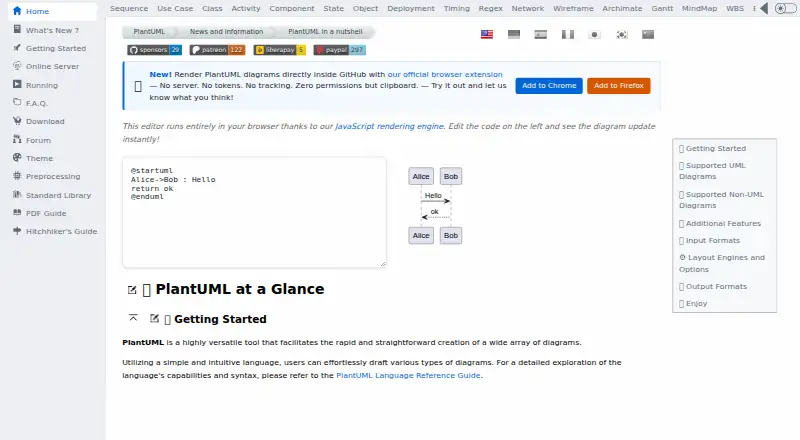
PlantUML turns textual descriptions into diagrams, covering UML types such as sequence, use-case, class, object, activity, component, deployment, state, and timing diagrams. It also supports regex, network, wireframe, Archimate, Gantt, mind map, WBS, EBNF, JSON, and YAML diagrams. Outputs include PNG, SVG, LaTeX, EPS, and sequence-diagram ASCII art; the broader export list also includes PDF, VDX, XMI, SCXML, HTML, ATXT, UTXT, and Braille PNG. Its browser editor uses JavaScript rendering and updates diagrams as code is edited. Layout engines include Graphviz, Smetana, VizJs, and ELK, though ELK does not cover every feature. PlantUML integrates with tools including GitHub, GitLab, Confluence, WordPress, Slack, Visual Studio Code, Eclipse, and IntelliJ IDEA. It is free and available across web, Windows, macOS, Linux, API, extension, and self-hosted options. Local installation requires Java, with Java 11 or later recommended; Graphviz is needed for some diagrams.
Who it suits
PlantUML suits people who want to create diagrams from text, including UML and other structured diagram types. It can also suit users who need local hosting for sensitive diagrams or integrations with development and collaboration tools.
What it does well
- Supports a broad range of UML and non-UML diagrams
- Browser editor updates diagrams as code changes
- Offers PNG, SVG, LaTeX, EPS, and other exports
- Can run as a local server
What to know first
- Local installation requires Java
- Graphviz is needed for some diagrams
- Does not prevent inconsistent diagrams
- Diagram dimensions default to a 4096-pixel limit
Limits
Image width and height are limited to 4096 by default; an environment variable or command-line option can change that limit. ELK does not cover all features, and Graphviz is required for some diagrams.
Plans
| Plan | Billed and limits | Price |
|---|---|---|
| PlantUML | Open source · Free of charge · Available under several licenses, with some features varying by license | Free |
As plantuml.com lists them, read 7 Oct 2026. The maker's own page has the final word.
Getting started
- Visit the PlantUML website or use its browser editor.
- Enter a textual description for the diagram you want to generate.
- Choose a supported output format or layout engine.
- For local installation, install Java; Java 11 or later is recommended.
- Install Graphviz if your diagrams require it, or run PlantUML as a local server.
Verdict
PlantUML offers a text-based route to many diagram types, with browser editing, integrations, and local hosting options. It is a drawing generator rather than a modeling tool, so it does not enforce consistency between diagrams.
Questions
Is PlantUML free?
Yes. The listed PlantUML plan costs nothing. It is open source and available under several licenses, with some features varying by license.
Which platforms can I use it on?
The listed platforms are API, extension, Linux, macOS, self-hosted, web, and Windows. A desktop app is also listed.
What can PlantUML diagram?
It supports UML types including sequence, use-case, class, activity, and state diagrams, along with types such as JSON, YAML, Gantt, network, and mind maps.
Can I host diagram generation myself?
Yes. PlantUML can run as a local server, and the project recommends this for diagrams containing sensitive information.
Does PlantUML offer a free trial?
No free trial is listed; PlantUML has a free plan.
Who makes PlantUML?
The maker is PlantUML, founded in 2009.
Facts from PlantUML's own pages
- Browser editor
- The site’s editor runs in the browser using a JavaScript rendering engine and updates diagrams as code is edited. · plantuml.com, 7 Oct 2026
- Browser extension
- The official browser extension renders PlantUML diagrams directly inside GitHub without a server, and the site says it uses no tokens or tracking and requests no permissions except clipboard. · plantuml.com, 7 Oct 2026
- Diagram size
- The FAQ states that image width and height are limited to 4096 by default, with an environment variable or command-line option to change the limit. · plantuml.com, 7 Oct 2026
- Diagram types
- It supports UML diagrams including sequence, use case, class, object, activity, component, deployment, state, and timing diagrams. · plantuml.com, 7 Oct 2026
- Founded
- 2009 · plantuml.com, 28 Sept 2026
- Free plan
- Yes · plantuml.com, 20 Sept 2026
- Integrations
- The project lists integrations with tools including GitHub, GitLab, Confluence, WordPress, Slack, Visual Studio Code, Eclipse, and IntelliJ IDEA. · plantuml.com, 7 Oct 2026
- Layout engines
- Available layout engines include Graphviz, Smetana, VizJs, and ELK; ELK supports orthogonal layout and does not cover all features. · plantuml.com, 7 Oct 2026
- Local requirements
- Local installation requires Java, with Java 11 or later recommended; Graphviz is needed only for some diagrams. · plantuml.com, 7 Oct 2026
- Notable limitation
- PlantUML functions as a drawing generator rather than a modeling tool and does not prevent inconsistent diagrams. · plantuml.com, 7 Oct 2026
- Other diagrams
- Supported non-UML diagrams include JSON, YAML, EBNF, regex, network, wireframe, Archimate, Gantt, mind map, and WBS diagrams. · plantuml.com, 7 Oct 2026
- Outputs
- Diagram output formats include PNG, SVG, LaTeX, EPS, and ASCII art for sequence diagrams. · plantuml.com, 7 Oct 2026
- Purpose
- PlantUML creates diagrams from simple textual descriptions. · plantuml.com, 7 Oct 2026
- Security profiles
- PlantUML provides security profiles that control access to local files and URLs, including INTERNET, ALLOWLIST, and SANDBOX modes. · plantuml.com, 7 Oct 2026
- Self hosting
- PlantUML can run as a local server, and the project recommends this for generating diagrams that contain sensitive information. · plantuml.com, 7 Oct 2026
- Server privacy
- The FAQ says PlantUML Server does not store diagrams, but warns that traffic goes through HTTP and can be intercepted. · plantuml.com, 7 Oct 2026
- Support
- The project directs users to its community forum for advice and solutions to common layout issues. · plantuml.com, 7 Oct 2026
Where PlantUML stands on Freedom251
- Diagramming tools#3 of 46
- Diagramming Software#20 of 44
- Diagram Software#17 of 36