Freedom251 › Social Media Management Tools

Plann
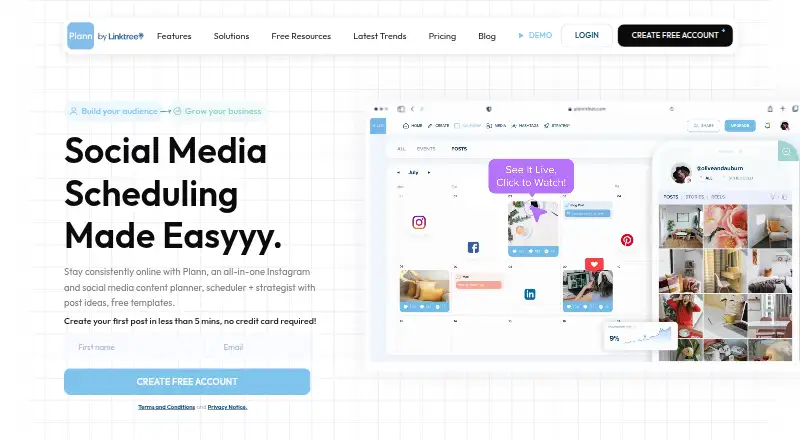
What Plann is
Plann brings social media planning, scheduling, analytics and strategy tools together for content teams and individual creators. Its drag-and-drop grid previews planned posts beside published ones, while content tools offer AI-generated captions, daily post ideas, royalty-free stock images and videos, and image editing. It supports planning and posting for Instagram, Facebook, LinkedIn, TikTok, Pinterest and YouTube Shorts, and integrates with Canva with access to more than 450,000 templates. Plann runs on Android, iOS and the web. The Free plan costs nothing and includes one user, one brand, 30 monthly AI credits, Instagram scheduling, up to 30 posts, stories and carousels, and five video posts per month. Power User costs $12.50 a month, billed annually. A seven-day premium-feature trial is available without a credit card. Instagram accounts must be Business or Creator accounts; personal accounts are unsupported.
Who it suits
Plann suits brands, bloggers, business owners, creatives and entrepreneurs who need to organize social posts. Its paid team plans suit collaborators who need chat and approval flows.
What it does well
- Previews planned posts alongside published posts.
- Supports six listed social networks.
- Includes AI captions and daily post ideas.
- Integrates with Canva and over 450,000 templates.
- Seven-day premium trial requires no credit card.
What to know first
- Free scheduling is limited to Instagram.
- Free plan allows five video posts monthly.
- Personal Instagram accounts are unsupported.
- Power User costs $12.50 a month, billed annually.
Limits
The Free plan is limited to one user, one brand, 30 monthly AI credits, Instagram scheduling, 30 posts, stories and carousels per month, and five video posts per month. Personal Instagram accounts are unsupported. The premium-feature trial lasts seven days.
Plans
| Plan | Billed and limits | Price |
|---|---|---|
| Free | Free Forever · 1 user · 1 brand · 30 monthly AI credits · 30 posts, stories and carousels per month · Instagram scheduling only · 5 video posts per month | Free |
| Power User | per month, paid annually · 1 user · 1 brand · unlimited media uploads and scheduled posts · Instagram, Facebook, LinkedIn, TikTok, Pinterest and YouTube Shorts | $12.50 a month |
| Build | per month, paid annually · 2 users · 2 brands · unlimited media uploads and scheduled posts · team chat and approval flows | $25 a month |
| Grow | per month, paid annually · 4 users · 5 brands · unlimited media uploads and scheduled posts · advanced insights and analytics | $62.50 a month |
As plannthat.com lists them, read 30 Sept 2026. The maker's own page has the final word.
Getting started
- Open https://www.plannthat.com/ in a web browser or use Plann on Android or iOS.
- Choose the Free plan or start the seven-day premium-feature trial; no credit card is required for the trial.
- Connect an Instagram Business or Creator account for Instagram scheduling.
- Use the grid to plan posts and the content tools to create or edit material.
- Choose a paid plan for additional networks, scheduled posts or team collaboration features.
Plann is a social media planning, creation, scheduling and analytics suite for brands, creators and small teams. It is strongest for people who care about the visual arrangement of a feed and want creative tools beside their publishing calendar. The free tier is useful for a small Instagram presence, while broader channel coverage and collaboration require paid plans.
Overview
Plann combines calendar planning, automatic publishing, content ideas and performance tracking in one workspace. Its drag-and-drop grid places planned posts beside published content, helping users judge sequencing and visual consistency before anything goes live. AI caption generation, daily post ideas, royalty-free stock images and videos, and image editing reduce the need to switch between separate creation tools. Canva integration and access to more than 450,000 templates add further design options.
The product supports Instagram, Facebook, LinkedIn, TikTok, Pinterest and YouTube Shorts. That six-network scope makes the paid entry tier considerably more useful than the free plan for a brand with a multi-platform calendar. Analytics are described as basic overall, with advanced insights reserved for the top plan.
Key features
Visual planning and content creation
The grid preview is valuable when a feed’s appearance matters, such as for visual brands, bloggers and creators. It shows how scheduled material will sit with published posts rather than treating each post as an isolated queue item. AI captions and repurposing can speed up repeated content work, while stock media and editing tools help fill a calendar without leaving Plann. Canva access broadens template-led production, although users who already have a separate design process may gain less from the bundled tools.
Publishing and team workflows
Automatic publishing is available across the supported networks on paid plans, while paid collaboration features include team chat, approval flows and shareable links. Those controls make Build and Grow more suitable for review-based teams than Power User. The free plan schedules Instagram only, so it is not a practical central calendar for campaigns spanning several networks.
Account and service considerations
Instagram scheduling requires a Business or Creator account; personal accounts are unsupported because of Meta API limitations. Plann can be used in a browser or on Android and iOS. Its help center covers setup, scheduling, billing, support and policy topics, and includes GDPR and data-management guidance. The terms identify Linktree Pty Ltd as the provider and do not promise uninterrupted or fully secure operation.
Pricing
Plann uses a freemium model. A seven-day premium trial requires no credit card, giving prospective subscribers a short way to assess paid capabilities.
| Plan | Price and limits | Best for |
|---|---|---|
| Free | Free forever; 1 user, 1 brand, 30 monthly AI credits, 30 posts, stories and carousels per month, Instagram scheduling only, and 5 video posts per month. | A single Instagram account with modest monthly volume. |
| Power User | $12.50 a month, billed monthly but paid annually; 1 user, 1 brand, unlimited media uploads and scheduled posts, and all six supported networks. | One operator publishing regularly across multiple channels. |
| Build | $25 a month, billed monthly but paid annually; 2 users, 2 brands, unlimited uploads and scheduled posts, team chat and approval flows. | A small partnership or client workflow needing review. |
| Grow | $62.50 a month, billed monthly but paid annually; 4 users, 5 brands, unlimited uploads and scheduled posts, plus advanced insights and analytics. | Teams managing several brands that need deeper reporting. |
The annual-payment requirement applies to the paid monthly rates shown. Power User is the least expensive route to multi-network scheduling, but it has one user and one brand. Collaboration starts at Build, and advanced analytics only appears at Grow, so teams should budget for a higher tier rather than treating the entry price as a team price.
Platforms
Plann runs on the web and has Android and iOS apps. It plans and posts to Instagram, Facebook, LinkedIn, TikTok, Pinterest and YouTube Shorts. Personal Instagram accounts cannot be connected; a Business or Creator account is required.
Who it's for
Plann fits growing brands, bloggers, business owners, creatives and entrepreneurs who want visual feed planning plus creation and scheduling tools. Power User suits a solo publisher with several networks. Build is the more appropriate choice when two people or two brands need approvals and chat. Grow targets agencies or larger in-house teams managing up to five brands and seeking advanced insights.
It is a weaker fit for someone needing only a lightweight queue, for a personal Instagram account, or for a team that requires collaboration at the lowest paid price.
Pros and cons
- Pro: The drag-and-drop grid previews upcoming posts with published content, supporting deliberate feed composition.
- Pro: AI captions, repurposing, ideas, stock media, editing and Canva templates keep much of content production in one place.
- Pro: Paid plans cover six major networks and automatic publishing.
- Pro: Build and Grow add approval-oriented collaboration for teams and multi-brand work.
- Con: Free scheduling is restricted to Instagram and capped at 30 monthly posts, 30 AI credits and five video posts.
- Con: The $12.50 entry plan supports only one user and one brand, so collaboration immediately costs more.
- Con: Advanced insights are limited to the $62.50 Grow tier.
- Con: Personal Instagram accounts cannot be used.
Alternatives
Choose Buffer instead if a free plan connecting up to three channels with 10 scheduled posts per channel is enough and you prefer broader platform availability, including an API and browser extension.
Metricool is a better match for a one-brand free setup capped at 20 posts per month when a trial is not required.
Pick Agorapulse for a free one-user account with three social profiles and 10 scheduled posts.
Later suits readers who want a paid visual scheduling product with a free trial but no free plan.
Choose Planable when a free allowance of 50 total posts or its paid workspace model better fits collaborative planning.
Publer is an alternative for a free workspace supporting three social accounts, 10 scheduled posts per account and 25 saved drafts.
Marketeer is a web-only option with a free trial and credit-based plans.
OpenBuzz offers a free, self-hosted-capable plan with three social accounts, 30 scheduled posts and 50 AI generations per month.
For broader comparisons, see AI Social Media Management Software and Social Media Management Tools.
Verdict
Choose Plann if visual feed planning, integrated content creation and scheduling across six networks matter more than having the lowest-cost team tier. Its free plan is a sensible starting point for a small Instagram operation, but multi-network users need Power User and collaborative teams need Build or Grow. Look elsewhere if you use a personal Instagram account, need advanced analytics below the top tier, or want team features without moving beyond the entry plan.
Verdict
Plann combines visual planning and content creation with scheduling across six listed networks. Check the free-tier limits and Instagram account requirement before choosing a plan.
Questions
Does Plann have a free plan?
Yes. Free Forever includes one user, one brand, 30 monthly AI credits, Instagram scheduling, 30 monthly posts, stories and carousels, and five video posts.
How much do Plann's paid plans cost?
Power User is $12.50 a month when billed annually. Build is $25 a month and Grow is $62.50 a month, both billed annually.
Which platforms and social networks does Plann support?
Plann runs on Android, iOS and the web. It lists Instagram, Facebook, LinkedIn, TikTok, Pinterest and YouTube Shorts for social planning and posting.
Does Plann offer a free trial?
Yes. Its premium-feature trial lasts seven days and does not require a credit card.
Which Instagram accounts can I use with Plann?
Instagram accounts must be Business or Creator accounts. Personal Instagram accounts are unsupported.
What integrations and team tools does Plann offer?
Plann integrates with Canva and offers access to more than 450,000 templates. Paid plans include team chat, approval flows and shareable links; Build includes team chat and approval flows.
Facts from Plann's own pages
- Audience
- Plann describes its audience as growing brands, bloggers, business owners, creatives and entrepreneurs. · plannthat.com, 30 Sept 2026
- Company
- Plann says it was created in Sydney, Australia and that its global workforce spans 10 countries. · plannthat.com, 30 Sept 2026
- Content creation
- Plann offers AI caption generation, daily post ideas, royalty-free stock images and videos, and image editing tools. · plannthat.com, 30 Sept 2026
- Data management
- Plann’s help center has a GDPR and data management support section. · help.plannthat.com, 30 Sept 2026
- Free plan
- Yes · plannthat.com, 20 Sept 2026
- Free-tier limits
- The free plan is limited to Instagram scheduling, 30 posts, stories and carousels per month, and five video posts per month. · plannthat.com, 30 Sept 2026
- Instagram account requirement
- Plann’s help page says Instagram accounts must be Business or Creator accounts; personal Instagram accounts are unsupported due to Meta API limitations. · help.plannthat.com, 30 Sept 2026
- Integrations
- The product page says Plann integrates with Canva and offers access to more than 450,000 templates. · plannthat.com, 30 Sept 2026
- Product
- Plann is a social media planning, scheduling, analytics and strategy suite. · plannthat.com, 30 Sept 2026
- Security and terms
- Plann’s terms identify Linktree Pty Ltd as the provider and say the platform may be accessed through a web browser or mobile device; the terms do not warrant that it will be secure or uninterrupted at all times. · plannthat.com, 30 Sept 2026
- Paid from
- 12.5 · plannthat.com, 20 Sept 2026
- Support
- Plann provides a Help Center with setup, scheduling, billing, support and policy articles. · help.plannthat.com, 30 Sept 2026
- Supported networks
- Plann lists Instagram, Facebook, LinkedIn, TikTok, Pinterest and YouTube Shorts for social planning and posting. · plannthat.com, 30 Sept 2026
- Team workflows
- Paid plans include team chat, approval flows and shareable links, with collaboration tools aimed at teams. · plannthat.com, 30 Sept 2026
- Trial
- Plann offers a seven-day trial of premium features and says no credit card is required. · plannthat.com, 30 Sept 2026
- Visual planning
- Its drag-and-drop grid previews how planned posts will look alongside published posts. · plannthat.com, 30 Sept 2026
Where Plann stands on Freedom251
- Social Media Management Tools#20 of 145
- AI Social Media Management Software#10 of 39