Freedom251 › Pixel Art Software
PixSplat
What PixSplat is
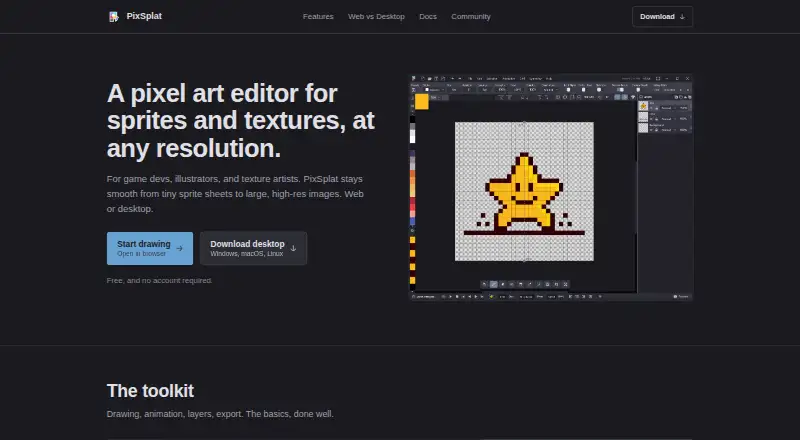
PixSplat is a pixel art editor for making graphics, animations, and sprite sheets. The web and desktop versions are free, and the tool is available on the web and for Windows, macOS, and Linux. Its frame-by-frame timeline includes onion skinning, animation tags, export, and independent timelines for layers. Layers also have visibility, opacity, and blend-mode controls, while supported pen tablets can use pressure sensitivity, tilt, and twist. The `.pxs` project format preserves layers, frames, tags, palette, and project settings across the web and desktop editions. Export formats include PNG, JPEG, WebP, GIF, TIFF, TGA, ICO, EXR, and HDR; PNG sprite strips are documented for Godot, Unity, and the web. The desktop version supports additional formats including PSD, GIF, TIFF, and TGA. The web edition does not work offline and cannot export embedded animated GIFs. It requires Chrome 125+, Firefox 125+, or Edge 125+ with WebGPU support. Desktop offline use is listed for Windows x64 only.
Who it suits
PixSplat suits game developers, illustrators, and texture artists creating pixel graphics or frame-based animation. The web edition may suit users with a supported browser, while desktop offline use is listed for Windows x64.
What it does well
- Free web and desktop versions.
- Timeline includes onion skinning and animation tags.
- Pen tablets support pressure, tilt, and twist.
- `.pxs` preserves project structure and settings.
- PNG sprite strips documented for Godot and Unity.
What to know first
- Web version does not work offline.
- Web version cannot export embedded animated GIFs.
- Web use requires WebGPU and a supported browser.
- Desktop offline use is listed for Windows x64 only.
Limits
Both plans are free. The web version does not work offline and cannot export embedded animated GIFs; desktop offline use is listed for Windows x64 only.
Plans
| Plan | Billed and limits | Price |
|---|---|---|
| Web | Free · no installation · web use requires a supported browser with WebGPU | Free |
| Desktop | Free · Windows, macOS, Linux · offline use · Windows x64 only | Free |
As pixsplat.com lists them, read 7 Oct 2026. The maker's own page has the final word.
Getting started
- Visit https://pixsplat.com/.
- Choose the web version or desktop version.
- For web use, open it in Chrome 125+, Firefox 125+, or Edge 125+ with WebGPU support.
- For desktop offline use, choose the Windows x64 version.
- Create or export artwork in a supported format, including PNG sprite strips for Godot or Unity.
Verdict
PixSplat combines pixel-art editing with animation timelines, tablet input, and sprite-sheet export. Choose the web version only if its browser and offline limitations work for you.
Questions
How much does PixSplat cost?
The Web and Desktop plans are each free.
Is there a free plan or trial?
Both versions have a free plan. There is no free trial.
Which platforms does PixSplat support?
It is available on the web and for Windows, macOS, and Linux. The web version requires Chrome 125+, Firefox 125+, or Edge 125+ with WebGPU support; desktop offline use is listed for Windows x64.
What formats can it export?
Listed formats include PXS, PNG, JPEG, WebP, GIF, TIFF, TGA, ICO, EXR, and HDR. PNG sprite strips are documented for Godot, Unity, and the web.
Can PixSplat export animated GIFs?
The web version cannot export embedded animated GIFs. The desktop version supports GIF among its formats.
Who created PixSplat?
PixSplat was created by Manuel Machado.
Facts from PixSplat's own pages
- Animation
- It includes a frame-by-frame timeline, onion skinning, per-layer timelines, animation tags, and animation export. · docs.pixsplat.com, 7 Oct 2026
- Audience
- The maker describes PixSplat as intended for game developers, illustrators, and texture artists. · pixsplat.com, 7 Oct 2026
- Compatibility
- The web version requires Chrome 125+, Firefox 125+, or Edge 125+ with WebGPU support. · docs.pixsplat.com, 7 Oct 2026
- Desktop formats
- The desktop version supports a broader range of formats, including PSD, GIF, TIFF, and TGA. · docs.pixsplat.com, 7 Oct 2026
- Drawing tablets
- Pen tablets are supported with pressure sensitivity, tilt, and twist. · docs.pixsplat.com, 7 Oct 2026
- Integrations
- The maker documents export formats including PNG sprite strips for use with Godot, Unity, and the web. · pixsplat.com, 7 Oct 2026
- Layers
- Layers support visibility controls, opacity, blend modes, and independent animation timelines. · docs.pixsplat.com, 7 Oct 2026
- Maker
- PixSplat was created by Manuel Machado. · docs.pixsplat.com, 7 Oct 2026
- Pricing
- The maker states that both the web and desktop versions are free. · docs.pixsplat.com, 7 Oct 2026
- Product
- PixSplat is a pixel art editor for creating graphics, animations, and sprite sheets. · docs.pixsplat.com, 7 Oct 2026
- Project files
- The `.pxs` project format preserves layers, animation frames, tags, palette, and project settings in both web and desktop versions. · docs.pixsplat.com, 7 Oct 2026
- Support
- The FAQ directs users to the Discord community to report bugs and request features. · docs.pixsplat.com, 7 Oct 2026
- Web limit
- The web version cannot export embedded animated GIFs and does not work offline. · docs.pixsplat.com, 7 Oct 2026
Where PixSplat stands on Freedom251
- Pixel Art Software#27 of 70