Freedom251 › AI Reverse Image Search Tools
PixGuard
What PixGuard is
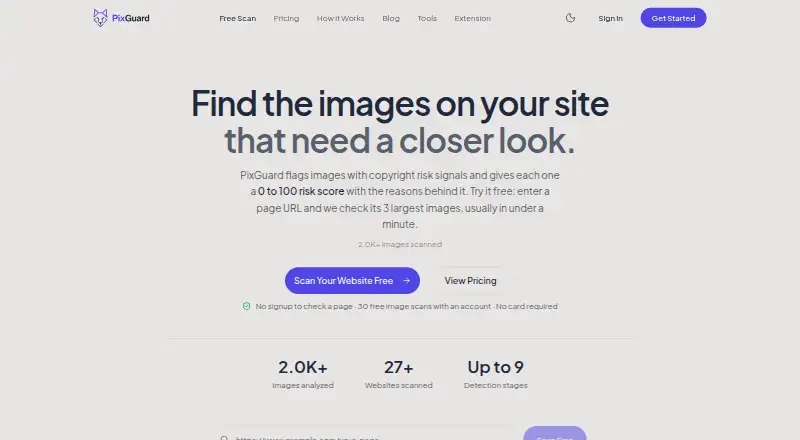
PixGuard scans website images and assigns each a copyright risk score from 0 to 100, with reasons for the result. Its checks cover image metadata, stock-agency watermarks, reference fingerprints, possible AI generation, and similarity. Pro and Business plans add AI vision review for ambiguous cases. An account scan follows links across up to 50 pages, subject to the plan’s limit on new images. Visitors can check a page without signing up; that check covers its three largest images. You can also upload JPG, PNG, WebP, or GIF files up to 10 MB. Previously analyzed images can be rescanned free, and images PixGuard cannot analyze are not charged. A WordPress plugin scans Media Library images and supports full-site scans; the Chrome extension scans from an image’s context menu or with Alt+Shift+P and displays a score, severity, and signal breakdown. API access is on Business. Plans include Free, Pro at $29 a month, Business at $79 a month, and a 300.00 USD one-time image pack. PixGuard says it does not permanently store uploaded images, using hashes for caching instead.
Who it suits
PixGuard suits website owners, agencies, content creators, e-commerce stores, and WordPress administrators who want to review image copyright risk. Its extension and API also offer ways to scan images from a browser or integrate through the Business plan.
What it does well
- Free plan includes 30 image scans, valid for 30 days.
- Page checks are available without signing up.
- Rescans of previously analyzed images are free.
- WordPress plugin supports Media Library and full-site scans.
- Image pack scans do not expire.
What to know first
- Free plan is valid for 30 days.
- Free page checks cover only three largest images.
- API access requires the Business plan.
- Uploads are limited to 10 MB.
Limits
The Free plan includes 30 image scans, is valid for 30 days and allows up to 10 new images per website scan. Pro includes about 250 scans per month and up to 500 new images per website scan; Business includes about 1,000 scans per month and up to 2,000 new images per website scan.
Plans
| Plan | Billed and limits | Price |
|---|---|---|
| Free | 30 image scans · valid 30 days · up to 10 new images per website scan · no credit card required | Free |
| Pro | $29/month; annual option says save 2 months · ~250 image scans/month · up to 500 new images per website scan · weekly monitoring for up to 3 sites | $29 a month |
| Image pack | One-time purchase · 1,700 image scans · never expires | $300, paid once |
| Business | $79/month; annual option says save 2 months · ~1,000 image scans/month · up to 2,000 new images per website scan · daily or weekly monitoring for up to 10 sites · API access | $79 a month |
As pixguard.io lists them, read 7 Oct 2026. The maker's own page has the final word.
Getting started
- Open the PixGuard website.
- Check a page directly without signing up, covering its three largest images.
- Create an account for website scans and select a plan.
- Upload a JPG, PNG, WebP or GIF image up to 10 MB for a score.
- Install the WordPress plugin or Chrome extension if you want scans in those workflows.
- Choose Business for API access.
Verdict
PixGuard offers several ways to check image risk, including page scans, uploads, a WordPress plugin, and a browser extension. The free plan provides 30 scans for 30 days; paid plans add higher scan limits, monitoring, and, on Business, API access.
Questions
Is PixGuard free?
Yes. Free costs nothing and includes 30 image scans, valid for 30 days, with no credit card required.
What do the paid plans cost?
Pro is $29 a month and Business is $79 a month. Each plan also has an annual option described as saving two months.
What platforms does PixGuard support?
Its listed platforms are API, extension, self-hosted and web. The Chrome extension and WordPress plugin are also described.
Can I use PixGuard without signing up?
Visitors can check a page without signing up. That free check examines the page’s three largest images.
Does PixGuard offer API access?
Yes. API access is listed as a Business plan feature.
How does PixGuard handle uploaded images and payments?
PixGuard says it does not permanently store uploaded images and stores image hashes for caching. Its privacy policy says Google handles OAuth authentication and Paddle handles payments; PixGuard says it does not store card numbers or payment details.
Facts from PixGuard's own pages
- API
- API access is listed as a Business plan feature. · pixguard.io, 7 Oct 2026
- Browser extension
- Its Chrome extension scans an image from the context menu or with Alt+Shift+P and displays a risk score, severity rating, and signal breakdown. · pixguard.io, 7 Oct 2026
- Data handling
- The privacy policy says Google handles OAuth authentication, Paddle handles payments, and PixGuard does not store credit card numbers or payment details. · pixguard.io, 7 Oct 2026
- Detection
- Its detection pipeline checks image metadata, stock-agency watermarks, reference fingerprints, signs of AI generation, similarity, and ambiguous cases with AI vision review on Pro and Business. · pixguard.io, 7 Oct 2026
- File uploads
- Users can upload JPG, PNG, WebP, or GIF images up to 10 MB for a risk score. · pixguard.io, 7 Oct 2026
- Free checks
- Visitors can check a page without signing up; the free page check examines its three largest images. · pixguard.io, 7 Oct 2026
- Integrations
- PixGuard offers a WordPress plugin that adds a copyright scan action to images in the Media Library and supports full-site scans from Tools → PixGuard. · pixguard.io, 7 Oct 2026
- Intended users
- PixGuard describes its intended users as website owners, agencies, content creators, e-commerce stores, and WordPress administrators. · pixguard.io, 7 Oct 2026
- Privacy
- PixGuard says it does not permanently store uploaded images and stores image hashes for caching instead. · pixguard.io, 7 Oct 2026
- Purpose
- PixGuard scans website images and assigns each a 0-to-100 copyright risk score with the reasons behind it. · pixguard.io, 7 Oct 2026
- Rescans
- Previously analyzed images can be rescanned free, and images the service cannot analyze are not charged. · pixguard.io, 7 Oct 2026
- Security
- The privacy policy lists HTTPS transmission encryption, JWT authentication tokens, encrypted database connections, regular security audits, and access controls and monitoring. · pixguard.io, 7 Oct 2026
- Support
- The contact page accepts questions, bug reports, and feature suggestions through a form or direct email. · pixguard.io, 7 Oct 2026
- Website scans
- An account website scan follows links across up to 50 pages and applies a plan-specific limit on new images. · pixguard.io, 7 Oct 2026
Where PixGuard stands on Freedom251
- AI Reverse Image Search Tools#10 of 31