Freedom251 › AI Image Colorizers
PixGrid Colorize Photo
What PixGrid Colorize Photo is
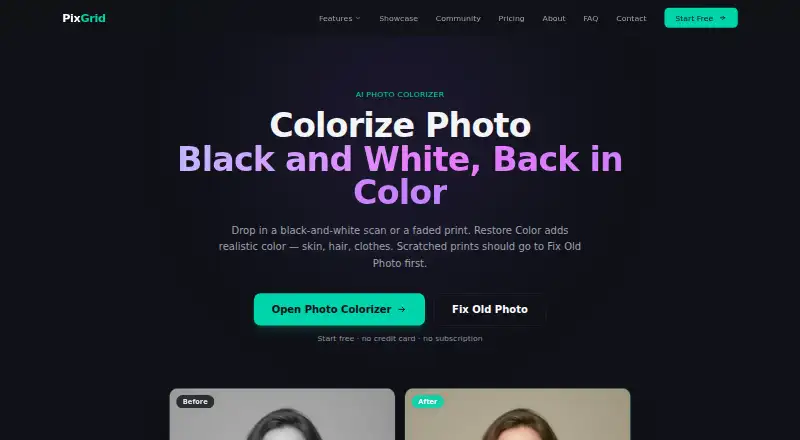
PixGrid Colorize Photo is a browser-based tool for adding color to black-and-white or badly faded photographs, including skin, hair, and clothes. Its Restore Color workflow applies color in one tap without extra sliders. Each black-and-white photo colorization costs 2 AI credits; you can open the colorizer for free, while restore actions use credits on a one-time pass. For scratched or dusty prints, PixGrid recommends repairing the image first with Fix Old Photo, then enabling Colorize. It says a sharp scan colorizes better than a dim or crooked phone photo and advises checking faces before printing. PixGrid lists Chrome, Safari, Firefox, and Edge as supported browsers. The Free plan costs nothing and includes watermarked exports. One-time passes start with Day Pass at $2.99, paid once for 15 AI credits and unwatermarked exports for 24 hours; Pro Month is $9.99, paid once for 120 credits and 30 days of unwatermarked exports; Ultra Pass is $29.99, paid once for 500 credits and the same export period. PixGrid says processed images are handled in memory and not stored after processing unless users publish them to Showcase.
Who it suits
PixGrid Colorize Photo suits people restoring color to monochrome or faded photographs through a browser-based, one-tap workflow. Its credit passes and supported export formats may suit users who also want unwatermarked exports for a defined period.
What it does well
- One-tap colorization without extra sliders.
- Colorizes details including skin, hair, and clothing.
- Supported in Chrome, Safari, Firefox, and Edge.
- Processed images are not stored after processing unless published.
- Paid passes do not auto-renew.
What to know first
- Each black-and-white photo colorization costs 2 AI credits.
- Free account exports are watermarked.
- Unwatermarked export access is limited to 24 or 30 days on passes.
Limits
The free account has unlimited watermarked exports, while colorizing each black-and-white photo costs 2 AI credits. Day Pass provides 15 credits and unwatermarked exports for 24 hours; Pro Month provides 120 credits and unwatermarked exports for 30 days; Ultra Pass provides 500 credits and unwatermarked exports for 30 days.
Plans
| Plan | Billed and limits | Price |
|---|---|---|
| Free | Free to use frontend tools · Full canvas editor · 60+ CPU AI tools and 5 deep background removals with a free account · unlimited watermarked exports | Free |
| Day Pass | 15 AI credits · 24 hours · Everything in Free · 15 AI credits · unlimited exports without watermark for 24 hours · no auto-renewal | $2.99, paid once |
| Ultra Pass | 500 AI credits · 30 days · 500 AI credits · unlimited exports without watermark for 30 days · no auto-renewal | $29.99, paid once |
| Pro Month | 120 AI credits · 30 days · Everything in Free · 120 AI credits · unlimited exports without watermark for 30 days · no auto-renewal | $9.99, paid once |
As pixgrid.io lists them, read 9 Oct 2026. The maker's own page has the final word.
Getting started
- Open PixGrid Colorize Photo in a supported browser.
- Open the colorizer for free, or choose a pass for AI credits.
- Upload a sharp scan when possible.
- For a scratched or dusty print, repair it with Fix Old Photo before enabling Colorize.
- Review faces before printing and export in a supported format.
Verdict
Choose PixGrid Colorize Photo if you want a browser-based, one-tap way to add color to faded or black-and-white photos. Look elsewhere if you need free unwatermarked exports; PixGrid's free account exports carry a watermark, and colorization consumes credits.
Questions
Can I use PixGrid Colorize Photo for free?
Yes. The colorizer can be opened in the browser for free, and the Free plan costs nothing. Restore actions use AI credits, and free account exports are watermarked.
How much do the paid passes cost?
Day Pass costs $2.99, paid once, Pro Month costs $9.99, paid once, and Ultra Pass costs $29.99, paid once. Each is a one-time pass with no auto-renewal.
How many credits does a photo colorization use?
Colorizing a black-and-white photo costs 2 AI credits.
Which browsers are supported?
PixGrid lists Chrome, Safari, Firefox, and Edge.
What export formats are listed?
PNG, JPEG, WebP, SVG, and PDF are listed as export formats.
How does PixGrid handle processed images?
PixGrid says AI-processed images are handled in memory and not stored after processing, unless you choose to publish them to the Showcase.
Facts from PixGrid Colorize Photo's own pages
- AI providers
- PixGrid says AI image generation and editing use fal.ai, with Google's Gemini additionally used for the Ultra 4K engine. · pixgrid.io, 9 Oct 2026
- Browser support
- PixGrid runs in a browser and lists Chrome, Safari, Firefox, and Edge as supported browsers. · pixgrid.io, 9 Oct 2026
- Colorizer workflow
- Restore Color is a one-tap colorizer that runs without extra sliders. · pixgrid.io, 9 Oct 2026
- Cost of colorization
- Colorizing a black-and-white photo costs 2 AI credits. · pixgrid.io, 9 Oct 2026
- Exports
- PixGrid's pricing page lists PNG, JPEG, WebP, SVG, and PDF exports; free account exports are watermarked. · pixgrid.io, 9 Oct 2026
- Free access
- The colorizer can be opened in the browser for free, while restore steps use credits on a one-time pass. · pixgrid.io, 9 Oct 2026
- Image handling
- PixGrid says AI-processed images are handled in memory and not stored after processing, unless the user opts to publish them to the Showcase. · pixgrid.io, 9 Oct 2026
- Maker
- PixGrid is built by Rafal, a software engineer based in Poland, and is described as an independent, self-funded product. · pixgrid.io, 9 Oct 2026
- Payment provider
- Payments are processed by Stripe, and PixGrid says it does not store card numbers, CVV, or full billing details. · pixgrid.io, 9 Oct 2026
- Photo guidance
- The page says a sharp scan colorizes better than a dim or crooked phone photo, and advises checking faces before printing. · pixgrid.io, 9 Oct 2026
- Purpose
- Restore Color adds color to black-and-white or badly faded photos, including skin, hair, and clothes. · pixgrid.io, 9 Oct 2026
- Repair workflow
- For scratched or dusty prints, PixGrid recommends repairing the photo first with Fix Old Photo, then enabling Colorize. · pixgrid.io, 9 Oct 2026
- Support
- PixGrid directs users to [email protected] for support and refund inquiries within 7 days of purchase. · pixgrid.io, 9 Oct 2026
Where PixGrid Colorize Photo stands on Freedom251
- AI Image Colorizers#22 of 26