Freedom251 › AI Image Expanders
Pixazo AI Image Extender
What Pixazo AI Image Extender is
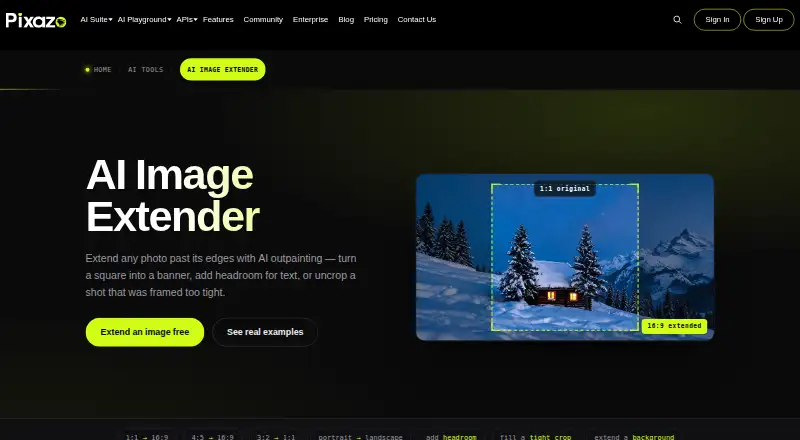
Pixazo AI Image Extender uses outpainting to add generated content around a photo while keeping the uploaded subject the same size. In Pixazo AI Playground, users open Expand Image, make room around the image, generate an extension, review it, and can regenerate the result. It supports wider, taller, and square compositions, including 16:9 and 9:16 formats. Upload one JPG or PNG file up to 5 MB; the extended image downloads as a PNG. Pixazo says the web tool works in modern browsers without installation and is also available through an API. Suggested uses include reframing photos, adding headroom for text, extending product shots or AI art, and creating wallpapers. Busy patterns, straight architecture, edge text or logos, extra faces or hands, and very large extensions can be difficult, and the tool does not increase resolution. Batch runs are unavailable. The Free plan costs nothing and includes a 7-day trial with 100 bonus credits; trial credits lapse afterward and do not include commercial rights. Pro Monthly is $15 a month, and Pro Yearly is $120 a year.
Who it suits
It may suit people who need to change an image’s framing or format without resizing its subject. Users with multiple images to process, or images with difficult edges, should note its stated limits.
What it does well
- Keeps the uploaded subject the same size.
- Supports wider, taller, and square formats.
- Works in modern browsers without installation.
- Offers web and API access.
What to know first
- Accepts only one image per run.
- Uploads must be JPG or PNG under 5 MB.
- Does not upscale resolution.
- Trial credits lapse after seven days.
Limits
The Free plan trial lasts seven days and includes 100 bonus credits; those credits lapse after the trial, and commercial rights are not included during it. Pro Monthly and Pro Yearly each include 300 credits per month and exclude API access. Each run accepts one JPG or PNG up to 5 MB, and the tool does not upscale resolution.
Plans
| Plan | Billed and limits | Price |
|---|---|---|
| Free | 7-day trial included · cancel anytime · 100 bonus credits during 7-day trial · no commercial rights during trial · credits lapse after trial | Free |
| Pro Yearly | Billed annually · 300 credits every month · 50% off every model · no API access | $120 a year |
| Pro Monthly | Billed monthly · cancel anytime · 300 credits/month · 50% off every model · no API access | $15 a month |
| API | No subscription · billed in USD per call · Pixazo Free Tier unlocks with first $10 top-up · $0.0003–$0.40 per image · other usage billed per call | On request |
As pixazo.ai lists them, read 7 Oct 2026. The maker's own page has the final word.
Getting started
- Open the Pixazo AI Image Extender page in a modern browser.
- Choose the Free plan trial or a paid plan.
- Open Pixazo AI Playground’s image-to-image editor and choose Expand Image.
- Upload one JPG or PNG image up to 5 MB.
- Make canvas space, generate the extension, review it, and regenerate if needed.
- Download the extended image as a PNG.
Verdict
Pixazo AI Image Extender provides a focused way to extend image edges and change composition. Check the file, image-content, batch, and trial limitations against your needs before choosing a plan.
Questions
How much does Pixazo AI Image Extender cost?
The Free plan costs nothing and includes a seven-day trial. Pro Monthly is $15 a month, and Pro Yearly is $120 a year. API usage is billed in USD per call at $0.0003–$0.40 per image; the API plan has no listed subscription price.
Is there a free plan or trial?
Yes. The Free plan includes a seven-day trial with 100 bonus credits. Credits lapse after the trial, and commercial rights are not included during it.
Which platforms can I use?
The listed platforms are web and API. Pixazo says the browser tool works in any modern browser without installation.
What image formats does it accept and download?
It accepts one JPG or PNG image up to 5 MB and downloads the extended image as a PNG.
Does a Pro plan include API access?
No. Pro Monthly and Pro Yearly do not include API access. The API is billed per call, and Pixazo says its Free Tier unlocks with the first $10 top-up.
Who makes Pixazo AI Image Extender?
Pixazo says the AI creative platform is built by Appy Pie LLP.
Facts from Pixazo AI Image Extender's own pages
- Aspect ratios
- It can extend images into wider, taller, or square formats, with examples including 16:9 and 9:16. · pixazo.ai, 7 Oct 2026
- Browser access
- Pixazo says the tool works in any modern browser and requires no installation. · pixazo.ai, 7 Oct 2026
- Commercial use
- Commercial use of extended images follows the user's Pixazo plan and the platform terms of use. · pixazo.ai, 7 Oct 2026
- Company
- Pixazo says it is an AI creative platform built by Appy Pie LLP, whose about page identifies 2016 as the parent company's founding year. · pixazo.ai, 7 Oct 2026
- Founded
- 2026 · pixazo.ai, 28 Sept 2026
- Headquarters
- Noida, India · pixazo.ai, 28 Sept 2026
- Image limitations
- Pixazo says busy patterns, straight architecture, edge text or logos, extra faces or hands, and very large extensions are difficult; it also says the tool does not upscale resolution. · pixazo.ai, 7 Oct 2026
- No batch runs
- The product page states that batch runs are unavailable and each image must be JPG or PNG under 5 MB. · pixazo.ai, 7 Oct 2026
- Payment handling
- The privacy policy says payments are processed by third-party processors and that Pixazo does not store the full card number. · pixazo.ai, 7 Oct 2026
- Security and compliance
- Pixazo's security page describes GDPR compliance, SOC 2 attestation, ISO 22301:2019 and ISO 27001:2013 certifications, and monthly vulnerability scanning. · pixazo.ai, 7 Oct 2026
- Third-party models
- Pixazo describes itself as an access layer over third-party image models that it does not own. · pixazo.ai, 7 Oct 2026
- Upload and download
- It accepts one JPG or PNG image up to 5 MB and downloads the extended image as a PNG. · pixazo.ai, 7 Oct 2026
- Use cases
- Pixazo describes reframing images, adding headroom for text, expanding product shots, fixing tight crops, making wallpapers, and extending AI art as use cases. · pixazo.ai, 7 Oct 2026
- What it does
- The AI Image Extender uses outpainting to add AI-generated content beyond a photo's edges while keeping the uploaded subject the same size. · pixazo.ai, 7 Oct 2026
- Workflow
- The tool runs in Pixazo AI Playground's image-to-image editor under Expand Image, where users make canvas space, generate, review, and can regenerate results. · pixazo.ai, 7 Oct 2026
Where Pixazo AI Image Extender stands on Freedom251
- AI Image Expanders#11 of 26