Freedom251 › Website Monitoring Software

Pinger Man
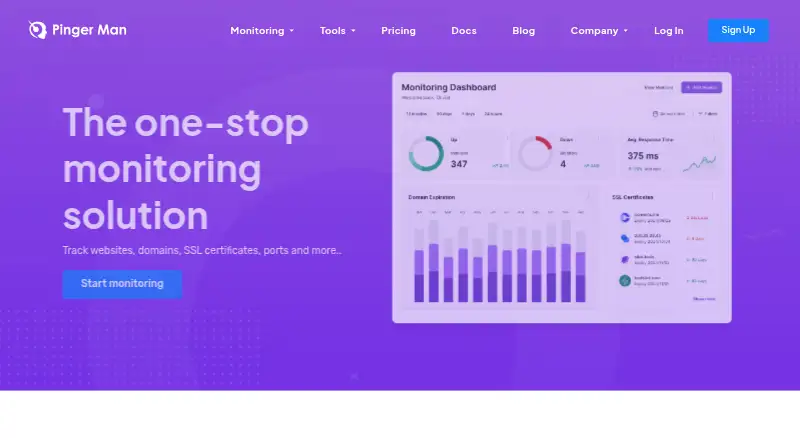
What Pinger Man is
Pinger Man monitors website uptime and response time, along with domains, SSL certificates, ports, DNS, ping, keywords, and website defacement. It says globally distributed monitoring servers help limit false downtime notifications. Alerts can be sent by email, SMS, Slack, Twitter, or webhooks. Users can publish status pages with current service status, uptime statistics, incidents, and response times, and review weekly reports and historical response-time views. The service is available on the web and through a REST API for automation; API calls use account credits. Listed integrations include AWS Route53 domain import, Azure, Namecheap, Slack, Twitter, and webhooks. A free plan includes five monitors and five-minute monitoring; paid plans start at $1/mo, and a 14-day trial is listed. The trial does not automatically become a paid subscription: users must upgrade manually afterward. Pinger Man also offers maintenance windows, SSL and latency monitoring, and page health checks.
Who it suits
The Free plan is for individual users, while the listed Solo, Team, and Enterprise plans are aimed at solopreneurs, small teams, and large teams. It may suit site owners who want uptime checks, alerts, and public status pages.
What it does well
- Monitors uptime, SSL, DNS, ports, and keywords
- Alerts through email, SMS, Slack, Twitter, and webhooks
- Public status pages show incidents and response times
- Weekly reports and historical response-time views
- REST API supports automation
What to know first
- Free plan is limited to five monitors
- Free monitoring runs every five minutes
- API calls consume account credits
- Trial requires a manual paid upgrade afterward
Limits
Free includes five monitors, five-minute monitoring, one SMS per month, and email alerts. Solo starts at $1 per month and includes 10 monitors, one-minute monitoring, and two SMS messages per month; its annual billing option is $12 per year.
Plans
| Plan | Billed and limits | Price |
|---|---|---|
| Free | $0 / mo or $0 / yr · 5 monitors · 5 min. monitoring · 1 SMS/month · email alerts | Free |
| Solo | $1 / mo or $12 / yr · 10 monitors · 1 min. monitoring · 2 SMS/month · SMS and Slack alerts · status pages · email support | $1 a month |
| Team | $20 / mo or $206 / yr · 200 monitors · 1 min. monitoring · 30 SMS/month · 3 team members · webhook alerts · phone support | $20 a month |
| Enterprise | $50 / mo or $490 / yr · 500 monitors · 1 min. monitoring · 50 SMS/month · 5 team members · cloud cost monitor · AWS, Azure and Namecheap integrations · REST API | $50 a month |
As pingerman.com lists them, read 8 Oct 2026. The maker's own page has the final word.
Getting started
- Visit https://pingerman.com/.
- Choose the Free plan or a paid plan for the intended monitor and alert capacity.
- Use the 14-day trial if you want to try a paid subscription first.
- Use the web service or REST API to work with Pinger Man.
- If using the trial, manually upgrade to a paid subscription afterward.
Verdict
Pinger Man combines a broad range of website and service checks with multiple alert channels, reports, status pages, and an API. Review monitor limits, alert allowances, and plan features to find a suitable tier.
Questions
Is there a free plan?
Yes. Free costs $0 per month and includes five monitors, five-minute monitoring, one SMS per month, and email alerts.
How much do paid plans cost?
Solo is $1 per month, Team is $20 per month, and Enterprise is $50 per month. Annual billing is listed at $12, $206, and $490 per year, respectively.
What platforms does Pinger Man support?
The listed platforms are web and API.
Does Pinger Man offer a trial?
Yes, a 14-day trial is offered. Users must manually upgrade to a paid subscription afterward.
What integrations are listed?
Integrations include AWS Route53 domain import, Azure, Namecheap, Slack, Twitter, and webhooks.
Who makes Pinger Man?
Pinger Man identifies itself as a product by Maxotek, and its About page names Partho Sarathi as founder.
Facts from Pinger Man's own pages
- Alerts
- Downtime notifications are available through email, SMS, Slack, Twitter, and webhooks. · pingerman.com, 8 Oct 2026
- Audience
- The pricing page describes Free for individual users, Solo for solopreneurs, Team for small teams, and Enterprise for large teams. · pingerman.com, 8 Oct 2026
- Availability claim
- The About page states that Pinger Man has 99.9% availability. · pingerman.com, 8 Oct 2026
- Distributed checks
- The service says globally distributed monitoring servers help reduce false positive downtime notifications. · pingerman.com, 8 Oct 2026
- Integrations
- The site lists AWS Route53 domain import, Azure, Namecheap, Slack, Twitter, and webhook integrations. · pingerman.com, 8 Oct 2026
- Maker
- Pinger Man identifies itself as a product by Maxotek, and its About page names Partho Sarathi as founder. · pingerman.com, 8 Oct 2026
- Monitoring
- Pinger Man monitors website uptime and response time, domains, SSL certificates, ports, DNS, ping, keywords, and website defacement. · pingerman.com, 8 Oct 2026
- Privacy and security
- The privacy policy says sensitive information is encrypted using SSL, transactions are processed by a gateway and are not stored or processed on Pinger Man servers, and the service does not use vulnerability scanning or PCI scanning. · pingerman.com, 8 Oct 2026
- Reports
- Pinger Man offers weekly monitor reports and historical website response-time views. · pingerman.com, 8 Oct 2026
- REST API
- A REST API is available to automate Pinger Man, and API calls consume account credits. · pingerman.com, 8 Oct 2026
- Status pages
- Users can create public status pages showing real-time service status, uptime statistics, downtime incidents, and response times. · pingerman.com, 8 Oct 2026
- Support
- The About page says email support is available and that the team usually responds the same day. · pingerman.com, 8 Oct 2026
- Trial
- The pricing page offers a 14-day trial and says users must manually upgrade to a paid subscription afterward. · pingerman.com, 8 Oct 2026
Where Pinger Man stands on Freedom251
- Website Monitoring Software#21 of 55