Freedom251 › AI Audio-to-MIDI Software
PineThink Score
What PineThink Score is
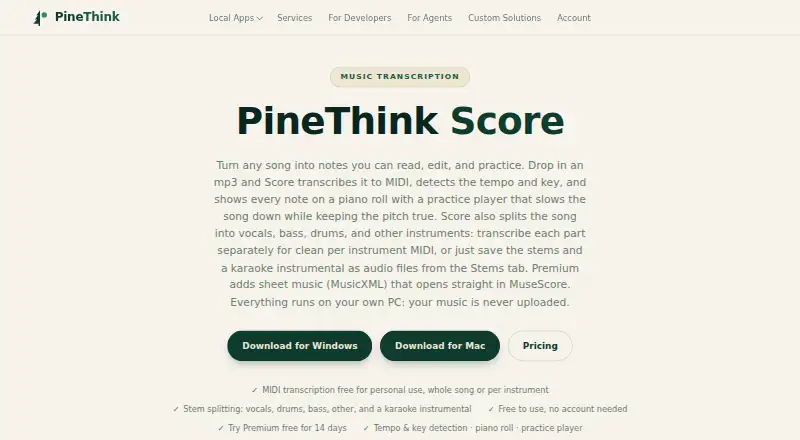
PineThink Score turns songs into MIDI and displays the notes on a piano roll for editing and practice. It detects a song’s tempo and key, and its practice player can slow playback while keeping the pitch unchanged. The app can also separate vocals, drums, bass, and other instruments, then save individual stems and a vocal-free instrumental as WAV files. MIDI output can be dragged into any DAW. Premium adds MusicXML sheet music export, which PineThink says opens in MuseScore, Finale, and Sibelius.
Score runs on macOS and Windows. Transcription and stem separation take place on the user’s PC, and music is not uploaded. PineThink says its apps send anonymous usage statistics without content; users can turn this off in the app settings. The Free plan costs nothing and supports personal use, with stem splitting limited to one track at a time. Premium costs $5.99 a month after a 14-day trial and adds batch processing, MusicXML export, commercial use, and AI agent access (MCP). A PineThink account is needed for the trial and subscription, while the free tier needs no account. Score needs internet for activation and periodic subscription checks, then works offline between checks.
Who it suits
Score suits musicians and learners who want to transcribe songs, practice parts at a slower speed, or isolate instruments. It also fits people making MIDI, sheet music from recordings, or karaoke stems; commercial use requires Premium.
What it does well
- Transcribes songs into MIDI and displays notes on an editable piano roll.
- Detects tempo and key, with pitch-preserving slow playback for practice.
- Separates vocals, drums, bass, and other instruments into WAV stems.
- Transcription and stem separation run on the user’s PC.
- Free personal use requires no account.
What to know first
- Free stem splitting is limited to one track at a time.
- Batch queue and MusicXML export require Premium.
- Commercial use requires Premium.
- Activation and subscription checks require internet access.
Limits
The Free plan is for personal use and limits stem splitting to one track at a time. Premium costs $5.99 a month after the 14-day trial; it adds batch queue, MusicXML export, commercial use, and AI agent access (MCP).
Plans
| Plan | Billed and limits | Price |
|---|---|---|
| Free | Personal use · one track at a time · no account · MIDI transcription, tempo/key detection, piano roll, practice player, per-instrument transcription, stem splitting | Free |
| Premium | $5.99 a month after the free trial; cancel anytime · MusicXML sheet music export · batch queue · commercial use · AI agent access (MCP) | $5.99 a month |
As pinethink.com lists them, read 8 Oct 2026. The maker's own page has the final word.
Getting started
- Visit https://pinethink.com/score/.
- Use the free tier without creating an account, or create a PineThink account for the 14-day Premium trial.
- Install Score on macOS or Windows.
- Connect to the internet to activate the app; Premium subscriptions also need periodic online checks.
Verdict
Choose PineThink Score for local song transcription, practice playback, and instrument stem separation on macOS or Windows. The free tier covers personal use one track at a time; look to Premium for batch queue, MusicXML export, or commercial work.
Questions
How much does PineThink Score cost?
The Free plan costs nothing. Premium is $5.99 a month, billed monthly after the 14-day trial.
What is included in the free plan?
It includes MIDI transcription, tempo and key detection, piano roll, practice player, per-instrument transcription, and stem splitting for personal use, one track at a time.
Which platforms does Score support?
Score runs on macOS and Windows.
Does Score export sheet music?
Premium exports MusicXML. PineThink says it opens in MuseScore, Finale, and Sibelius.
Does Score upload music for transcription?
Transcription and stem separation run on the user’s PC, and music is not uploaded.
Who makes PineThink Score?
PineThink is the brand of Pinethink LLC, which its privacy policy identifies as a Tennessee limited liability company.
Facts from PineThink Score's own pages
- Account and trial
- The free tier needs no account; a PineThink account is required for the 14-day Premium trial and subscription. · pinethink.com, 8 Oct 2026
- Audio features
- It detects tempo and key and includes a practice player that slows playback while keeping pitch unchanged. · pinethink.com, 8 Oct 2026
- Commercial use
- Using Score for work or business requires Premium, according to the maker. · pinethink.com, 8 Oct 2026
- Free tier limit
- Free personal-use stem splitting is limited to one track at a time; batch queue is a Premium feature. · pinethink.com, 8 Oct 2026
- Integrations
- MIDI output can be dragged into any DAW, and MusicXML is supported by MuseScore, Finale, and Sibelius. · pinethink.com, 8 Oct 2026
- Intended users
- The maker describes use cases including learning songs by ear, making sheet music from recordings, isolating a part, producing MIDI, and creating karaoke stems. · pinethink.com, 8 Oct 2026
- Internet requirement
- The app needs internet to activate and periodically confirm a subscription, then works offline between check-ins. · pinethink.com, 8 Oct 2026
- Local processing
- Transcription and stem separation run on the user's PC, and music is not uploaded. · pinethink.com, 8 Oct 2026
- Maker
- PineThink is the brand of Pinethink LLC, which the privacy policy identifies as a Tennessee limited liability company. · pinethink.com, 8 Oct 2026
- Privacy telemetry
- PineThink says its apps send anonymous usage statistics without content, and users can turn them off in app settings. · pinethink.com, 8 Oct 2026
- Purpose
- PineThink Score transcribes songs into MIDI and shows notes on a piano roll for editing and practice. · pinethink.com, 8 Oct 2026
- Sheet music
- Premium exports MusicXML that the maker says opens in MuseScore, Finale, or Sibelius. · pinethink.com, 8 Oct 2026
- Stem separation
- It separates vocals, drums, bass, and other instruments, and can save the stems and a vocal-free instrumental as WAV files. · pinethink.com, 8 Oct 2026
Where PineThink Score stands on Freedom251
- AI Audio-to-MIDI Software#17 of 29
- Music Transcription Software#20 of 31
- AI Music Transcription Software#19 of 29