Freedom251 › Speech-to-Text Software
Picovoice Leopard
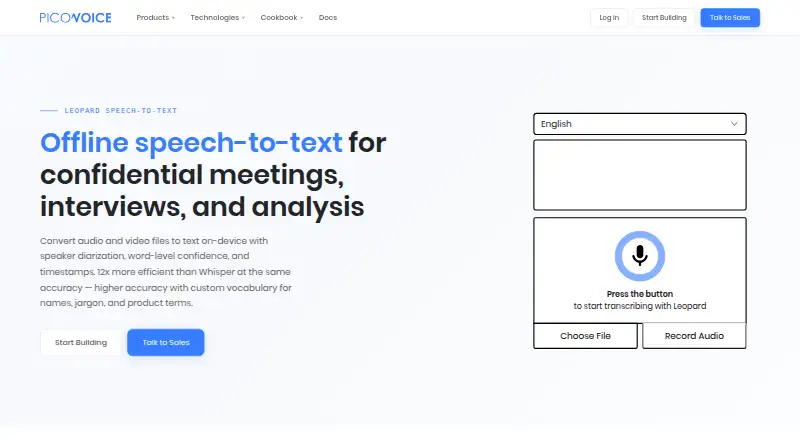
What Picovoice Leopard is
Picovoice Leopard is an on-device speech-to-text engine for transcribing recordings and audio or video files, including interviews, meetings, calls, podcasts, and voicemails. Picovoice says inputs and generated outputs remain on the device and are not transmitted to, stored by, or accessible to the company or its service providers. Transcripts can include each word’s start and end times, confidence score, and speaker tag. Developers can use Picovoice Console to add custom vocabulary and raise the likelihood of selected words and phrases. Listed languages are English, French, German, Italian, Japanese, Korean, Portuguese, and Spanish. Leopard supports Linux, macOS, Windows, Android, iOS, web, and Raspberry Pi, with SDK quick starts across those platforms and several frameworks and programming languages. Use requires a Picovoice AccessKey, which authenticates access and checks usage against account limits. Usage is measured by audio processed per second and resets every 30 days. Leopard does not support real-time transcription. Pricing is on request; a seven-day trial is listed as free, includes all Picovoice products, and requires no credit card or auto-renewal.
Who it suits
Leopard suits developers and enterprise teams building transcription into on-device workflows. Picovoice says it has no dedicated plans for personal or non-commercial use.
What it does well
- Audio and outputs remain on-device, according to Picovoice
- Word-level timing, confidence scores, and speaker tags
- Custom vocabulary and phrase boosting
- SDK quick starts cover multiple platforms and frameworks
- Seven-day trial requires no card and does not auto-renew
What to know first
- No real-time transcription
- Requires a Picovoice AccessKey
- Pricing is on request
- No dedicated personal or non-commercial plans
Limits
The free trial lasts seven days and includes access to all Picovoice products. Usage is tracked by audio processed per second and resets every 30 days; an AccessKey verifies that use remains within account limits. Real-time transcription is not included.
Plans
| Plan | Billed and limits | Price |
|---|---|---|
| Free Trial | 7 days · Access to all Picovoice products · No credit card required · No auto-renewal | Free |
As picovoice.ai lists them, read 10 Oct 2026. The maker's own page has the final word.
Getting started
- Open the Leopard website
- Choose the platform or SDK quick start for your project
- Create or access a Picovoice account and obtain an AccessKey
- Use the seven-day free trial, which requires no credit card and does not auto-renew
- Process recordings within the account's usage limits
Verdict
Leopard offers local transcription with word metadata and vocabulary customization, but it is not for streaming transcription. Review its AccessKey and usage requirements before integrating it.
Questions
What does Leopard transcribe?
It transcribes recorded audio and video, including interviews, meetings, calls, podcasts and voicemails.
Which languages are listed?
English, French, German, Italian, Japanese, Korean, Portuguese and Spanish.
Does Leopard work in real time?
No. Picovoice directs users needing streaming transcription to Cheetah.
How much does it cost?
Pricing is on request. The listed free trial costs 0.00 USD for seven days, requires no credit card and does not auto-renew.
What access is required?
Use requires a Picovoice AccessKey that authenticates and authorizes access and checks usage against account limits.
Which platforms are supported?
Android, iOS, Linux, macOS, Windows, web, Raspberry Pi and API access are listed, with SDK quick starts for additional languages and frameworks.
Facts from Picovoice Leopard's own pages
- Access and usage
- Using Picovoice requires an AccessKey, which authenticates and authorizes use and verifies that usage is within account limits. · picovoice.ai, 10 Oct 2026
- Access requirement
- Using Leopard requires a Picovoice AccessKey, which authenticates use and verifies it is within account limits. · picovoice.ai, 9 Oct 2026
- API access
- Yes · picovoice.ai, 20 Sept 2026
- Audience
- Picovoice describes itself as a B2B company focused on on-device AI for enterprises and says it has no dedicated plans for personal or non-commercial use. · picovoice.ai, 10 Oct 2026
- Customization
- Picovoice Console lets users add custom vocabulary, specify IPA pronunciations, and boost frequent words and phrases in speech-to-text models. · picovoice.ai, 10 Oct 2026
- Data use
- Picovoice says it cannot access, collect, or use end-user data to train or improve its AI models, except for custom development where a customer explicitly provides data under a separate written agreement. · picovoice.ai, 10 Oct 2026
- Free plan
- No · picovoice.ai, 20 Sept 2026
- Free trial
- Picovoice offers enterprise developers a one-time free trial with no credit card required; it does not renew automatically. · picovoice.ai, 9 Oct 2026
- Integrations
- Picovoice provides Leopard SDK quick starts for Android, C, .NET, Flutter, iOS, Java, Linux, macOS, Node.js, Python, Raspberry Pi, React, React Native, web, and Windows. · picovoice.ai, 9 Oct 2026
- Intended users
- Picovoice describes itself as a B2B company focused on on-device AI tools for enterprises and says it has no dedicated plans for personal or non-commercial use. · picovoice.ai, 9 Oct 2026
- Languages
- Leopard supports English, French, German, Italian, Japanese, Korean, Portuguese, and Spanish; other languages are available to Enterprise Plan customers through Picovoice contacts. · picovoice.ai, 10 Oct 2026
- Local processing
- Leopard processes voice locally on the device. · picovoice.ai, 10 Oct 2026
- Purpose
- Leopard is an on-device speech-to-text engine for transcribing audio and video files, including recordings of interviews, meetings, calls, podcasts, and voicemails. · picovoice.ai, 10 Oct 2026
- Real-time limitation
- Leopard does not support real-time transcription; Picovoice directs users needing streaming transcription to Cheetah. · picovoice.ai, 9 Oct 2026
- SDK availability
- Leopard SDK quick starts are listed for Android, C, .NET, Flutter, iOS, Java, Linux, macOS, Node.js, Python, Raspberry Pi, React, React Native, Web, and Windows. · picovoice.ai, 10 Oct 2026
- Security
- Picovoice says end-user inputs and generated outputs remain on-device and are not transmitted to, stored by, or accessible to Picovoice or its service providers. · picovoice.ai, 10 Oct 2026
- Security and compliance
- Picovoice says it does not list security certifications because it cannot access audio processed by its engines or their outputs. · picovoice.ai, 9 Oct 2026
- Speaker identification
- Yes · picovoice.ai, 20 Sept 2026
- Support
- Enterprise customers can customize their support level, prospects can contact sales for dedicated support, and enterprise developers can report code or documentation issues on GitHub. · picovoice.ai, 10 Oct 2026
- Supported platforms
- The SDK introduction lists Linux, macOS, Windows, Android, iOS, web, and Raspberry Pi as supported platforms. · picovoice.ai, 9 Oct 2026
- Timestamp support
- Yes · picovoice.ai, 20 Sept 2026
- Usage limits
- Picovoice tracks Leopard usage by audio processed per second, and usage resets every 30 days. · picovoice.ai, 10 Oct 2026
- What it does
- Leopard is an on-device speech-to-text engine for transcribing audio recordings. · picovoice.ai, 9 Oct 2026
- Word metadata
- Along with transcripts, Leopard can return each word’s start and end times, confidence, and speaker tag when diarization is enabled. · picovoice.ai, 10 Oct 2026
Where Picovoice Leopard stands on Freedom251
- Speech-to-Text Software#26 of 35
- Speech Recognition Software#24 of 32
- Transcription Software#36 of 46
- AI transcription tools#38 of 46
- Transcription tools#24 of 28