Freedom251 › Photo Booth Software
Pibooth
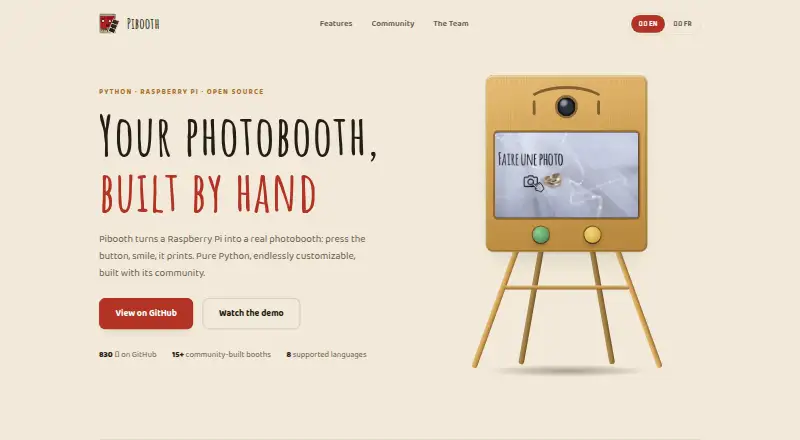
What Pibooth is
Pibooth is a free, pure-Python photobooth application designed for Raspberry Pi. It captures between one and four photos, then combines them into a final picture. The software works with cameras compatible with gPhoto2, OpenCV, and Raspberry Pi, and can be operated using GPIO buttons, a keyboard, a mouse, or a touchscreen. Operators can customize pictures with text, fonts, colors, backgrounds, and overlays, and can extend behavior through plugins. Pibooth saves both the completed pictures and individual captures on the device. For printing, it sends final pictures through a CUPS server and shows the print queue. The project repository lists community plugins for services and functions including Google Photos, Dropbox, QR codes, Telegram uploads, and S3 uploads. The documented hardware setup uses a Raspberry Pi 3 Model B or higher and a compatible camera; buttons, lights, and a printer are optional. Pibooth also runs on Unix and Linux systems, with documentation reporting testing on Ubuntu 16 and Mac OS X 10.14.6. It is distributed under the MIT License without warranty, and its documentation describes private use rather than professional or commercial activity.
Who it suits
Pibooth suits people setting up a Raspberry Pi photobooth who want local photo storage, customizable layouts, and printing support. It also fits users who can configure compatible camera hardware and prefer to control capture with physical buttons or common input devices.
What it does well
- Combines one to four captures into a final picture.
- Supports gPhoto2, OpenCV, and Raspberry Pi cameras.
- Offers GPIO buttons, keyboard, mouse, and touchscreen controls.
- Customizes pictures with text, fonts, colors, backgrounds, and overlays.
- Stores final pictures and individual captures on the device.
- Supports printing through a CUPS server.
What to know first
- Requires compatible hardware and setup.
- Professional or commercial activity is outside its documented intended use.
- The software is provided without warranty.
Plans
| Plan | Billed and limits | Price |
|---|---|---|
| Pibooth | MIT-licensed photobooth software · requires compatible hardware and setup | Free |
As pibooth.org lists them, read 8 Oct 2026. The maker's own page has the final word.
Getting started
- Visit https://pibooth.org/.
- Prepare a Raspberry Pi 3 Model B or higher and a compatible camera.
- Install and configure Pibooth on a Linux or macOS system.
- Choose a compatible camera and select an input method such as GPIO buttons, keyboard, mouse, or touchscreen.
- Configure picture customization and, if needed, a CUPS server for printing.
Pibooth is a free, pure-Python photobooth application for Raspberry Pi and compatible Unix/Linux computers. It fits builders of private booths who can select hardware and handle configuration. The software’s strongest proposition is a flexible, local capture-and-print workflow with extensive image customization, while its hardware and intended-use constraints rule out some buyers.
Overview
Pibooth turns a compatible camera and computer into a self-contained booth. It captures individual images, combines them into a finished composition, stores both the finished picture and source captures on the device, and can print through a CUPS server while showing the print queue. Offline capture is useful for venues that do not want to depend on an internet connection.
The documented setup centers on a Raspberry Pi 3 Model B or newer and a compatible camera; buttons, lights, and a printer are optional. That makes the software adaptable, but not turnkey: the operator remains responsible for assembling and configuring the system. Pibooth is MIT-licensed and supplied without warranty, and its documented purpose is private use rather than professional or commercial activity.
Key features
Capture and operation
A session can take from one to four photos and combine them into one final picture. Camera support covers devices compatible with gPhoto2, OpenCV, and Raspberry Pi, giving hardware builders several routes to a working booth. Compatibility still depends on the specific camera and configuration. Raspberry Pi GPIO buttons support dedicated physical controls, while a keyboard, mouse, or touchscreen can operate the booth without custom button wiring.
Design, storage, and printing
Final images can be shaped with custom text, fonts, colors, backgrounds, and overlays. That is a practical advantage for private events that need a particular visual treatment rather than a fixed template. Plugin support extends the behavior beyond the core application. Community plugins listed by the project connect to Google Photos, Dropbox, QR codes, Telegram uploads, and S3, although each adds its own setup considerations.
Pibooth prints through CUPS and reports the queue, which suits a locally managed printer workflow. Keeping images on the device supports offline operation but makes storage handling and access control part of the operator’s job. European operators are advised to follow GDPR requirements and tell participants that generated images are stored locally.
Pricing
Pibooth: free. The free plan is the software itself under the MIT license, with compatible hardware and setup required. There is no free trial because the product is already free, and there are no published seat, usage, or quota limits. Hardware, printer, and configuration work remain separate practical costs.
Platforms
Pibooth supports Linux, macOS, and self-hosted deployments. Its documentation describes operation on Unix/Linux systems and reports testing on Ubuntu 16 and Mac OS X 10.14.6. The documented hardware path is Raspberry Pi 3 Model B or higher, paired with a compatible camera.
Who it's for
Choose Pibooth if you want to build a private Raspberry Pi booth, need one-to-four-photo layouts, want control over typography and artwork, or require capture and printing without an online service. It also suits technically comfortable operators who value GPIO controls and plugin-based extensions.
Look elsewhere if you need a managed commercial product, a ready-made hardware package, or an explicitly professional event platform. Pibooth’s documented private-use scope, no-warranty license, and required hardware setup place those responsibilities with the operator.
Pros and cons
- Pros: free MIT-licensed software avoids subscription charges; offline capture and local storage reduce dependence on connectivity; one-to-four-photo compositions and broad camera interfaces support varied builds; text, fonts, colors, backgrounds, overlays, and plugins enable tailored output; CUPS printing and queue status support a local print station.
- Cons: a Raspberry Pi or other compatible computer, camera, and configuration are required; hardware compatibility must be worked out by the builder; local image storage creates privacy and retention duties; the project is documented for private use, not professional or commercial activity; the software is provided without warranty.
Alternatives
FreeBooth is a free option for readers who need Linux, macOS, web, and Windows coverage rather than Pibooth’s Raspberry Pi-centered setup.
Photobooth-App is another free, MIT-licensed choice spanning API, Linux, macOS, self-hosted, and Windows deployments.
RevoSpin 360 is worth considering when Android, iOS, or web access matters; its free download has in-app purchases, including a $49.99 one-time Pro plan.
FotoBox is a free open-source photobooth application for Raspberry Pi, Linux, and macOS.
Photo Booth Studio suits iOS users who can accept a watermark on the free plan or pay $29.99 per month for Pro.
ZillaBooth is an iOS alternative with free 2×2 and 1×4 layouts and no watermark; its Pro plan uses a monthly or yearly subscription with price not listed.
OpenBooth is a free open-source option for Linux.
Curator Live is a cross-platform event alternative for iOS, macOS, web, and Windows, with paid per-event plans and a free trial.
Browse the Photo Booth Software list for more options.
Verdict
Pibooth is a strong choice for a technically capable operator building a private, Raspberry Pi-based booth who wants customizable images, offline capture, and CUPS printing without a software fee. The main reason to look elsewhere is the same setup responsibility: commercial operators or anyone seeking turnkey hardware, support, and a professional-use workflow should choose a product designed for that purpose.
Verdict
Choose Pibooth for a Raspberry Pi based photobooth with customizable pictures, offline capture, and CUPS printing. It suits a private setup where you can provide and configure compatible hardware; its documentation does not describe it for professional or commercial activity.
Questions
How much does Pibooth cost?
Pibooth is free, listed as free.
Does Pibooth offer a free trial?
No. It is listed as free, with no free trial.
Which platforms does Pibooth support?
It supports Linux and macOS, and can be self-hosted. Its documentation describes Unix/Linux systems and reports testing on Ubuntu 16 and Mac OS X 10.14.6.
Is Pibooth open source?
Pibooth is distributed under the MIT License.
What hardware does Pibooth require?
The documented setup uses a Raspberry Pi 3 Model B or higher and a compatible camera. Buttons, lights, and a printer are optional.
Can Pibooth print photos?
Yes. It prints final pictures through a CUPS server and indicates the print queue.
Facts from Pibooth's own pages
- Camera support
- It supports cameras compatible with gPhoto2, OpenCV, and Raspberry Pi. · documentation.pibooth.org, 8 Oct 2026
- Controls
- It can be controlled with Raspberry Pi GPIO hardware buttons, a keyboard, a mouse, or a touchscreen. · documentation.pibooth.org, 8 Oct 2026
- Customization
- Users can customize final pictures with text, fonts, colors, backgrounds, and overlays, and extend behavior with plugins. · documentation.pibooth.org, 8 Oct 2026
- Hardware requirement
- The documented hardware setup uses a Raspberry Pi 3 Model B or higher and a compatible camera; buttons, lights, and printer are optional. · documentation.pibooth.org, 8 Oct 2026
- Integrations
- The project repository lists community plugins for Google Photos, Dropbox, QR codes, Telegram uploads, and S3 uploads. · github.com, 8 Oct 2026
- Intended use
- The documentation describes Pibooth as developed for private use without professional or commercial activity. · documentation.pibooth.org, 8 Oct 2026
- License
- Pibooth is distributed under the MIT License and is provided without warranty. · documentation.pibooth.org, 8 Oct 2026
- Operating systems
- The documentation says Pibooth can run on Unix/Linux systems and reports testing on Ubuntu 16 and Mac OS X 10.14.6. · documentation.pibooth.org, 8 Oct 2026
- Photo layouts
- It can capture 1 to 4 photos and combine them into a final picture. · documentation.pibooth.org, 8 Oct 2026
- Photo storage
- Pibooth stores the final pictures and individual captures on the device. · documentation.pibooth.org, 8 Oct 2026
- Printing
- It prints final pictures through a CUPS server and indicates the print queue. · documentation.pibooth.org, 8 Oct 2026
- Privacy guidance
- The documentation says operators in Europe should ensure their use follows GDPR rules and inform users that generated images are stored on the device. · documentation.pibooth.org, 8 Oct 2026
- Purpose
- Pibooth is a pure-Python photobooth application designed for Raspberry Pi. · documentation.pibooth.org, 8 Oct 2026
Where Pibooth stands on Freedom251
- Photo Booth Software#6 of 26