Freedom251 › Photo Booth Software
FotoBox
What FotoBox is
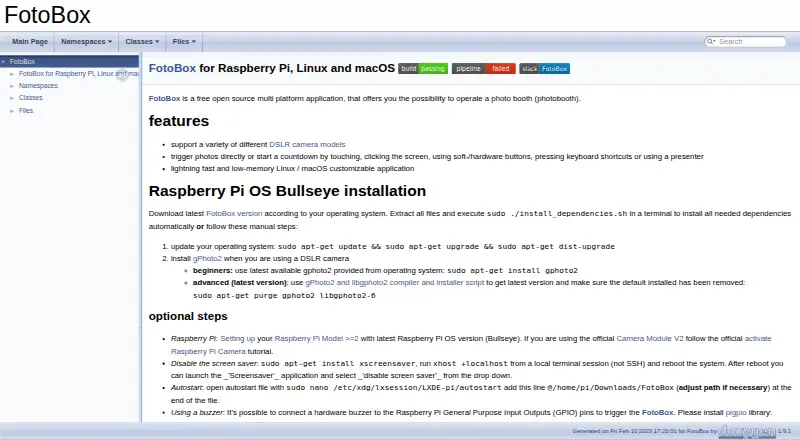
FotoBox is a free, open-source application for operating a photo booth on Linux and macOS, including Raspberry Pi OS. It supports a range of DSLR cameras, with compatibility checked against the libgphoto2 supported-camera list; using a DSLR requires gPhoto2. People can trigger a photo or begin a countdown by touching or clicking the screen, using soft or hardware buttons, pressing keyboard shortcuts, or using a presenter. The installation guide describes using the official Raspberry Pi Camera Module V2. A buzzer connected to Raspberry Pi GPIO can also trigger FotoBox when the pigpio library and daemon are installed. On Linux, it can run without the X Window System using Qt for Embedded Linux. The maker describes the app as customizable, fast, and low in memory use. For help, the maker points users to German- or English-language Raspberry Pi forums. Bugs and feature suggestions can be sent through the GitLab issue tracker.
Who it suits
FotoBox suits people setting up a photo booth on Linux, macOS, or Raspberry Pi OS. Its range of photo triggers and support for DSLR cameras or the Raspberry Pi Camera Module V2 may fit different booth setups.
What it does well
- Free and open source
- Supports several ways to trigger photos
- Can use a Raspberry Pi Camera Module V2
- Linux operation without the X Window System
What to know first
- DSLR use requires gPhoto2
- GPIO buzzer triggering requires pigpio library and daemon
- DSLR compatibility depends on the supported-camera list
Limits
The listed plan is free. DSLR use requires gPhoto2, and camera compatibility is tied to libgphoto2’s supported-camera list.
Plans
| Plan | Billed and limits | Price |
|---|---|---|
| Free open source | Photobooth application · Raspberry Pi, Linux and macOS | Free |
| FotoBox | free open-source photobooth application · Raspberry Pi/Linux/macOS | Free |
As tomikais.github.io lists them, read 9 Oct 2026. The maker's own page has the final word.
Getting started
- Visit the FotoBox website.
- Choose a Linux, macOS, or Raspberry Pi OS setup.
- For DSLR use, check the camera against libgphoto2’s supported-camera list and install gPhoto2.
- For Raspberry Pi camera use, follow the guide for the official Camera Module V2.
- For a GPIO buzzer trigger, install the pigpio library and daemon.
FotoBox is a free, open-source photo booth application for Linux, macOS and Raspberry Pi OS. It suits operators who want flexible ways to trigger still photos and are comfortable configuring a camera or Raspberry Pi setup. Its appeal is the breadth of trigger options; the trade-off is that DSLR and GPIO setups require additional software and compatible hardware.
Overview
FotoBox focuses on booth photo capture rather than a wider set of capture modes: photos are its supported mode. You can start a countdown or trigger a shot by touching or clicking the screen, using a keyboard shortcut, pressing a soft or hardware button, or using a presenter. That range can suit unattended booths as well as setups with an operator nearby, though the trigger method depends on the installation and connected equipment.
The maker describes the application as customizable, fast and light on memory. Linux users can also run it without the X Window System using Qt for Embedded Linux, a useful option for a dedicated booth system that does not need a conventional desktop session.
Key features
Camera and trigger choices
FotoBox supports a range of DSLR models, with compatibility tied to libgphoto2’s supported camera list. DSLR users need to install gPhoto2, so this route involves a software prerequisite as well as checking that the camera is supported. For a Raspberry Pi setup, the installation guide covers the official Raspberry Pi Camera Module V2.
A buzzer wired to Raspberry Pi GPIO pins can act as a trigger when the pigpio library and daemon are installed. This gives hardware builders another way to start a capture, but it adds configuration and hardware requirements that make it less suitable for anyone seeking a plug-and-play setup.
Support and issue reporting
For help, the maker points users to the German Raspberry Pi Forum or the English-language Raspberry Pi Forum. Bug reports and feature suggestions go to the GitLab issue tracker.
Pricing
FotoBox is free and open source. Its Free open source plan costs nothing and includes the photobooth application for Raspberry Pi, Linux and macOS. There is no paid tier or trial to weigh against the free option in the stated pricing model.
The price removes a software subscription as a barrier, but it does not remove the setup requirements: DSLR capture calls for gPhoto2, while GPIO buzzer triggering calls for compatible Raspberry Pi hardware plus pigpio and its daemon.
Platforms
FotoBox supports Linux, macOS and Raspberry Pi OS. Linux has an additional framebuffer route through Qt for Embedded Linux, allowing operation without the X Window System. Raspberry Pi users can follow guidance for Camera Module V2, while DSLR compatibility depends on libgphoto2 support.
Who it's for
FotoBox is a strong fit for technically confident users building a still-photo booth on Linux, macOS or Raspberry Pi OS, especially those who value multiple ways to initiate a capture. It is less compelling for users who want a broader capture toolkit or do not want to check camera compatibility and install the supporting software their chosen hardware needs.
Pros and cons
Pros
- Several trigger methods: Touch or click, keyboard shortcuts, buttons and a presenter give booth builders flexibility in how guests or operators start captures.
- Broad setup range: DSLR, Raspberry Pi Camera Module V2 and GPIO-trigger options can accommodate different booth hardware approaches.
- Free and open source: The application costs nothing, with no paid plan required for the stated photo-booth functionality.
- Linux without a desktop session: Qt for Embedded Linux enables a framebuffer setup without X Window System.
Cons
- Hardware setup takes planning: DSLR compatibility depends on libgphoto2, and DSLR use requires gPhoto2 installation.
- GPIO triggering adds dependencies: A buzzer trigger requires Raspberry Pi GPIO hardware along with the pigpio library and daemon.
- Photos only: The supported capture mode is still photos, so users looking for other capture modes should consider another application.
Alternatives
Photo Booth Software is the broader category directory for comparing booth applications.
- FreeBooth is another free option for users who want a booth app spanning Linux, macOS, web and Windows.
- Photobooth-App is worth considering if its listed API, self-hosted and Windows platform support, in addition to Linux and macOS, better matches your deployment.
- RevoSpin 360 suits readers seeking an Android, iOS or web option with a free download and in-app purchases, rather than FotoBox’s desktop and Raspberry Pi focus.
- Photo Booth Studio is an iOS alternative; its free plan applies a watermark to photos and compositions.
- Pibooth is another free choice for Linux, macOS or self-hosted use, with compatible hardware and setup required.
- ZillaBooth is an iOS alternative with a free Core plan offering 2×2 and 1×4 layouts without a watermark.
- OpenBooth is a free, open-source option for Linux users.
- Curator Live is an alternative for users seeking support across iOS, macOS, web and Windows; its Standard plan is $29, paid once, billed per event, with one capture-device license and additional licenses at $19.
Verdict
Choose FotoBox if you want a free, open-source photo booth with several capture triggers and a Linux, macOS or Raspberry Pi OS setup. Its flexibility is most valuable when you are prepared to match the camera and supporting software to your build. Look elsewhere if you need capture modes beyond photos or want to avoid hardware and dependency configuration.
Verdict
FotoBox offers several ways to trigger booth photos and supports both DSLR and Raspberry Pi camera setups. Check camera compatibility and the additional DSLR or GPIO requirements before choosing a setup.
Questions
How much does FotoBox cost?
Its Free open source plan is listed as free.
Which platforms does it support?
The listed platforms are Linux, macOS, and Raspberry Pi OS.
Is FotoBox open source?
Yes. It is described as a free, open-source photo booth application.
What cameras can I use?
It supports a variety of DSLR models, with compatibility checked against libgphoto2’s supported-camera list. DSLR use requires gPhoto2.
How can I trigger a photo or countdown?
You can use the screen, soft or hardware buttons, keyboard shortcuts, or a presenter. A Raspberry Pi GPIO buzzer can also trigger the app when pigpio’s library and daemon are installed.
Where can I get help or report a bug?
The maker points users to German- or English-language Raspberry Pi forums for support. Bugs and feature suggestions can be submitted through the GitLab issue tracker.
Facts from FotoBox's own pages
- Bug reports
- The maker directs users to the GitLab issue tracker to report software bugs or suggest features. · tomikais.github.io, 9 Oct 2026
- Build extensibility
- The project provides CMake and qmake build paths and documents Docker-based cross-compilation for Raspberry Pi binaries. · forum-raspberrypi.de, 15 Oct 2026
- Camera requirement
- For DSLR use, the installation instructions say to install gPhoto2. · tomikais.github.io, 9 Oct 2026
- Camera support
- The application supports various DSLR cameras through gPhoto2 and also supports the Raspberry Pi Camera Module. · forum-raspberrypi.de, 15 Oct 2026
- Changelog item
- Version 1.3.5 improved performance, added a help button, included a Linux installer script, and fixed gPhoto2 camera-model detection handling. · forum-raspberrypi.de, 15 Oct 2026
- Dependencies
- DSLR operation requires gPhoto2/libgphoto2, while GPIO buzzer support uses pigpio. · tomikais.github.io, 15 Oct 2026
- Developer tooling
- Development instructions list Qt Creator, CMake, qmake, Git, Doxygen, Graphviz, build-essential, and ccache. · tomikais.github.io, 15 Oct 2026
- Documentation
- The project publishes generated Doxygen documentation and a README with installation and troubleshooting guidance. · tomikais.github.io, 15 Oct 2026
- Fullscreen mode
- The forum feature list identifies FotoBox as a fullscreen application. · forum-raspberrypi.de, 15 Oct 2026
- GPIO buzzer
- A Raspberry Pi GPIO-connected buzzer can trigger the application through pigpio. · tomikais.github.io, 15 Oct 2026
- Languages
- The forum feature list says the interface is available in German and English. · forum-raspberrypi.de, 15 Oct 2026
- Licence
- The GitHub repository identifies the project as GPL-2.0 licensed. · github.com, 15 Oct 2026
- Limit: GPIO dependency change
- Earlier versions used WiringPi for GPIO, but that framework was no longer maintained and the maker was migrating to pigpio. · forum-raspberrypi.de, 15 Oct 2026
- Limit: incomplete gallery documentation
- The maker acknowledged that the offline guest gallery and its configuration were not documented in a full tutorial. · forum-raspberrypi.de, 15 Oct 2026
- Limit: no live view
- The maker stated in the forum that live camera preview had not yet been implemented. · forum-raspberrypi.de, 15 Oct 2026
- Limit: no printing
- The forum discussion states that photo printing was not implemented at that time and remained planned work. · forum-raspberrypi.de, 15 Oct 2026
- Limit: stalled development
- In October 2022 the maker described the project as largely dormant and said no newer official release had been published after version 1.3.5. · forum-raspberrypi.de, 15 Oct 2026
- Linux framebuffer
- FotoBox can run without X11 using Qt for Embedded Linux and the linuxfb platform. · tomikais.github.io, 15 Oct 2026
- macOS installation
- The macOS instructions require Homebrew, gPhoto2, and a downloaded FotoBox release. · tomikais.github.io, 15 Oct 2026
- Maker
- The project is attributed to Thomas Kais, whose GitLab account owns the repository. · gitlab.com, 15 Oct 2026
- Performance
- The maker describes FotoBox as a customizable application for Linux and macOS that is fast and uses little memory. · tomikais.github.io, 9 Oct 2026
- Performance claim
- The maker describes the Linux and macOS application as customizable, fast, and low-memory. · tomikais.github.io, 15 Oct 2026
- Photo storage
- Captured photos can be saved on the Raspberry Pi storage and on the camera's SD card. · forum-raspberrypi.de, 15 Oct 2026
- Photo triggering
- Users can start captures or countdowns with touch, mouse clicks, keyboard shortcuts, soft or hardware buttons, or a presenter. · tomikais.github.io, 15 Oct 2026
Where FotoBox stands on Freedom251
- Photo Booth Software#1 of 26