Freedom251 › Database Proxy Software
pgagroal
What pgagroal is
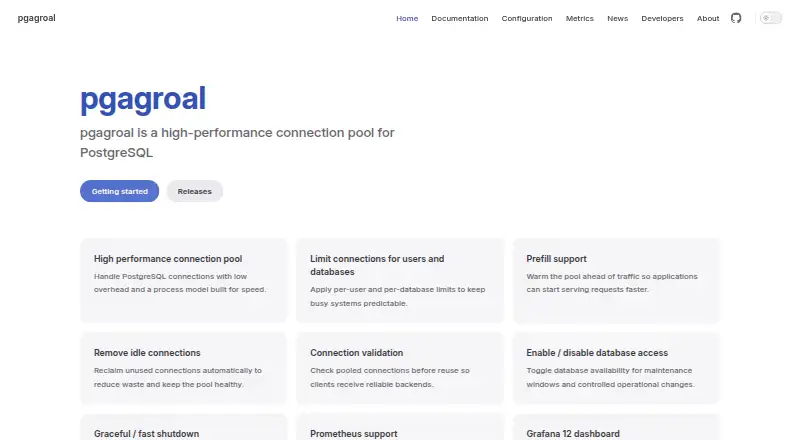
pgagroal is a free, self-hosted connection pool for PostgreSQL. It manages connections using per-user and per-database limits, pool prefill, idle connection removal, and connection validation. Administrators can enable or disable database access, choose graceful or fast shutdown, and use remote management or command-line tools for runtime and user administration. For monitoring, pgagroal exports Prometheus metrics and provides a Grafana 12 dashboard. Authentication options include database-backed queries and a user vault for credentials. It can trigger an external failover workflow when a PostgreSQL server can no longer accept writes. The project lists TLS v1.2 or later, with server-only and mutual client/server certificate authentication described in its TLS guide. It works with PostgreSQL-compliant drivers, including pgjdbc, Npgsql, and pq. The repository identifies its license as BSD-3-Clause and lists Fedora 38+, RHEL 9.x, Rocky Linux 9.x, FreeBSD, and OpenBSD as tested systems. The releases page lists packages through Fedora 42/43, RHEL 10, and Rocky Linux 10. GitHub is the channel for questions, issues, feature requests, and contributions.
Who it suits
pgagroal suits teams running PostgreSQL who want a self-hosted connection pool with administrative controls and Prometheus monitoring. It is intended for users comfortable with the listed Linux and BSD systems and project-based support channels.
What it does well
- Sets per-user and per-database connection limits.
- Exports Prometheus metrics and includes a Grafana 12 dashboard.
- Supports database-backed authentication and a credential vault.
- Works with pgjdbc, Npgsql, and pq drivers.
What to know first
- Self-hosted deployment is required.
- Supported database listing is PostgreSQL.
- Support channels are GitHub questions, issues, and requests.
Limits
The free plan is a self-hosted PostgreSQL connection pool. No trial is offered.
Plans
| Plan | Billed and limits | Price |
|---|---|---|
| pgagroal | BSD-3-Clause · self-hosted PostgreSQL connection pool | Free |
As pgagroal.github.io lists them, read 7 Oct 2026. The maker's own page has the final word.
Getting started
- Visit the pgagroal project website.
- Choose a self-hosted deployment on a supported system.
- Connect PostgreSQL-compliant drivers such as pgjdbc, Npgsql or pq.
- Use the command-line tools or remote management for administration.
- Consult the project on GitHub for questions, issues or feature requests.
pgagroal is a self-hosted connection pool for PostgreSQL, aimed at teams that want to manage database connections within their own infrastructure. Its strongest case is a focused set of operational controls, monitoring, and authentication options at no software cost; it is less suited to readers seeking a managed service or pooling across database products.
Overview
Connection pooling is pgagroal’s purpose, and PostgreSQL is its only supported database. Per-user and per-database limits, pool prefill, idle-connection removal, and connection validation give operators several ways to shape and maintain the pool. That makes it a practical fit for PostgreSQL deployments that need explicit connection management rather than a general-purpose database platform.
Operations are covered beyond connection allocation: administrators can enable or disable database access and choose graceful or fast shutdown. Remote management and command-line tools handle runtime administration and user management. These capabilities give teams control over routine changes and shutdowns, while the self-hosted model means they remain responsible for operating the software.
Key features
Pool and operations controls
Per-user and per-database limits help operators allocate connections deliberately, while prefill can prepare the pool in advance. Idle connection removal and validation address pool upkeep. The ability to disable database access and select a shutdown mode adds useful control during maintenance or operational changes.
Monitoring and failover
Prometheus metrics and a Grafana 12 dashboard give monitoring teams a way to observe pgagroal alongside their existing metrics setup. When a PostgreSQL server can no longer accept writes, pgagroal can trigger an external failover workflow. That is a useful integration point, not a replacement for the surrounding failover process.
Authentication and transport security
Database-backed authentication queries and a user vault provide two credential-management options. The project supports TLS v1.2 or later; its TLS guide covers both server-only and mutual client/server certificate authentication. These options suit deployments that need encrypted connections and configurable authentication, though teams must still manage their chosen configuration.
Drivers and administration
pgagroal works with PostgreSQL-compliant drivers, including pgjdbc, Npgsql, and pq. Remote management, command-line runtime controls, and user-management tools support administrative work without changing its focus on PostgreSQL connection pooling.
Pricing
pgagroal is free: the pgagroal plan costs nothing and is BSD-3-Clause licensed. It is self-hosted, with no paid tier or free trial to weigh against the free plan. The trade-off is that teams operate the deployment themselves; no managed service is part of the offering.
Platforms
pgagroal supports Linux, macOS, and self-hosted deployment. Tested systems include Fedora 38+, RHEL 9.x, Rocky Linux 9.x, FreeBSD, and OpenBSD. Current packages extend through Fedora 42/43, Red Hat Enterprise Linux 10, and Rocky Linux 10. The gap between tested-system and package lists is worth checking against an organization’s target platform before adopting it.
The BSD-3-Clause license and GitHub-based routes for questions, issues, feature requests, and code contributions make it a fit for teams comfortable with community-oriented project support.
Who it's for
Choose pgagroal if you run PostgreSQL on infrastructure you control and want connection limits, monitoring, authentication choices, and an external failover hook without a software fee. It is a particularly relevant option for teams already using Prometheus and Grafana, or PostgreSQL-compliant drivers such as pgjdbc, Npgsql, or pq.
Look elsewhere if you need managed hosting, support for databases beyond PostgreSQL, or an operating model that removes responsibility for deployment and administration. Those needs do not match pgagroal’s self-hosted, PostgreSQL-specific scope.
Pros and cons
- Pros: Per-user and per-database limits, prefill, idle removal, and validation give operators meaningful control over pool behavior.
- Pros: Prometheus metrics and a Grafana dashboard provide a defined monitoring path, while external failover hooks can connect pooling to a broader recovery workflow.
- Pros: Database-backed authentication, a user vault, and TLS options support varied credential and transport-security configurations.
- Cons: PostgreSQL is the sole supported database, so it will not serve teams seeking a cross-database pool.
- Cons: The self-hosted model puts deployment and operations on the user rather than providing a managed alternative.
- Cons: Platform coverage varies between the tested-system list and current packages, so operators should verify fit for their target before rollout.
Alternatives
For a broader directory of options, see Database Proxy Software.
- MySQL is worth considering when a freemium database platform, a free trial, or a wider set of listed platforms matters more than choosing a PostgreSQL-specific connection pool.
- OceanBase Database offers a free Community Edition and a freemium model; consider it when a distributed database with full kernel capabilities is a better fit than a PostgreSQL connection pool.
- PgDog is another free, self-hosted option for Linux and macOS, with Windows also supported. Its open-source plan is AGPL-3.0; choose it if that licensing and platform combination suits your deployment better.
- PgBouncer is a free, self-hosted alternative with Linux and Windows support. Consider it when those platform options are the deciding factor.
- PgDoorman is another free, self-hosted option for Linux and macOS. Consider it as a peer alternative if you want to compare PostgreSQL pooling projects.
- ShardingSphere-Proxy offers a free open-source binary distribution with Docker and Helm deployment. It is the alternative to consider when that distribution and deployment approach fits better.
- TiCDC is a free, self-hosted option for Linux and macOS; consider it if that platform coverage fits your needs.
- TurbineProxy is a free option for Linux and self-hosted deployment. It may suit readers whose platform requirements align with that narrower set.
Verdict
pgagroal is a strong fit for teams running PostgreSQL on their own infrastructure who want detailed pool controls, monitoring integrations, authentication options, and a failover hook without paying for the software. Its focused scope and zero-cost BSD-3-Clause plan are compelling; choose another option if you need managed operations, broader database support, or platform coverage that better matches your environment.
Verdict
pgagroal provides connection management, monitoring, authentication options, and failover hooks for PostgreSQL deployments. Its self-hosted model and listed system support are important considerations.
Questions
Is pgagroal free?
Yes. The pgagroal plan is free and is licensed under BSD-3-Clause.
Which database does pgagroal support?
It is a connection pool for PostgreSQL and works with PostgreSQL-compliant drivers, including pgjdbc, Npgsql and pq.
Which systems are supported?
The repository lists Fedora 38+, RHEL 9.x, Rocky Linux 9.x, FreeBSD and OpenBSD as tested platforms. The releases page lists packages through Fedora 42/43, RHEL 10 and Rocky Linux 10.
Does pgagroal offer a free trial?
No. The product is free, and no free trial is offered.
Is pgagroal open source?
The project repository identifies its license as BSD-3-Clause.
Where can users get support?
The project directs users to GitHub for questions, issue reports, feature requests and code contributions.
Facts from pgagroal's own pages
- Administration
- It supports remote management and includes command-line tools for runtime administration and user management. · pgagroal.github.io, 7 Oct 2026
- Authentication
- It supports database-backed authentication queries and a user vault for credential management. · pgagroal.github.io, 7 Oct 2026
- Connection controls
- It supports per-user and per-database connection limits, pool prefill, idle connection removal, and connection validation. · pgagroal.github.io, 7 Oct 2026
- Current package availability
- The releases page lists packages through Fedora 42/43, Red Hat Enterprise Linux 10, and Rocky Linux 10. · pgagroal.github.io, 7 Oct 2026
- Drivers
- It works with PostgreSQL-compliant drivers, including pgjdbc, Npgsql, and pq. · pgagroal.github.io, 7 Oct 2026
- Failover
- It can trigger external failover workflows when a PostgreSQL server can no longer accept writes. · pgagroal.github.io, 7 Oct 2026
- License
- The project repository identifies its license as BSD-3-Clause. · github.com, 7 Oct 2026
- Monitoring
- It exports Prometheus metrics and provides a Grafana 12 dashboard. · pgagroal.github.io, 7 Oct 2026
- Operations
- It can enable or disable database access and supports graceful or fast shutdown. · pgagroal.github.io, 7 Oct 2026
- Purpose
- pgagroal is a high-performance connection pool for PostgreSQL. · pgagroal.github.io, 7 Oct 2026
- Support
- The project directs users to ask questions, raise issues, submit feature requests, and contribute code through GitHub. · pgagroal.github.io, 7 Oct 2026
- Supported systems
- The repository lists Fedora 38+, RHEL 9.x, Rocky Linux 9.x, FreeBSD, and OpenBSD as tested platforms. · github.com, 7 Oct 2026
- Transport security
- The project lists TLS v1.2+ support, and its TLS guide describes server-only and mutual client/server certificate authentication. · pgagroal.github.io, 7 Oct 2026
Where pgagroal stands on Freedom251
- Database Proxy Software#12 of 31